CRM integration services connect your CRM to the tools where customer information is created, such as forms, inboxes, billing, support and marketing, so records update themselves instead of being retyped. The best result comes from a custom-built connection designed around your own workflow and growth stage, not from a generic bundle of connectors. That is the approach we take at Elevator Pitch Automations, where consultations, custom integrations and done-for-you setups are built around what your team actually repeats every day.
This guide explains what the term means, the ways systems get connected, what is worth automating first, and how to plan the work whether you are a solo professional or a larger team.
TL;DR
- CRM integration means your CRM exchanges data and triggers actions with your other applications automatically, so contacts, deals and invoices stay consistent without manual entry.
- Systems are connected through native connectors, APIs, integration platforms or custom builds. The right one depends on complexity, volume and how fast updates must arrive.
- Start with one painful, repetitive task (lead capture, follow-up emails, deal-to-billing handoff), then expand.
- Solo operators with clean data can finish in weeks, while larger teams with many systems should plan for a quarter or more.
- A tailor-made setup, with consultation and training, fits growth better than a one-size connector.
Table of Contents
- What CRM integration actually means
- What you can connect to a CRM
- The four ways systems get connected
- Real-time or scheduled: decide how fresh the data must be
- Automating CRM data entry and updates
- Planning an integration by team size
- A worked example: from web inquiry to paid invoice
- Keeping integrations healthy as you grow
- How we approach it
- Getting started with us
- Our perspective
- FAQ
- Sources
What CRM integration actually means
A CRM is the system of record for your customers: who they are, what they bought, what you promised them. Integration connects it to other applications so data and workflows sync automatically. Salesforce notes that the connected applications can be cloud-based, legacy or on-premises, so the idea is not limited to modern software.
The practical effect is that an action in one tool changes the data in the others. A form submission creates a contact. A closed deal creates an invoice. A support ticket shows the account’s history to whoever answers it. Capterra’s overview for small and mid-sized businesses describes the CRM as the central source of customer data, with integrations managing how information flows between systems and reducing data silos.
The word “services” matters. A CRM integration service is the design, building, testing and upkeep of those connections, not just a switch you flip inside a settings page. That distinction is where most of the value, and most of the trouble, sits.
What you can connect to a CRM
Microsoft’s CRM integration guide lists the usual neighbors: ERP and accounting, email, contact center, commerce, marketing, collaboration and productivity tools, and analytics and reporting. The workflows it names are the ones most teams recognize:
- Capturing and routing new leads to the right person.
- Logging emails, calls and meetings against the right record.
- Creating a finance order after a deal closes.
- Showing purchase history to a service rep.
HubSpot’s documentation on workflow automation adds lead nurture and lifecycle updates, task creation, ticket routing, data-cleanup workflows and cross-tool actions such as updating billing when a deal reaches “Closed won” through webhooks. A webhook is a small automatic message one system sends another the moment something happens.
For a self-employed professional, this might be as simple as every website inquiry landing in the CRM with a tag and an instant reply. For a mid-sized team, it is usually five or six systems exchanging data in both directions. For an enterprise, it is permissions, audit trails and volume.
The four ways systems get connected
Sources describe slightly different lists, but they converge on the same families. Capterra says integrations are implemented with native connectors, APIs, integration platforms (often called iPaaS) or custom solutions, depending on complexity and the technical resources available. Slack’s guide draws a similar line between native connectors, point-to-point API integration, middleware and no-code workflow builders.
| Method | What it is | Best for | Where it strains |
|---|---|---|---|
| Native connector | A ready-made link built by the CRM or app vendor | Common pairings with standard fields | Fixed behavior, limited customization |
| Integration platform (iPaaS) or low-code | A middle layer with prebuilt connectors and workflow rules | Several apps, moderate volume | Rules multiply and need an owner |
| API or middleware | Direct, standardized data exchange written to your needs | High volume, custom systems, strict control | Needs design and maintenance |
| Custom-built automation | A system designed around your exact process | Unusual workflows, growth, mixed tools | Needs a clear scope up front |
NetSuite describes APIs as standardized channels for securely exchanging data between a CRM and marketing, ecommerce, accounting and other systems. Microsoft recommends prebuilt connectors and low-code automation as lower-effort options and APIs or middleware for complex, high-volume or custom integrations.
The common thread is that the choice is rarely about the technology. It is about how your process really runs. That is why we start with a consultation and then build the connection to match, with custom AI agent integration where a step needs judgment rather than a fixed rule, and with custom training so your team knows how to run what we deliver.
Real-time or scheduled: decide how fresh the data must be
One decision shapes every integration: how quickly a change must travel. Slack explains that real-time sync pushes changes as they happen, while scheduled sync moves data in timed batches.
A simple way to choose:
- Real-time: new leads, replies that need an instant answer, deal stage changes that trigger billing or onboarding. Speed is the point.
- Scheduled: reporting rollups, enrichment, nightly cleanups. Nobody is waiting on them.
HubSpot’s developer pages show the real-time pattern concretely: a deal closes, billing updates, onboarding starts and a team notification fires, all from one CRM event. Designing which events deserve that treatment, and which do not, is a large part of a good integration service.
Automating CRM data entry and updates
Most people searching this topic want one thing: to stop typing the same information twice. Automated synchronization reduces manual entry and makes customer information available across marketing, sales, service and operations, as HubSpot explains. The gains are fewer typos, fewer duplicates and faster responses, because the person who picks up the phone sees the same record as everyone else.
In practice, the pieces look like this:
- Capture. Website forms, landing pages, chat and other channels send each lead straight into the CRM. Our lead capture guide walks through building that system.
- Respond. An auto-response goes out the moment the record is created, so the lead hears from you while interest is high.
- Update. Stage changes, replies and bookings write back to the record without anyone touching it.
- Hand off. A closed deal triggers the next system: billing, onboarding or a project board.
- Clean. Rules merge duplicates and standardize fields so reports can be trusted.
If manual entry is your biggest drain, our guide to automating data entry shows how teams approach it, and our piece on what to automate and what to keep human in sales helps you decide where a personal touch still belongs.
Planning an integration by team size
Microsoft’s advice for choosing a method is a good planning order: name the specific friction, inventory the applications and data involved, pick the lightest method that works, and note how fast updates must be. Scale changes the details.
Self-employed and solo operators
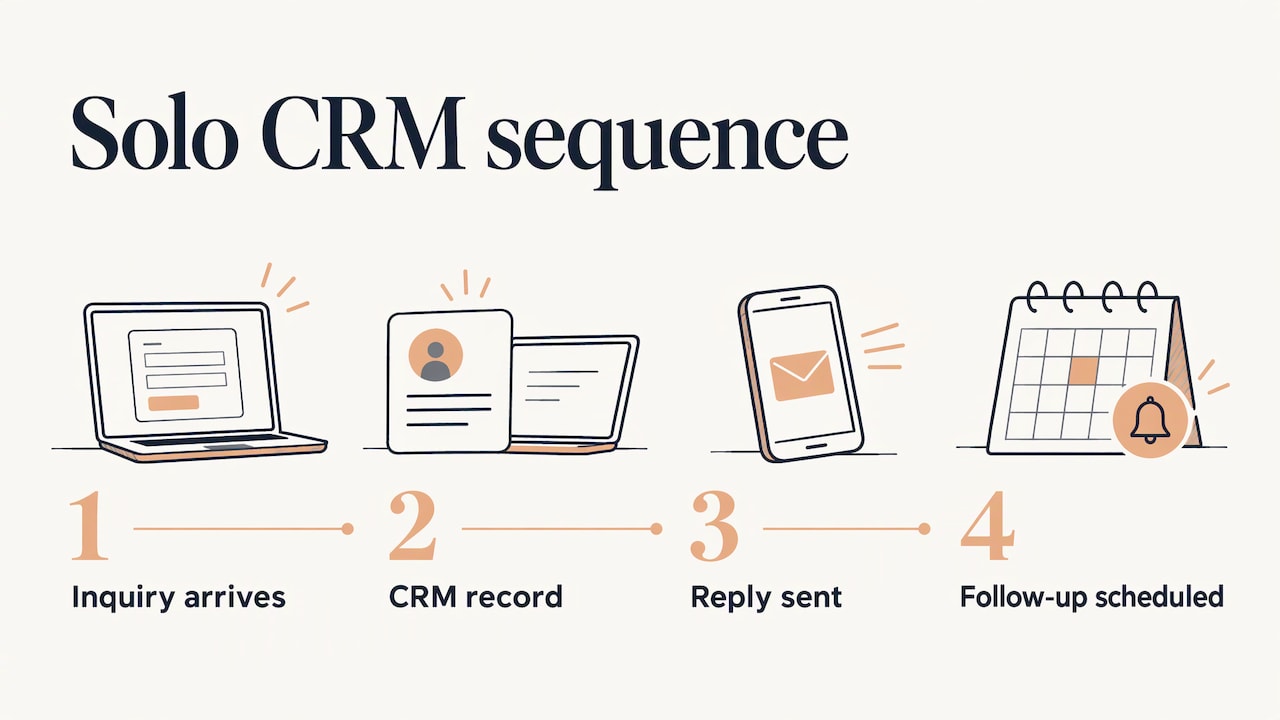
You usually have few tools and little time. The goal is a short chain that runs on its own: inquiry in, record created, reply sent, follow-up scheduled. Coherence’s implementation guide suggests that solo operators with clean data may finish in one to three weeks. Clean data is the condition, so tidy your contact list before anything is connected.
Small teams
For a cloud CRM serving roughly 5 to 20 users, the same guide advises planning around eight weeks. The extra time goes to agreeing who owns which fields, how leads are assigned and what counts as a qualified contact. Write those rules down before building them.
Medium teams and enterprises
Larger teams with complex permissions or several integrations should allow 10 to 12 weeks or more, according to the same source. Here the work is staged rollout, monitoring and governance. Microsoft’s guidance is to set data ownership and access rules, prevent duplicates, test against a copy of real records, and watch error logs and data quality after a staged launch. NetSuite adds that integration platforms can supply workflow management, performance monitoring and data-security tools.
We offer the same range of engagement: consultations, custom training content, full-scale automation setups and ongoing support, whether you are one person or an enterprise operations group.
A worked example: from web inquiry to paid invoice
Consider a five-person consulting firm that gets inquiries from its website, email and a trade show booth. Today someone copies each inquiry into the CRM, writes a follow-up by hand, and sends the invoice from a separate accounting tool after a deal closes.
A joined-up design would work like this:
- Every channel feeds one capture flow, so the CRM receives a complete record with the source noted. Teams that meet people in person can see how that works in our guide to capturing leads at trade shows.
- An automatic email and auto-response confirm receipt immediately and offer a booking time.
- When the rep marks the deal “Closed won,” a webhook creates the invoice and starts onboarding. Our invoice processing guide covers the finance side.
- A weekly job flags duplicates and incomplete records for review.
Nothing here is exotic. The value is that each handoff is defined once and then runs without anyone remembering to do it. Mapping workflows this way is also the core of good automation practice generally, as shown in this guide to CRM workflow automation for service businesses.
Keeping integrations healthy as you grow
An integration is not finished at launch. Fields change, new tools arrive and volume rises. Build in a few habits:
- Name an owner for each connection, so a broken sync has someone to notice it.
- Log errors and review them on a schedule, not only when a customer complains.
- Limit access to the data each system truly needs.
- Document the rules in plain language, including which system wins when two records disagree.
- Review quarterly whether each automation still matches how you work.
Data migration and cleanup deserve special attention whenever platforms change, since mismatched fields and duplicate contacts are the usual casualties. This migration case study shows how much care moving email and contact data between platforms can take.
How we approach it
Our offering is built around the idea that your integration should fit your business, not the other way around. We design custom automation for workflows such as automatic lead generation, lead capturing, email marketing, social media scheduling and auto-response systems, and we can integrate custom AI agents where a task needs more than fixed rules. We also deliver custom training content so your team understands the system, and ongoing support as it evolves. You can see what each service covers on our automation services page, and our guide to AI automation consulting explains how an engagement typically starts.
Getting started with us
If you want the connections built for you, the Turn On Elevator Pitch Automations plan is listed at $300 per month on our setup page. Our other services, including consultations, customized help and done-for-you builds, are scoped to your workflow, and you can see the full list on our pricing page.
When you are ready to talk through your CRM and the tools around it, get in contact and bring a list of the repetitive tasks that cost you the most time.
Our perspective
Most of the CRM projects we hear about go wrong in the same place: the tools were connected before anyone decided what the process should be. A connector copies a field from A to B. It cannot tell you whether that field should exist, who owns it, or what should happen next.
That is why we begin with the work, not the software. We ask what your team repeats, where leads slow down, and what a good handoff looks like. Then we build the automation around that answer, so it fits a solo practice today and can grow into a larger team’s system tomorrow.
We think a tailor-made system, supported by consultation and training, is the strongest way to keep a CRM accurate over years, because the people running it understand why it works the way it does.
Joshua
FAQ
What does CRM integration mean?
It means connecting your CRM to other applications so data and workflows sync automatically. An action in one tool, like a form submission or a closed deal, updates the records in the others without manual entry.
How long does a CRM integration take?
It depends on size and data quality. One implementation guide suggests one to three weeks for solo operators with clean data, about eight weeks for a cloud CRM with 5 to 20 users, and 10 to 12 weeks or more for larger teams with several integrations. Scoping the work first gives you a firmer estimate.
Which CRM tasks are best to automate first?
Start with the most repetitive and time-sensitive ones: capturing leads, sending the first response, and updating records after a reply or booking. These save time immediately and are easy to measure. Deal-to-billing handoffs are a strong second step.
Do I need real-time sync for everything?
No. Use real-time sync where speed affects the customer, such as new leads and deal changes that trigger billing. Scheduled batches work well for reporting and cleanup, where nobody is waiting on the data.
Sources
- CRM Integration: A Complete Guide, Salesforce
- CRM integrations explained, Capterra
- What Is CRM Integration? Microsoft Dynamics 365
- Workflow Automation Software, HubSpot
- CRM Integration: Benefits, Types, and Best Practices, Slack
- What Is CRM Integration? An Overview and Guide, NetSuite
- Automate Your HubSpot Data, HubSpot Developers
- What is CRM integration? HubSpot Blog
- CRM Implementation Timeline, Coherence
- CRM Workflow Automation for Service Businesses
- 3 Keap Accounts Migrated to Maropost, Dogtooth Inc