Invoice processing automation means software handles the repetitive path a supplier invoice takes: it arrives, the data is read, the numbers are checked, the right person approves, and payment is scheduled and recorded. You keep the decisions. The system does the typing, matching, chasing and filing. For a freelancer that can mean no more retyping PDFs. For a team it can mean invoices that no longer sit in someone’s inbox for two weeks.
This guide covers what the process includes, how each step works, where AI helps, where a person still needs to look, what it costs, and how to roll it out without breaking your books.
TL;DR
- Invoice processing automation covers incoming supplier invoices (accounts payable): capture, data extraction, matching, approval, payment and recording. It is not the same as sending invoices to customers.
- OCR and AI read the invoice, rules route it for approval, and people handle exceptions such as duplicates, mismatches and unreadable documents.
- Start with capture and routing. It is usually the quickest win and does not force you to rebuild how you approve spending.
- Pricing models range from per-user subscriptions to per-document fees, so estimate your monthly invoice volume before you compare.
- We build custom invoice and email workflows around your existing tools, with consultations, done-for-you setup or a flat monthly plan.
Table of Contents
- What invoice processing automation actually covers
- How automated invoice processing works, step by step
- Where OCR and AI help, and where people still look
- What you can expect: speed, accuracy and the realistic caveats
- What invoice automation costs
- How to roll it out without breaking your books
- Our perspective
- Work with us on your invoice workflow
- Choosing the right approach for your size
- Common mistakes to avoid
- FAQ
- Sources
What invoice processing automation actually covers
The phrase gets used for two different jobs, and mixing them up leads to buying the wrong tool.
Accounts payable (AP) automation deals with invoices you receive from suppliers and must pay. One industry guide on invoice automation draws the line this way: processing covers receiving, validating, approving and paying supplier invoices, while customer invoicing automation is about generating and sending invoices to the people who owe you. That second job sits in accounts receivable (AR).
If your pain is “bills pile up and I keep retyping them,” you need the first kind. If your pain is “I forget to send invoices and clients pay late,” you need the second. Many businesses need both, and they can be built as two separate workflows.
There is also a difference between invoice processing and AP automation as a whole. IBM’s explanation describes invoice processing as commonly covering capture, extraction, routing and approval, while broader AP automation can extend through payment, record-keeping, ERP integration and vendor communication. In practice, a small business can start with the narrow version and widen it later.
How automated invoice processing works, step by step
Different write-ups name the stages differently, but they describe the same path. Sage’s overview lists five: receipt and verification, data extraction, approval, payment and recording. Stripe’s guide adds exception handling, reconciliation and reporting. Here is the full flow in plain terms.
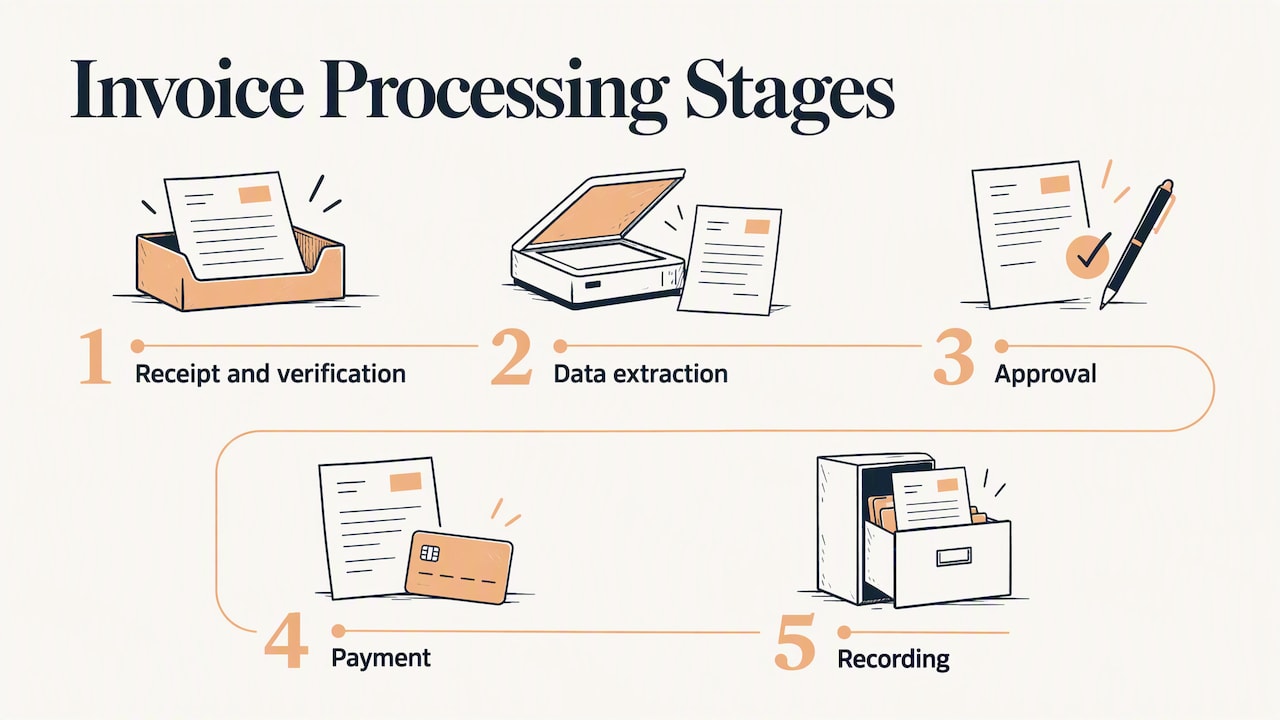
1. Receive and consolidate
Invoices arrive by email, supplier portals, uploads and scanned paper. Automation pulls them into one queue instead of leaving them scattered across inboxes. A simple rule can watch a dedicated address such as a payables mailbox, pull out the attachment and log the sender and time.
2. Extract the data
Optical character recognition (OCR) turns a scan or PDF into machine-readable text. AI then finds the fields that matter: vendor, invoice number, date, line items, tax and total. Systems of this kind are described as using machine learning and OCR to ingest and validate vendor invoices, which cuts manual data entry in accounts payable.
3. Validate and match
The system checks the invoice against what you expected. Does the vendor exist in your records? Is this invoice number a duplicate? Does the amount agree with the purchase order? A three-way match compares the invoice, the purchase order and the receipt, which Amazon Business describes as a fraud control before payment is authorized.
Most freelancers and small teams do not run formal purchase orders. A simpler version still works: compare the amount with the contract, the last invoice from that vendor or an approved budget line.
4. Route for approval
Validated invoices go to the right approver. Sage notes that automated systems can route by department, approval limit or project code. That might look like this:
- Under a set amount, with a known vendor: approved automatically and queued for payment.
- Above that amount: sent to the budget owner with the invoice attached.
- Above a higher limit: sent to an owner or finance lead.
Reminders go out if nobody responds, so approvals stop depending on someone remembering.
5. Pay
Once approved, payment is scheduled through your accounting system. According to Sage, payment can go by ACH, check or wire. Scheduling lets you pay on the due date, or early when a discount is offered, rather than whenever someone gets around to it.
6. Record and archive
The approved data posts to your accounting system or ERP, the payment is reconciled and the original document is stored with its approval trail. That trail is what you want ready when an accountant or auditor asks why a bill was paid.
Where OCR and AI help, and where people still look
OCR reads. AI interprets. Machine learning improves with corrections. Ramp’s explanation of AI invoice processing puts it this way: OCR makes scans machine-readable, AI interprets content and applies business rules, and machine learning categorizes expenses and learns from fixes your team makes.
The same source is clear about what should still reach a person:
- Fields the system reads with low confidence
- Handwritten or damaged invoices
- Formats it has never seen
- Complex cost allocations
- Exceptions such as duplicates, PO mismatches, missing fields or odd pricing
That is the right mental model. Automation removes routine data entry, and people keep the judgment calls: new vendors, unusual charges and anything that looks wrong. Set up this way, you review a short exceptions list instead of every invoice.
Can AI do my invoices?
For the reading, coding and routing parts, yes. For deciding whether a charge is legitimate, you still want a human in the loop, especially early on while the system learns your vendors. Systems can also learn from past approvals to suggest actions, according to Workday’s guide, which reduces approval bottlenecks over time.
Can QuickBooks automate invoices?
Partly. Intuit’s product update notes say QuickBooks Online’s Intuit Intelligence can draft invoices from saved documents, schedule reminders and create automations such as overdue reminders and bill flagging. That helps with the AR side and with spotting bills. If your process also involves email intake, custom approval rules, spreadsheets, a CRM or another tool, you can connect those pieces around QuickBooks with a custom workflow.
What you can expect: speed, accuracy and the realistic caveats
Vendors publish impressive numbers, so treat them as ranges to test against your own volume. One AP automation guide reports that manual processing often takes 10 to 16 days from receipt to authorization, against 3 to 5 days with automated workflows. The same page puts manual entry error rates at roughly 1% to 3%, often cut sharply by OCR-based capture and validation.
What that means for different readers:
| Your situation | Typical pain | What to automate first |
|---|---|---|
| Self-employed | Retyping bills, missing due dates | Email capture, data extraction, due-date reminders, a spreadsheet or accounting entry |
| Small team (2 to 15 people) | Approvals stuck in inboxes | Approval routing by amount or project, reminders, duplicate checks |
| Medium team | Several approvers, several systems | Matching against POs, exception queues, posting to accounting or ERP |
| Enterprise | Volume, audit trail, vendor communication | Full AP workflow with integrations, monitoring and reporting |
The same guide suggests capture is often the fastest first win because it removes high-error manual entry without changing your approval structure. That fits our experience of how to sequence work: fix intake first, then layer on rules.
What invoice automation costs
There is no single price per invoice, because vendors charge in different ways. One AP software comparison lists per-user subscriptions, flat monthly plans, per-document fees and quote-based pricing, and notes transaction fees may apply on top. The same page shows entry points as low as $49 per user per month for one type of plan and from $1.99 per document for another.
To compare fairly, work out:
- How many invoices you handle each month.
- How many people touch them (users).
- Whether payments also run through the tool, which can bring transaction fees.
- Whether you need integrations to accounting, banking or a CRM, and who builds them.
- What setup and training cost.
A per-document model rewards low volume. A flat model rewards high volume. A custom build rewards unusual processes that off-the-shelf tools do not fit.
How to roll it out without breaking your books
A gradual rollout is the safest path. Stripe’s integration guidance boils down to: set goals, choose compatible middleware or APIs, map your data and workflows, address security and compliance, test thoroughly and roll out gradually while monitoring.
Here is how that looks for a small business.
- Write down the current path. Follow the last ten invoices from arrival to payment. Note who touched each, how long it waited and where it went wrong.
- Pick one intake channel. One mailbox or upload form beats five.
- Define the rules. Approval limits, who approves what, which vendors are pre-approved, what counts as a duplicate.
- Connect the systems. Link email, storage, accounting and any spreadsheets or dashboards you use. Map each field so the vendor name in the invoice matches the vendor record in your books.
- Run in parallel. For a few cycles, process invoices both ways and compare. Fix mismatches before trusting it.
- Go live, then monitor. Review the exceptions list weekly and adjust rules.
One vendor guide suggests an invoice capture platform for small and mid-sized businesses typically follows a four-week timeline covering configuration, pilot testing, team training and full rollout. Treat that as a planning reference, not a promise; your timeline depends on how many systems you connect and how clean your vendor data is.
Security and records
Invoices contain bank details and tax information. Limit who can change vendor bank details, keep an approval log, and make sure the automation uses your own accounts and permissions rather than shared passwords. Ask your accountant which records you must keep and for how long under your state and federal rules before you decide what to archive or delete.
Our perspective
Most invoice problems we see are not software problems. They are routing problems: an invoice lands in the wrong inbox, nobody knows who approves it, and it sits.
That is why we build around your business instead of handing you a generic tool. We start with a consultation to map how invoices actually move through your team, then design automations for the parts that repeat: capturing email attachments, sending auto-responses to vendors, logging data, notifying approvers and tracking what is outstanding. Our approach is tailor-made systems that grow with you, whether you are self-employed, a small team or running larger operations.
Our view is that automation should take over the typing and the chasing, and people should keep the decisions. A well-built workflow shows you the invoices that need your attention and quietly handles the rest. You can start small with one workflow, then add more as the volume grows, rather than replacing everything at once.
Joshua
Work with us on your invoice workflow
If you would rather have this built than assemble it yourself, we design custom automation around the tools you already use. That can include email automation, auto-responses, lead and data capture, custom AI agent integration, dashboards and training for your team. You can book a consultation, ask for done-for-you setup, or take a flat plan: our Unlimited plan is $300 per month, and you can also turn on automations here at $300 per month.
To see what we can automate besides invoices, browse our automation services or the automation ideas page, then contact us with a description of your current process. Our offers for custom projects do not have published prices, so we scope them with you first.
Choosing the right approach for your size
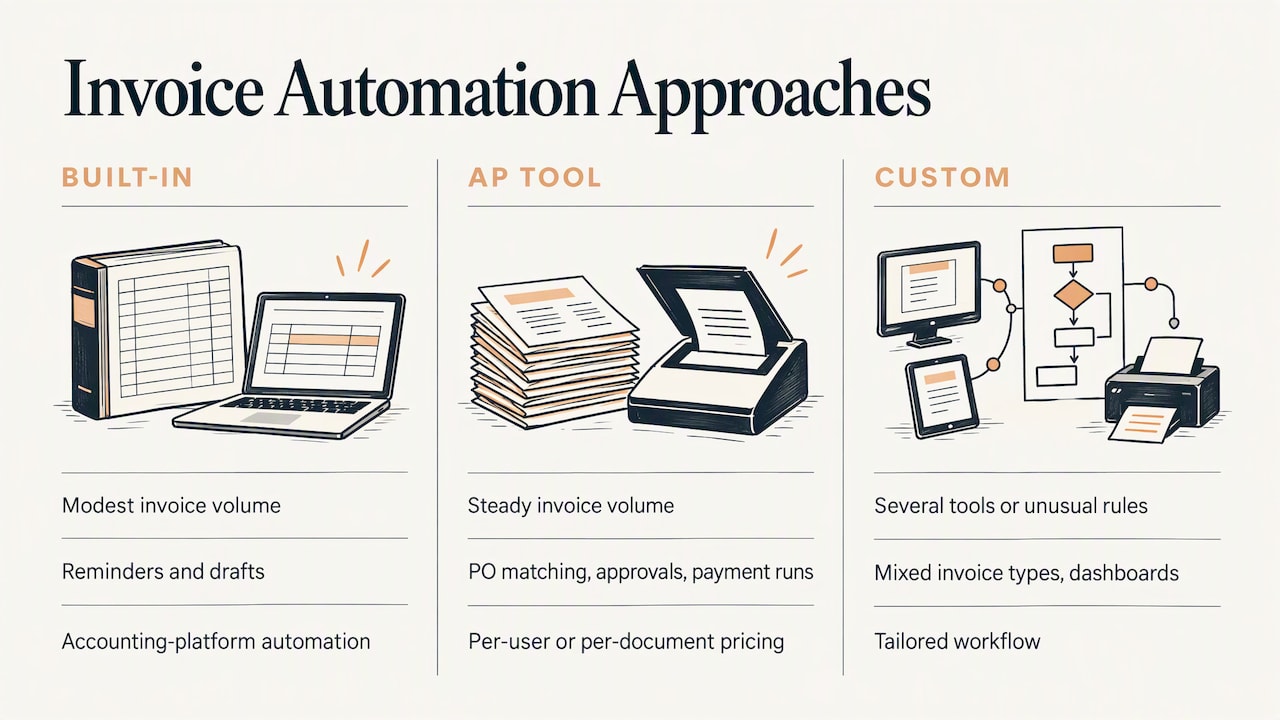
You have three realistic routes, and each fits a different stage.
Use the features in your accounting software. If you send a modest number of invoices and mainly want reminders and drafts, the built-in automation in your accounting platform may cover it. Check what it handles for bills you receive, which is often less than for invoices you send.
Add a purpose-built AP tool. If invoice volume is steady and your process is standard (PO matching, approvals, payment runs), a dedicated tool with per-user or per-document pricing can fit. Weigh the pricing model against your volume as described above.
Commission a custom workflow. If your process spans several tools, has unusual approval rules, mixes invoice types, or needs to feed a dashboard, a tailored build avoids bending your business around a template. This is where we work. It suits teams that have outgrown manual steps but do not fit neatly into one product.
Whichever route you choose, judge it on four questions: Does it cut the number of times a person touches an invoice? Does it keep an approval trail? Does it connect to your accounting system without re-keying? Can it change when your process changes?
Common mistakes to avoid
- Automating a messy process. Fix unclear approval ownership first, or you will only move the bottleneck faster.
- Skipping the exceptions path. Every system meets invoices it cannot read. Decide who sees them and how fast.
- Trusting the first week blindly. Run parallel cycles and check totals against your bank and books.
- Forgetting vendor data. Duplicate or outdated vendor records cause mismatches no matter how good the OCR is.
- Ignoring the people. Tell approvers what will change, give them a simple way to approve and train them briefly. Rollouts fail on habits more often than on technology.
FAQ
How do you automate the invoice processing workflow?
Start by mapping how invoices move today, then automate in order: capture from email or upload, data extraction, validation, approval routing, payment scheduling and posting to your accounting system. Run the new flow beside the old one for a few cycles before switching over. You can do it with built-in features, an AP tool or a custom build.
What is the difference between invoice processing and invoicing automation?
Invoice processing handles bills you receive from suppliers and must pay (accounts payable). Invoicing automation creates and sends invoices to your customers and tracks what they owe (accounts receivable). They use different tools and rules, though many businesses automate both.
Does automation remove the need for people?
No. Automation takes over data entry, matching and routing, while people review low-confidence fields, unusual charges, new vendors and exceptions such as duplicates or mismatches. The practical goal is a short list of items that need judgment.
How much does it cost to automate invoice processing?
It depends on the pricing model: per-user subscriptions, flat monthly plans, per-document fees or quotes, sometimes with transaction fees. Count your monthly invoices, the people involved and the integrations you need before comparing. Our Unlimited plan is $300 per month, and custom projects are scoped after a consultation.
Can AI handle my invoices?
AI can read invoices, pull out the fields, suggest coding and route approvals, and it improves as your team corrects it. A person should still approve unusual, high-value or unfamiliar invoices, particularly in the first months.
Sources
- Invoice automation guide on AP versus customer invoicing
- What is automated invoice processing, IBM
- What is invoice processing, Sage Advice US
- How automation works in invoice processing, Stripe
- AP automation guide, Amazon Business
- AI invoice processing, Ramp
- Automated invoice processing, Workday
- QuickBooks feature updates, Intuit
- Accounts payable automation benefits and ROI
- Best accounts payable software comparison
- Invoice capture software guide