AI sales automation means letting software and AI agents handle the repetitive steps between a stranger’s first click and a signed deal: capturing the lead, routing it, sending the first reply, scheduling follow-ups, updating records and flagging deals that have gone quiet. The tools that do this are widely available. What separates teams that profit from it is the design around them: which steps are automated, which stay with a person, and how the whole thing is wired to your business. We build exactly that kind of tailor-made setup, and this guide shows you how to plan it whether you sell alone or run a sales floor.
TL;DR
- AI sales automation removes repetitive work (lead capture, routing, follow-up, CRM updates, reporting) so sellers spend time on conversations.
- It is already mainstream: in one 2025 survey of B2B software buyers, 60% reported using AI in their sales processes.
- Time saved does not turn into revenue by itself. Gartner found that 72% of sales organizations reinvest little of it.
- Automate bounded, repeatable tasks, keep people on pricing, commitments and relationships, and prove it with a 30 to 90 day pilot.
Table of Contents
- What AI sales automation actually is
- Why teams are adopting it
- The reinvestment gap: where most of the value is lost
- Which parts of the sales pipeline to automate
- Sales outreach automation: personalize at scale, review at the edges
- Keeping data, tasks and handoffs organized
- How to start: a 30 to 90 day plan
- What to consider by size of business
- Measuring whether it works
- Our perspective
- Get your sales workflow automated
- FAQ
- Sources
What AI sales automation actually is
Sales automation on its own is rule-based: when a form is submitted, create a contact and send an email. The AI layer adds judgment on top of the rules. It can read an inquiry and decide whether it looks like a fit, draft a reply that refers to what the prospect actually wrote, or notice that a deal has had no activity for ten days.
Gartner defines AI in sales as using AI in sales tools and processes to help sellers work more efficiently, simplify the buyer journey and improve the customer experience. It also describes agentic AI, meaning software that perceives, decides and acts with little or no supervision, as the part reshaping prospecting and sales research.
In practice, the work falls into four groups:
- Getting leads in: capturing inquiries from your website and channels, and generating prospect lists.
- Reaching out: first replies, email sequences, follow-ups, scheduling.
- Moving deals: routing, task creation, stage updates, stalled-deal alerts.
- Keeping records: CRM updates, meeting summaries, reporting and forecasting.
Most of the pain for a small business sits in groups 2 and 4. A solo consultant who spends Friday afternoon copying notes into a spreadsheet and writing “just checking in” emails is a perfect automation candidate.
Why teams are adopting it
The numbers explain the interest, though they come from surveys and you should read them as signals, not guarantees.
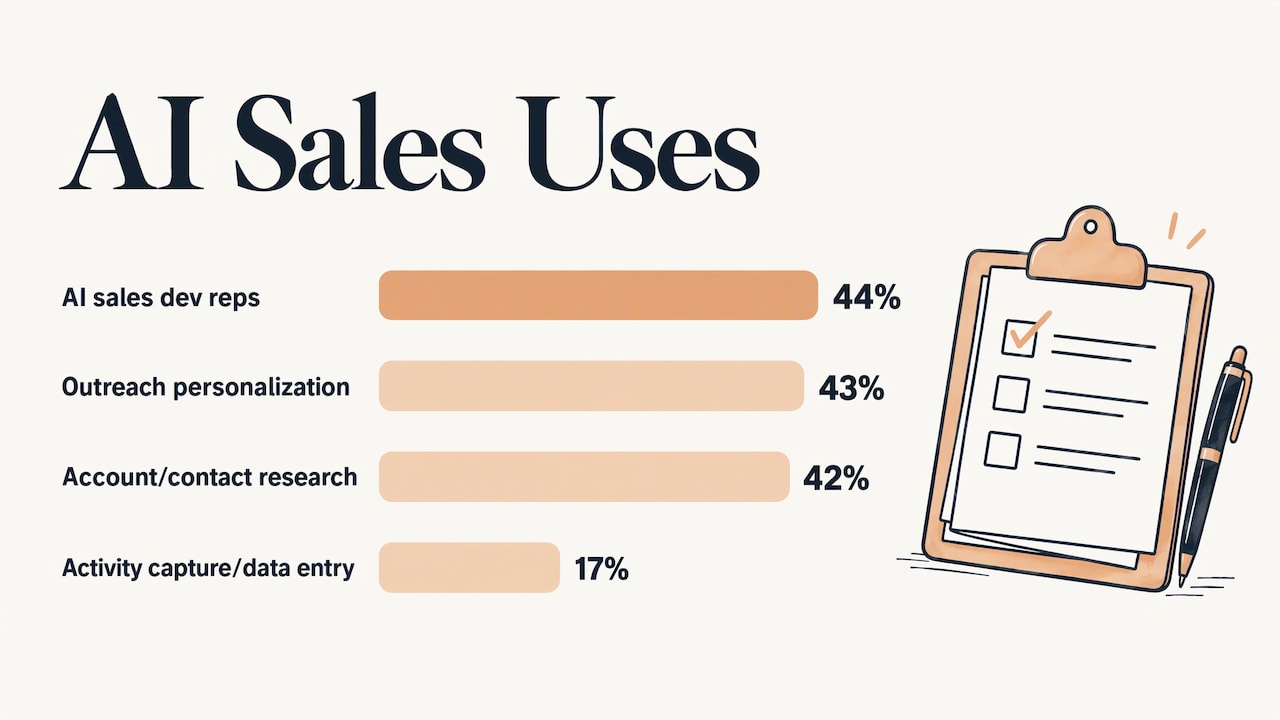
In G2’s April 2025 survey of over 1,000 B2B software buyers, the most common AI uses in sales were AI sales development reps (44%), outreach personalization (43%) and account and contact research (42%). Activity capture and data entry came in lower, at 17%, which suggests plenty of teams still do that work by hand.
A June 2025 article by a Forbes business development council member, citing a global study with Ipsos, reported that AI-personalized outreach saw a 28% increase in response rates, and sellers using AI for research saved 1.5 hours per week. The same piece says AI-enabled CRM automation shaves on average a full week off the sales cycle.
A 2026 Gartner survey of 210 chief sales officers and senior sales leaders found AI saves sellers an average of 4.8 hours per week. For a self-employed seller, that is most of a working day every two weeks.
The reinvestment gap: where most of the value is lost
The same Gartner survey has the finding that matters most for how you plan. While sellers save time, 72% of sales organizations report low reinvestment of those savings in high-value activities. Organizations that do reinvest the time are 2.2 times more likely to exceed customer growth goals and 3.1 times more likely to exceed lead-to-opportunity conversion goals.
The practical lesson: decide before you automate what the freed hours are for. Name the activity. More discovery calls, faster proposals, a weekly check-in with your top ten accounts, a second round of outreach to past customers. If the saved time disappears into email and admin again, the automation worked and the business did not change.
The SMM report on the same Gartner research makes the point that existing approval loops and habits often stay unchanged, so the time goes nowhere. Automation should replace a step, not sit on top of it.
Which parts of the sales pipeline to automate
Most sales workflows share one shape: a trigger (a form submission, a stage change, a missed payment), a rule or AI check that filters or routes, and an outcome (a record created, an owner assigned, a message sent). Once you see that pattern, you can map almost any pipeline stage onto it.
| Pipeline stage | Good to automate | Keep with a person |
|---|---|---|
| New lead | Capture from forms and channels, create the record, assign an owner, send an instant acknowledgment | Review spam, duplicates and unusually large inquiries |
| Qualification | Enrich the record, score against your ideal customer profile, tag, create a task | Confirm the fit and the real need |
| Meeting | Scheduling, confirmations, reminders, no-show follow-up, meeting summaries | The conversation itself |
| Proposal | Attach the right template, schedule follow-ups, pause when the buyer replies | Scope, pricing, discounts and terms |
| Negotiation | Alert the manager, log changes | Every commitment |
| Closed won | Update records, start onboarding, log revenue | The welcome call for key accounts |
| Closed lost | Record the reason, schedule a re-engagement touch | Deciding which losses deserve a personal note |
Two rules keep this from going wrong. First, stage changes should reflect real progress: if a deal moves to “proposal sent” automatically, make sure a proposal was actually sent, or your forecast fills with fiction. Second, every automated sequence needs a stop condition. When a prospect replies, the sequence should pause so a person takes over.
Start with lead capture
If you automate only one stage, make it the first. Leads that wait hours for a reply go cold, and leads that arrive by five different channels get lost. A system that captures inquiries from your site and channels, writes them into one place and replies immediately is the base everything else sits on. We cover how to build it in our guide to lead capture that works automatically.
Sales outreach automation: personalize at scale, review at the edges
Outreach is where AI sales automation gets the most attention and the most abuse. Done well, AI researches a prospect, finds an angle that is relevant to them, drafts a message and schedules follow-ups based on whether the prospect opened, clicked or replied. Done badly, it sends thousands of near-identical messages that train your market to ignore you.
A workable split looks like this:
- AI does: account research summaries, first drafts, follow-up timing, reply categorization, meeting scheduling.
- A person does: confirm that the prospect fits and that the evidence in the research is real, approve messages for important accounts, and handle anything involving price, terms or a commitment.
That division matches published guidance. TechnologyAdvice’s AI-powered sales process has AI produce research summaries and outreach angles while people confirm fit and evidence, and says people should validate judgments, commitments, deal status, pricing and terms. Gartner’s overview adds that benefits include better decision making and resource planning, but only when the underlying data is sound.
That last point deserves emphasis. AI forecasts and lead scores are only as good as the records feeding them. If your CRM is full of duplicates and stale stages, fix that before you add intelligence on top.
Follow-up sequences that respect the buyer
A good automated follow-up behaves like a polite assistant, not a stalker:
- It starts from a real trigger, such as a completed call, a downloaded guide or a quote that has gone unanswered.
- It references what actually happened.
- It stops the moment the prospect replies, books or says no.
- It sends a limited number of touches, then moves the lead to a slower nurture track.
Auto-responses and automatic emails are the simplest version of this, and they are often the best first project. Our automation services include auto-responses, automatic emails, automatic lead generation and lead capturing.
Keeping data, tasks and handoffs organized
Sales automation breaks down at the seams: between marketing and sales, between sales and delivery, and between sales and billing. A few habits prevent that.
- One source of truth. Pick one place where each lead, deal and customer lives. Every automation reads from and writes to it.
- One owner per record. Routing rules should always assign a human owner, even if AI does the first touch.
- Visible handoffs. When a deal closes, the next step (onboarding, invoicing, kickoff) should trigger automatically and notify a named person.
- Money follows the deal. The end of the sales workflow is getting paid. If invoicing and reminders are manual, you have automated the fun part and left the slow part. A look at payment collection automation shows how reminders and payment links can pick up where the sales workflow ends.
How to start: a 30 to 90 day plan
The common advice from implementation guides is consistent: audit repetitive work, pick one or two measurable use cases and pilot before scaling, typically over 30 to 90 days. Here is that plan in steps, with the part we take off your hands at each one.
Step 1: List the repetitive tasks
For one week, note every sales task you do more than five times: copying lead details, writing the same reply, chasing quotes, building reports. Rank them by how often they happen and how much time they take. Tasks that are frequent, rule-bound and low-risk go to the top. Where it goes wrong: choosing something exciting, like a fully autonomous AI outreach agent, instead of something boring that saves four hours a week.
Step 2: Measure your baseline
Write down today’s numbers before changing anything: how long a new lead waits for a first reply, how long follow-ups take to send, what share of leads become meetings. Without a baseline you will not know whether the pilot worked. Where it goes wrong: skipping this step because the numbers feel embarrassing.
Step 3: Choose one workflow and design it
Write the trigger, the rule, the outcome and the stop condition on one page. Decide who owns exceptions. This is where a tailored design matters, because your lead sources, your CRM and your sales cycle are not generic. In a consultation we map your current workflow and the tools you already use, so the first automation fits how you sell rather than forcing you into a template. You can book a consultation from our main page.
Step 4: Build and connect it
This is the technical step: connecting forms, email, calendar, CRM and any AI agent so data moves without retyping. Our team builds custom automations and custom AI agent integrations, and the done-for-you option means you are not assembling it yourself. Where it goes wrong: a connection fails silently and leads stop flowing. Test with real inquiries before you go live.
Step 5: Run the pilot and review it
Run it on a subset: one lead source, one product line or one rep. Check the results weekly against your baseline. A simple four-week rhythm works well: ownership and baselines in week one, live operation and training in week two, review in week three, and a decision to stop, adjust or scale in week four. For bigger setups, extend to 90 days.
Step 6: Reinvest the time
Back to the Gartner finding. When the pilot frees hours, schedule the activity that will use them, and track that activity’s results too. For moving beyond a pilot, our guide to AI deployment from pilot to production covers the next stage.
What to consider by size of business
Self-employed sellers
Your constraint is hours, not headcount. Automate prospect research, call preparation, follow-up and reporting first. Keep the setup simple: one capture point, one reply sequence, one place for records. Custom training content can help you run it confidently without becoming a technician.
Small teams
With two to five sellers, the problem is usually consistency: leads routed unevenly, follow-up that depends on who remembers, deals prioritized by gut feel. Shared routing rules, scoring and task creation fix that. Time savings come second.
Medium teams
Here scalability is the question. Standardize the workflow, document the stop conditions and exceptions, and make sure each automation has an owner. Add reporting so managers can see where deals stall without asking reps for updates.
Enterprises
The challenge is orchestration across teams, regions and systems. Gartner’s May 2026 analysis argues that AI value depends less on access to the technology and more on how sales organizations redesign the systems around it. That is a design problem, and it is why enterprise rollouts benefit from a comprehensive plan instead of a set of disconnected tools. Our guide to business AI agents explains what agents do inside a company and how to begin.
Measuring whether it works
Pick three to five measures and keep them stable:
- Time to first response for new leads
- Hours per week spent on admin and data entry
- Lead-to-meeting and meeting-to-proposal rates
- Follow-up completion (how many deals get every planned touch)
- Revenue per seller, once the pilot has run long enough
If you add paid traffic to feed the pipeline, the same discipline applies: a clear Google Ads strategy for qualified leads pairs well with automated capture and follow-up, because every click lands in a workflow that replies quickly.
Our perspective
We have one view on AI sales automation: the tool is rarely the problem. Most businesses already own software that can send an email sequence or score a lead. What they lack is a workflow designed around how they actually sell.
That is why we build tailor-made systems rather than one-size-fits-all packages. A self-employed consultant, a five-person agency and an enterprise sales organization all want to stop retyping and chasing, but they need very different setups, and the right setup changes as the business grows.
Our approach is to start with consultation, map the repetitive work, and automate the bounded, repeatable steps first: lead capture, auto-responses, automatic emails, lead generation, follow-up. People stay on the parts that earn trust: pricing, terms and relationships.
Then comes the part most teams skip. Decide what the saved hours are for, and measure it. Automation that frees time and then lets it evaporate is a missed opportunity, and we would rather build the system and the habit together.
Joshua
Get your sales workflow automated
We design and build custom automation for lead generation, lead capturing, automatic emails, auto-responses and social media, and we integrate custom AI agents into the way your team already works. You can start with a consultation, ask for customized help, or choose the done-for-you route. Our Elevator Pitch Automations Unlimited plan is $300 per month, and you can see the plans and services or turn on Elevator Pitch Automations directly.
If you want the sales side mapped first, start at our home page and book a consultation. For a broader look at where automation pays off, browse our automation ideas.
FAQ
What can AI be used for in sales?
The most common uses are prospect and account research, outreach personalization, lead scoring and prioritization, meeting summaries, follow-up drafts, CRM updates and forecasting. In G2’s 2025 survey, AI sales development reps, outreach personalization and account research were the top three. The best starting points are bounded tasks with clean inputs.
Can I automate my sales pipeline without losing the personal touch?
Yes, if you automate the mechanics and keep people on the conversations. Let automation capture leads, reply instantly, schedule and log. Keep people on discovery, pricing, terms and key accounts, and make every sequence stop when the prospect replies.
How long does it take to see results?
Plan on a pilot of 30 to 90 days with a baseline measured first. Simple automations such as instant replies and follow-up sequences often show their effect on response time within the first weeks. Revenue effects take longer to read.
Is AI sales automation only for large companies?
No. Self-employed sellers and small teams often gain the most, because repetitive admin takes a larger share of their week. The setup is smaller, but the principles are the same: one workflow, clear ownership, a measured pilot.
How much does it cost to get started with us?
Our Elevator Pitch Automations Unlimited plan and the Turn On Elevator Pitch Automations plan are each listed at $300 per month. Consultations and custom projects are quoted individually, so book a consultation to scope your workflow.
Sources
- Gartner: The Role of Artificial Intelligence in Sales
- G2: AI’s Impact on Sales, 2025
- Forbes Business Development Council: The ROI Of AI In B2B Sales
- Gartner survey on AI saving sellers time, May 2026
- Sales & Marketing Management: Gartner Special Report, June 2026
- TechnologyAdvice: How to Build an AI-Powered Sales Process
- Payment collection automation
- Google Ads strategy for qualified leads