Social media automation means letting software handle the repetitive parts of your social presence: scheduling and publishing posts, drafting captions, sorting inbound messages, sending routine replies and compiling reports. It works when you automate the mechanics and keep people on the judgment: what to say, who to answer personally and when to stay quiet. The strongest setup is built around how your business actually runs, with your content sources, approvals and lead follow-up wired together. That is the kind of custom system we build at Elevator Pitch Automations.
TL;DR
- Automate the repeatable work: scheduling, publishing, recycling evergreen posts, saved replies to FAQs, message sorting and recurring reports.
- Keep people in charge of strategy, topic choice, fact-checking, complaints, sensitive conversations and personal engagement.
- Platform rules matter: LinkedIn and X both restrict bots that act on your behalf, so engagement stays human while publishing and reporting are automated.
- A good rollout is small: audit what you do now, pick a single content source, connect accounts, test with one post, then add steps.
- The real payoff comes when social posting connects to lead capture, email and follow-up, which is where a custom build beats a stand-alone scheduler.
Table of Contents
- What social media automation actually covers
- Why it matters for a small business
- What to automate, and what to keep human
- How to set up automated social media posting, step by step
- A worked example: a three-person service business
- Connecting social media to leads and revenue
- Using AI in the workflow without losing your voice
- Scaling from solo operator to enterprise
- Mistakes to avoid
- Where we come in
- Our perspective
- FAQ
- Sources
What social media automation actually covers
Most people hear “social media automation” and think of a scheduler: write ten posts on Monday, publish them all week. That is one piece. A complete setup covers five jobs:
- Creating: AI-assisted drafts of captions, hashtags, video scripts and platform-specific versions of one long piece of content.
- Publishing: queues, calendars, recurring posts and automatic sharing when something new goes live, such as a blog post or a product listing.
- Listening: alerts when your brand, a keyword or a competitor topic is mentioned.
- Responding: saved replies, auto-responses to common questions and routing of comments and direct messages to the right person.
- Reporting: weekly or monthly performance summaries that arrive without anyone building a spreadsheet.
The difference between a tool and a system is the connections. A tool does one of these jobs. A system links them: a new blog post triggers drafts for each platform, a person approves them, they publish on schedule, a comment asking for pricing is routed to sales, and the week’s results land in a report. Each link removes a manual handoff, and handoffs are where small teams lose hours.
Why it matters for a small business
If you are self-employed or on a small team, social media competes with the work that earns revenue. Posting consistently takes real time, and it is the first thing to slip during a busy week. Gaps in posting are the usual reason an account goes quiet.
Automation changes the economics in three ways:
- Batching. You write or approve a week or month of content in one sitting instead of context-switching every day.
- Consistency. Posts go out on time whether or not you remember.
- Speed on routine messages. Common questions (hours, pricing ranges, how to book) get an immediate answer, so a prospect is not left waiting.
For a self-employed professional, that can mean an hour of planning a week instead of fifteen scattered minutes a day. For a team of five to twenty, it means a shared calendar, clear approvals and fewer “did anyone post this?” messages. For an enterprise, it means governance: roles, permissions, approval trails and consistency across regions and business units.
What to automate, and what to keep human
This is the decision that separates automation that helps from automation that damages a brand. A practical split:
| Task | Automate? | Why |
|---|---|---|
| Scheduling and publishing approved posts | Yes, fully | The most mature and lowest-risk use. A person approves, software publishes on time. |
| Recurring and evergreen posts | Yes | Reuse your best material on a schedule instead of rewriting it. |
| Caption, hashtag and variant drafts | Partly | Software drafts, a person edits the opening lines and checks facts. |
| Repurposing long content into posts | Partly | Fast first drafts, human review before anything goes live. |
| Saved replies to FAQs | Yes, with limits | Good for hours, shipping, booking links. Not for anything emotional. |
| Sorting and tagging inbound messages | Yes | Rules can categorize and prioritize so a person answers the right ones first. |
| Brand and keyword monitoring | Yes | Alerts tell you when to step in. |
| Reports | Yes | Recurring summaries replace manual exports. |
| Complaints, refunds, sensitive situations | No | Hand these to a person quickly. |
| Likes, comments, follows and reposts on other people’s content | No | Platform rules and relationship value both say keep it human. |
| Strategy, topic choice, tone | No | Judgment, context and relationships are what people are for. |
The guiding principle: automate the delivery of decisions people have already made, not the decisions themselves.
Platform rules you need to respect
This is a safety issue for your accounts, not a style preference. LinkedIn states that it does not permit third-party software, including bots and browser extensions, that automates activity on its website, and it also bars fake engagement. X publishes its own automation rules, which, among other things, do not allow automated liking of posts and limit automated replies and mentions.
In practice, that points to a clear line. Scheduling your own content, sending requested replies to people who contacted you first, monitoring and reporting are the safe uses. Automated commenting, mass liking, auto-connecting and similar engagement tactics put your account at risk and make your brand look like spam. Platform rules change, so check each network’s current policy before you connect anything new.
How to set up automated social media posting, step by step
Here is the routine, with where it tends to go wrong at each step.
Step 1: Audit what you do now
List the platforms you actually post on, how often, who writes, who approves and how long it takes each week. Include the invisible work: resizing images, copying captions from one app to another, checking messages on three platforms.
Where it goes wrong: automating everything you have ever tried. Keep the platforms where your customers actually are and drop the rest before you build anything.
Step 2: Choose a repeatable content source
Automation needs something to publish. Common sources are a monthly content sheet, new blog posts, new product or listing entries, customer reviews you have permission to share, or long-form material (a webinar, a newsletter) that can be cut into pieces.
Where it goes wrong: no source. Software cannot create a content strategy for you. A simple calendar with date, platform, topic and format is enough to start.
Step 3: Set brand templates and a voice
Decide fonts, colors, image sizes, standard hashtags, link formats and a few sentences that describe your tone. If AI drafts captions, this is the reference it works from.
Where it goes wrong: generic output. If a draft could have come from any competitor, it needs a stronger brief and a human edit on the first line, which is the part readers see before “see more.”
Step 4: Connect accounts and decide destinations
Authorize each profile, then decide which posts go where. A product announcement might go to every channel, a behind-the-scenes clip to one. Rules do the work here: a trigger (new blog post) leads to an action (draft a post) under constraints (only this platform, only on weekdays).
Where it goes wrong: expired connections, media in the wrong format and accounts of the wrong type. These are the usual reasons a scheduled post silently fails. Build in an alert so a failure reaches a person instead of disappearing.
Step 5: Add a human approval
Put a review between the draft and the publish button. For a solo owner, that is five minutes on a phone. For a team, it is a routed approval that notifies the right person and stops chasing people over email.
Where it goes wrong: skipping review on AI-written copy. Inaccurate or robotic text, or a cheerful post scheduled during bad news, is the typical way automation embarrasses a brand.
Step 6: Test with one post
Send a single post through the full path before you load a month of content. Check the formatting on each platform, the link, the image crop and the timestamp.
Step 7: Review weekly, then expand
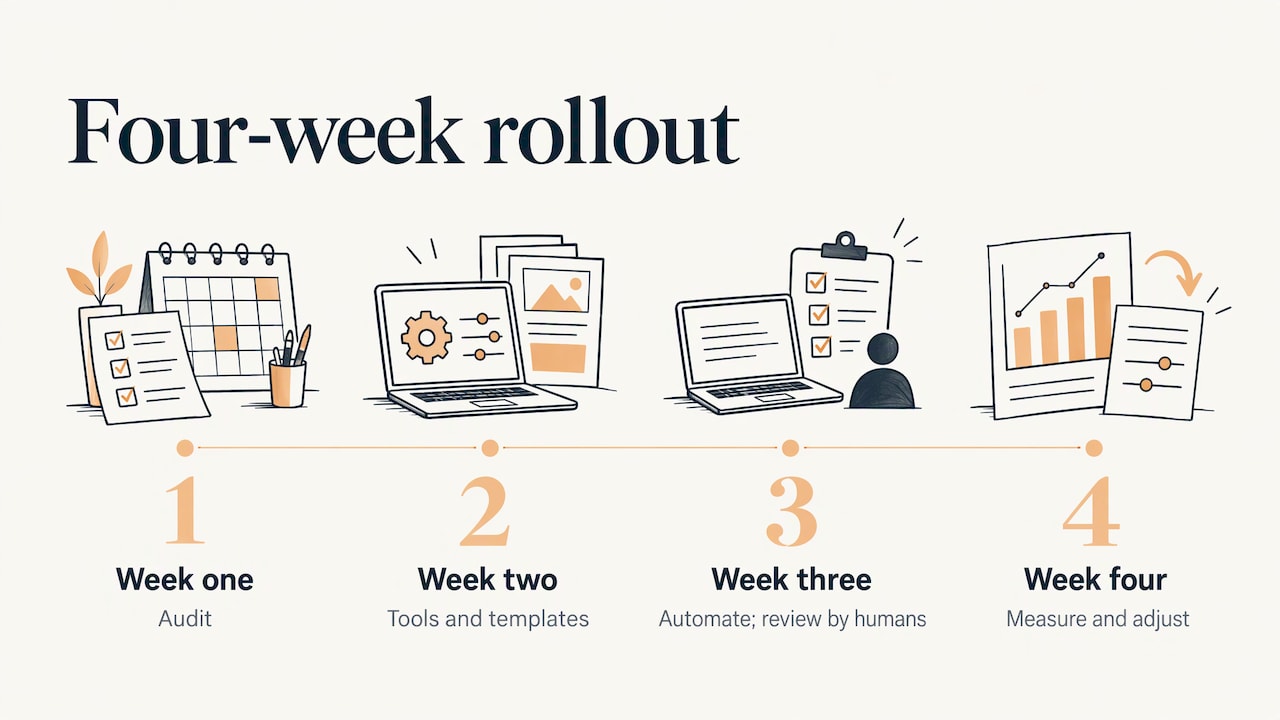
Check the log of what went where and what the results were. Compare time spent with your Step 1 baseline. Then add the next layer: saved replies, message sorting, monitoring, reports. A four-week rollout is realistic for most small businesses: audit in week one, tools and templates in week two, automate repeatable steps with human review in week three, measure and adjust in week four.
A worked example: a three-person service business
Picture a three-person landscaping design firm. Before automation, the owner posts when she remembers, a designer takes project photos that never get captioned, and inquiries arrive as Instagram DMs that sit unread over weekends.
After a simple build:
- Project photos dropped in a shared folder are logged in a content sheet each Friday.
- Draft captions are generated for each platform from a short project note. The owner edits the first lines and approves in one sitting.
- Approved posts publish on a set schedule, three per week.
- Each new case study on the website triggers a share to the business’s channels.
- Inbound messages containing words like “quote” or “estimate” are flagged, answered with a saved reply that asks for the project location and sends a booking link, and routed to the owner.
- A weekly report summarizes reach, clicks and inquiries.
Nothing in that list replaces the owner’s taste or her conversations with clients. It removes the copying, the forgetting and the missed weekend messages. That is the right scale of ambition.
Connecting social media to leads and revenue
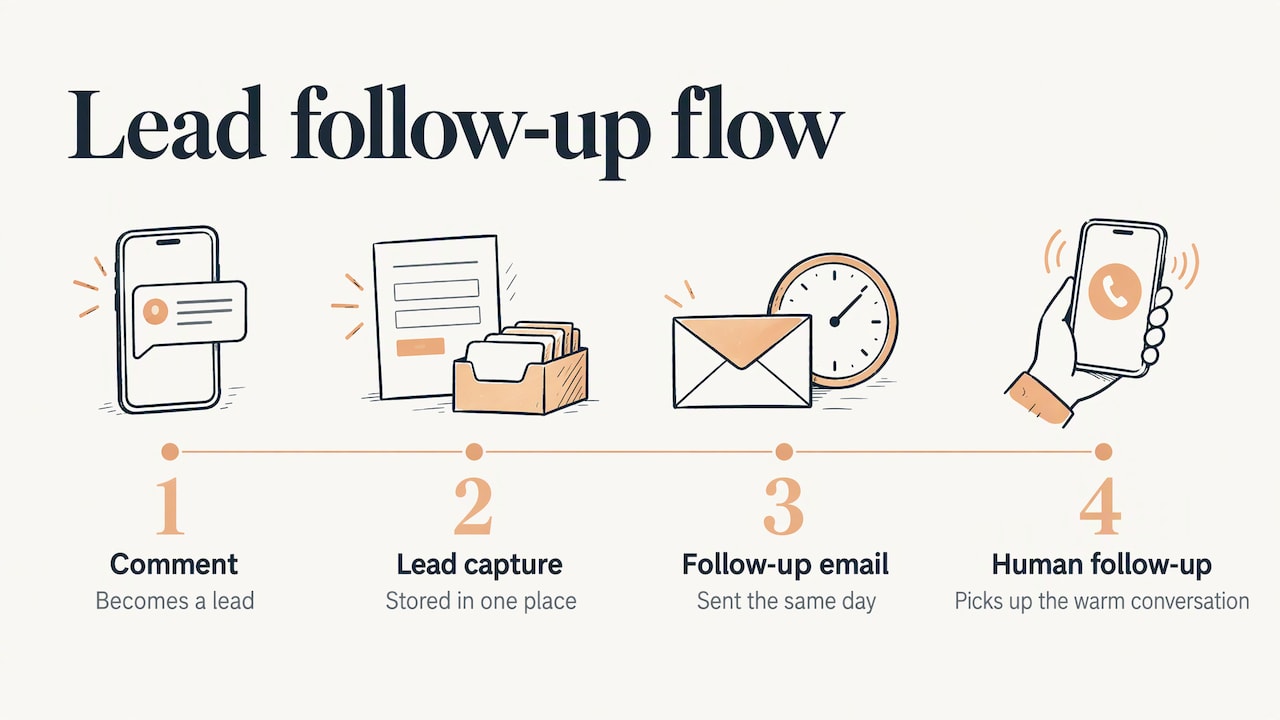
Posting is not the goal. Inquiries are. The biggest return in social media automation comes from what happens after someone engages: a comment becomes a lead, the lead is captured in one place, a follow-up email goes out the same day, and a person picks up the conversation when it is warm.
That is why we treat social media as one channel in a larger flow. Our automation services include automated social media, automated advertising, auto-responses, automatic emails, automatic lead generation and automatic lead capturing, so the post, the capture form, the reply and the email sequence can work as one system. If lead handling is your weak point, our guide to building a lead capture system walks through the pieces.
If you also run customer-facing messaging, the same principle applies to inboxes. Our article on automating customer support without losing the human touch shows where saved replies and routing fit, and where a person must step in. For more starting points, see our collection of automation ideas.
Using AI in the workflow without losing your voice
AI is now the fastest way to produce first drafts: caption options, hashtag suggestions, video scripts, and shorter versions of a long article. Used well, it turns one hour of source material into a week of posts. Used badly, it floods your feed with interchangeable copy.
Three habits keep it useful:
- Give creative direction. A short brief with the audience, the point of the post and one detail only you know beats an open-ended prompt.
- Edit the first line yourself. It decides whether anyone reads on.
- Verify every claim. Names, numbers, dates and product details are checked by a person before publishing.
Because AI-written content increasingly feeds how people discover brands, it is also worth thinking about visibility beyond the feed. This guide on getting cited in AI answers covers what helps a brand appear in AI-generated responses, a useful companion to a consistent, well-sourced content calendar.
Scaling from solo operator to enterprise
The right level of automation depends on where you are.
Self-employed. One or two platforms, a simple queue, a handful of saved replies and a weekly report. The goal is to get time back and never go silent.
Small team (2 to 10 people). Add a shared calendar, approval routing, an inbox that sorts messages by type and a rule for who answers what. The win is fewer handoffs and no duplicate work.
Medium team. Add several brands or product lines, role-based permissions, templates per campaign and reporting that ties social activity to leads. This is where one-size-fits-all tools start to bend, because every business has its own approval chain and lead process.
Enterprise. Governance comes first: who can publish where, what needs legal or brand review, how regional teams stay consistent, and how everything is logged. Automation here is as much about control and an audit trail as about speed.
The pattern is the same at every size: start with the work that repeats, add structure only when the team needs it, and keep a person on every decision that carries risk.
Mistakes to avoid
- Over-automating engagement. Automated comments and likes break platform rules and hollow out the relationships that make social media worth doing.
- Cross-posting identical content everywhere. Each platform has its own format and audience. Adapt the first line, length and visuals.
- Insensitive timing. A cheerful scheduled post during a crisis or tragedy hurts. Make sure someone can pause the queue.
- No failure alerts. Broken connections fail quietly. You find out a month later that nothing has gone out.
- No log. Keep a record of what was published, where and who approved it. It is your audit trail and your learning loop.
- Chasing tools instead of outcomes. A new scheduler is not a strategy. Decide what the channel is supposed to deliver first.
Where we come in
Most social tools do one job well and leave the joins to you. Our work is the joins. At Elevator Pitch Automations we build tailor-made automation frameworks calibrated to your growth stage, with personal consultations and custom integrations that adapt to the way your business operates. That can mean a consultation to map what to automate, custom training so your team can run the system, or a done-for-you build, from automated social media and advertising to lead capturing and email follow-up.
Our plan, Turn On Elevator Pitch Automations, is listed at $300 per month on our setup page, and you can see the full range of options on our pricing page. If you would rather talk through your workflow first, you can start with a consultation.
Our perspective
We have a simple view on social media automation: the schedule is the easy part, and the system around it is what pays.
Most small businesses do not fail at social media because they cannot find a posting tool. They fail because posting is disconnected from everything else. The post goes out, a comment comes in, a message sits unread, a lead is never captured and nobody follows up. Each gap is small. Together they are the reason the channel never seems to pay for itself.
So we build around the whole path, from content to conversation to lead to follow-up, and we tailor it to the stage your business is at. A self-employed consultant needs a light, dependable routine. A growing team needs approvals and shared inboxes. An enterprise needs control. Those are different systems, and treating them as one product is how businesses end up paying for features they do not use and still doing the important work by hand.
We also hold a firm line on what stays human. Automation should deliver your decisions on time, not make them for you. Your voice, your judgment on a sensitive message and your relationships with customers are the parts no system should touch.
Joshua
FAQ
What is the best way to start with social media automation?
Start with scheduling and publishing for the one or two platforms that matter most. Build a simple calendar, connect your accounts, send a single test post and review the results after a week. Once that runs reliably, add saved replies, message sorting and reporting.
Is automated social media posting against platform rules?
Scheduling your own content is a standard, accepted use. Automating actions on other people’s content is where accounts get into trouble: LinkedIn bars bots and extensions that automate activity on its site, and X does not allow automated liking. Keep engagement personal and check each platform’s current policy.
Can AI write my social media posts for me?
AI is good at first drafts, caption options and turning long content into shorter posts. A person should supply the direction, edit the opening lines and check every fact before publishing. That keeps the speed without the generic, robotic tone.
How is automated social media management different from using a scheduler?
A scheduler publishes posts. Automated management also covers drafting, approvals, message sorting, monitoring and reporting, and ideally connects them to lead capture and email. The connections are what save the most time as a business grows.
What should never be automated on social media?
Complaints, refund requests and emotionally charged conversations should go to a person, as should strategy and topic choice. Likes, comments and follows on other people’s content should also stay manual, both for platform compliance and because that is where relationships are built.
Sources
- LinkedIn Help: Prohibited software and extensions
- X Help: Automation rules
- Wiki Republic: How to get cited in AI answers