Automation gives you back hours, cuts repeat errors and lets a team handle more work without hiring at the same pace. The costs are real too: setup money, process changes and upkeep. The businesses that come out ahead pick the right workflows first and build the system around how they actually work. That is what we do at Elevator Pitch Automations, and this guide gives you the evidence to judge for yourself.
TL;DR
- Automation pays off most on repetitive, rule-based work: follow-up emails, lead capture, scheduling, auto-responses, reporting.
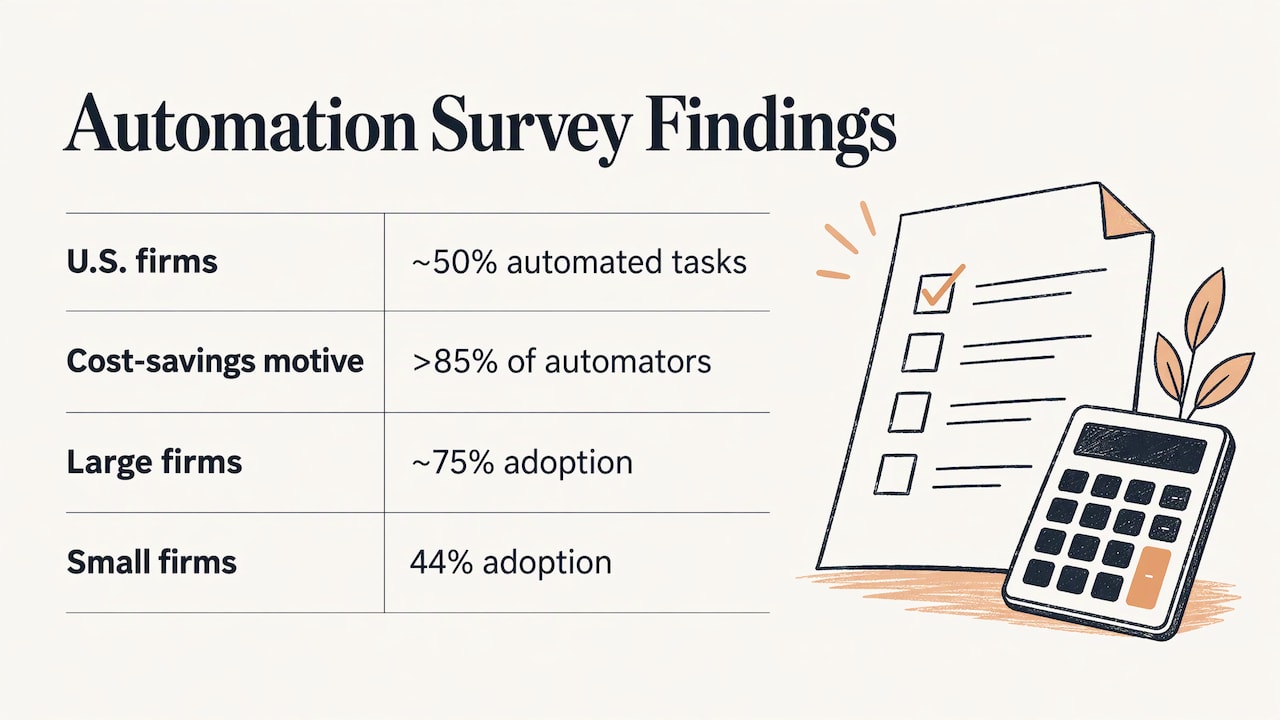
- About half of U.S. firms automated employee tasks in a recent 12-month window, and over 85% of them cited cost savings as a reason.
- The main costs are upfront investment, learning new processes and ongoing maintenance, all manageable with a scoped start.
- Gains depend on the task: studies show strong improvements in some settings and none in others, so choose workflows deliberately.
- A tailored system built for your size and stage avoids most of the pitfalls that come from forcing a generic tool onto your process.
Table of Contents
- What automation means for a working business
- The pros of automation
- The cons of automation, and how to plan for each
- How the trade-offs look by business size
- A practical way to decide what to automate
- Keeping oversight and flexibility
- Work with Elevator Pitch Automations
- FAQ
- Sources
What automation means for a working business
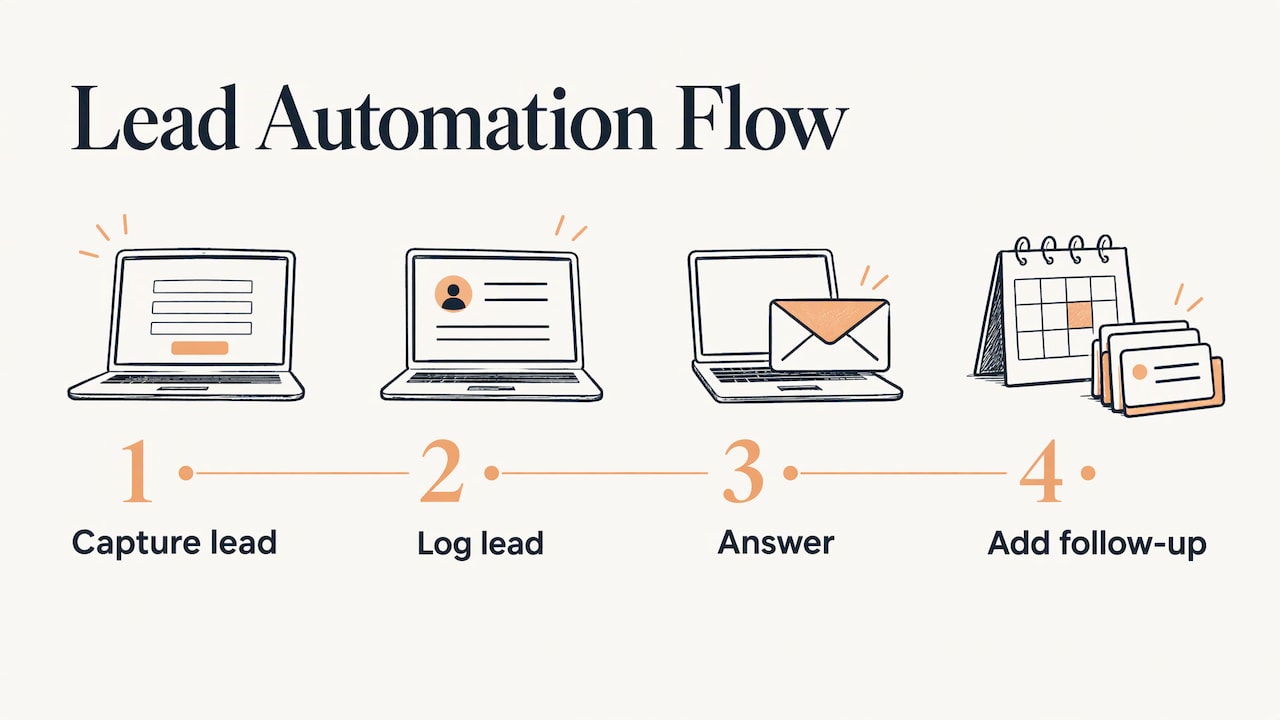
In business, automation means letting software handle steps your team currently does by hand, so a person only steps in when judgment is needed. Think of a new inquiry arriving on your website: the lead is captured, logged, answered within seconds and added to a follow-up sequence, with no one copying and pasting between tools.
There are two broad levels. Task automation covers a single step, such as a reminder or an auto-response. Process automation links many steps across several tools, such as moving a lead from a web form to a CRM (the system where you track customers), to a proposal, to an invoice. Most small businesses start with the first and grow into the second.
If you want ideas for where to begin, our automation ideas page lists common starting points.
The pros of automation
Time back on repetitive work
The clearest benefit is time. Every business has steps that follow the same rules each time: sending confirmations, updating records, posting scheduled content, answering the same five questions. Automating them removes the hours and leaves people for conversations, creative work and decisions. For a self-employed owner, that can be the difference between working in the business and working on it.
Consistency and fewer errors
A rule runs the same way every time. Manual copying between systems is where typos, missed follow-ups and forgotten invoices come from. A workflow that fires on every inquiry does not have a bad Friday afternoon. This is also why standardizing a process before you automate it pays off, which we cover in our guide on how to standardize business processes without slowing your team.
Lower cost per task
Cost is the reason most firms automate. A March 2024 Richmond Fed CFO survey commentary found that around half of U.S. firms had automated employee tasks in the prior 12 months, and that over 85% of those firms named cost savings as a motivation. Adoption was about 75% among firms with more than 500 employees and 44% among smaller ones, so smaller businesses are still earlier in the curve and have room to move.
Capacity that scales without matching headcount
A workflow that handles 50 leads a week can usually handle 500 with little extra effort. That is what lets a growing team take on more customers without every new client requiring another hire. The same survey found that about 60% of automating firms kept their hiring rate steady, which shows many businesses use automation to support growth rather than replace people.
Faster response and always-on coverage
Auto-responses, lead capture and scheduled social posts work outside business hours. A prospect who fills out a form at 9 p.m. gets an answer at 9 p.m. For service businesses, speed of first response often decides who wins the job.
Better work for the people who stay
When the dull steps disappear, people spend their day on the parts of the job they were hired for. That helps with morale, and it also improves the quality of customer-facing work, because attention goes where it matters.
The cons of automation, and how to plan for each
Upfront investment
Automation can be a significant financial commitment. NIST’s automation planning guide lists capital expense, the work of learning new skills and building new processes, and wariness left over from earlier investments that did not deliver. Each of these is a planning issue rather than a roadblock. Start with one workflow, set a measurable goal, and expand once it works. Our guide to measuring the return on your AI investment shows how to set that baseline.
Not every task is worth automating
What is technically possible is not the same as what is worth building. In a Brookings analysis of the last mile problem in AI, researchers found that about 80% of computer vision tasks are technically feasible to automate, but once customization costs are counted only 23% of worker tasks (by compensation) are both feasible and cost-effective. The lesson is to rank candidates by volume, repetition and value, and automate the ones that clear the bar.
That is also why generic, off-the-shelf setups can disappoint: the last stretch of customization is where the cost sits. A system designed around your actual process takes that stretch on directly.
Results vary by task
A U.S.-focused systematic review of 61 studies found real gains in some settings, such as about 15% more customer-service issues resolved per hour and 26.08% more completed coding tasks, alongside null results in others. U.S. Census data cited in the same review put AI use at 18% of firms, and 66% of AI-using firms reported using it only to augment workers. The practical takeaway: pilot on a narrow task, measure it, then scale. Our piece on moving from pilot to production walks through that sequence.
Changes to staffing
Automation changes how work is distributed. In the Richmond Fed survey, nearly 40% of automating firms left openings unfilled, laid off employees or slowed hiring because of it, while the other 60% kept hiring at the same pace. Automating firms expected employment growth 1.5 percentage points slower than non-automators. Brookings researchers argue the broader effect is gradual rather than abrupt, with job loss in the later phase below normal economy-wide turnover.
For a small team, the useful framing is redeployment. Decide up front which tasks leave the plate and which higher-value work replaces them. A look at HR technology trends shows how the staffing effects of workplace technology differ from one organization to the next.
Maintenance and oversight
Rules change, tools update, and a workflow nobody checks can quietly send the wrong message. Build in a monthly review, keep a person responsible for each automation, and keep the business rules easy to edit. Ongoing support is a normal part of a healthy system, not an afterthought.
Automating the wrong things
Some work needs a human voice: sensitive customer situations, negotiation, exceptions. A useful guide on what to automate and what not to makes the same point for onboarding, and the rule applies everywhere. Automate the routine, and let the system hand off clearly to a person for the rest. Our guide to AI sales automation draws that line for sales.
How the trade-offs look by business size
| Business | Biggest upside | Main thing to plan for | Good first workflows |
|---|---|---|---|
| Self-employed | Hours returned to billable work | Choosing a few high-value automations rather than many | Auto-responses, lead capture, scheduled social posts |
| Small team (2 to 15) | Consistent follow-up without extra hires | Documenting the process before building | Email sequences, lead routing, reporting |
| Medium team | Capacity that scales across departments | Integration across existing tools | Finance and HR workflows, CRM updates |
| Enterprise | Standardized operations at volume | Governance, oversight and phased rollout | Cross-system process automation, AI agents |
The Richmond Fed data fits this pattern: larger firms adopt more, because they can spread upfront cost across more volume. Smaller teams can get the same benefit by narrowing scope and building exactly what they need.
A practical way to decide what to automate
- List the repeat tasks. Write down everything you or your team does weekly that follows the same steps.
- Score each on volume, time and error cost. A ten-minute task done 40 times a week outranks an hour-long task done once a month.
- Pick one workflow. Choose the one with clear rules and a measurable result, such as response time or hours saved.
- Document the current process. Automation copies whatever you give it, so fix the process first.
- Build, then watch it. Check outputs weekly for the first month and keep a human on the exceptions.
- Measure and expand. Compare against your starting numbers before adding the next workflow.
This is the stage where a specialist saves the most effort. We do the scoring, scoping and building with you through consultations, custom help or a done-for-you setup, so your time goes to running the business rather than learning every tool. Specific areas have their own guides: finance workflow automation, HR automation and social media automation.
Keeping oversight and flexibility
The businesses that keep the benefits tend to do the same few things: map the workflow before building, keep rules flexible, expand gradually, and track results with dashboards and regular audits. The SSRN review reaches a similar conclusion, recommending evidence-gated steps from pilot to production to scale. Build that rhythm in from day one and the downsides above stay small.
Our perspective
We build automation for self-employed owners, small and medium teams and enterprises, and the pattern we care about is fit. A tool bought off the shelf rarely matches how your business runs, so you end up bending your process to the software. We prefer the reverse: a framework calibrated to your growth stage, with a consultation first, so the system is designed around the work you actually do.
That is why we offer consultations, custom training and full automation setups under one roof. The evidence says the gains show up where the task is well chosen and the customization is done properly. Those two things are what we spend our time on with every client.
Start small, measure, and let the system grow with you. Automation should feel like a better week, not a bigger project.
Joshua
Work with Elevator Pitch Automations
If you want the benefits above without piecing the tools together yourself, our automation services cover automatic lead generation and capture, automatic emails, auto-responses, automated social media and advertising, and search engine and media optimization. Our Elevator Pitch Automations Unlimited and Turn On Elevator Pitch Automations plans are each $300 per month; see the pricing page for everything included. To talk through your first workflow, book a consultation.
If you are weighing outside help, our guide to AI automation consulting explains what a good engagement looks like.
FAQ
What are the main advantages of automation?
The biggest are time saved on repetitive work, fewer manual errors, consistent follow-up and the ability to handle more work without hiring at the same pace. Over 85% of automating firms in a Richmond Fed survey cited cost savings as a motivation.
What are the main disadvantages of automation?
The main ones are upfront investment, the effort of building new processes, ongoing maintenance and changes to how roles are staffed. NIST names the financial commitment and the work of learning new skills as the key hurdles. A scoped first project and regular reviews keep them manageable.
Is automation worth it for a one-person business?
Often yes, because a solo owner feels every hour of admin directly. Auto-responses, lead capture and scheduled posts are common first steps, since each is rule-based and runs without attention once built. Start with the task that eats the most time each week.
Will automation replace my employees?
The evidence points to a mixed, gradual picture. In the Richmond Fed survey about 60% of automating firms maintained their hiring rate, and Brookings researchers expect later-phase job effects to be gradual. Many businesses use automation to take routine work off their team and move people to higher-value tasks.
How do I know which tasks to automate first?
Choose work that is frequent, rule-based and easy to measure. Score tasks by weekly volume and time spent, start with the top one, and track results against your starting numbers before adding more.
Sources
- The Impact of Automation on Firm Performance and Employment, Richmond Fed CFO Survey commentary (March 2024)
- Automation 101: How to Plan for Successful Implementation, NIST
- The last mile problem in AI, Brookings
- Enterprise AI at the Decision Point: A U.S.-Focused Systematic Review, SSRN
- HR technology trends for hiring in 2026
- AI onboarding automation: what to automate and what not to