To standardize business processes, pick the one recurring workflow that causes the most friction, map how it runs today, agree on a single best way to do it, write that way down in a short document, train the people who use it, and review it on a set schedule. Automate it only after that. Standardizing means everyone does a recurring task the same way, so results stop depending on who happens to do the work.
This guide walks through that method in plain steps. It also covers which processes deserve a standard, how to keep standards light, and where automation fits.
TL;DR
- Standardize the few processes that touch customers, handoffs, money or compliance. Leave the rest flexible.
- Map the process as it actually runs, choose one best path, and document it in a page or two.
- Standardize first, then automate. Automation encodes rules, so it needs clear rules to work from.
- Give every standard an owner, a review date and one or two metrics.
- Start with one painful workflow, prove it works, then repeat.
Table of Contents
- What standardizing a business process means
- Which processes to standardize first
- A step-by-step method to standardize a process
- Standardize without creating bureaucracy
- Standardize first, then automate
- Worked example: standardizing lead follow-up
- Measure, maintain and improve
- How standardization fits into business process management
- Perspective
- Where we can help
- FAQ
- Sources
What standardizing a business process means
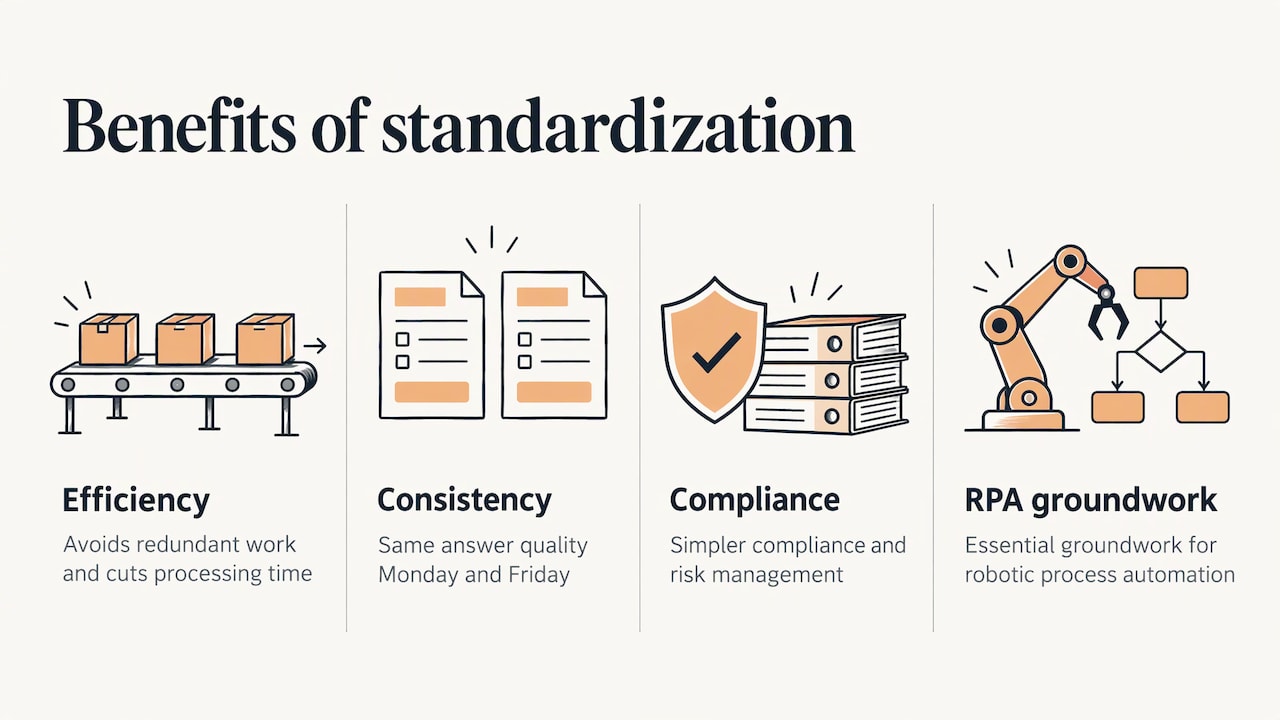
A standardized process is a documented, agreed way of doing a recurring piece of work. Microsoft’s guidance for Dynamics 365 implementations describes it as establishing uniform methods, procedures and practices across departments, functions, locations or legal entities. It lists the benefits as efficiency, consistency and quality, lower cost, simpler compliance and risk management, and better collaboration.
A 2023 peer-reviewed review in the Schmalenbach Journal of Business Research adds more reasons organizations do it: avoiding redundant work, improving process transparency, cutting processing time, coordinating across organizational boundaries and complying with rules. The same article notes that standardized processes are essential for digital transformations such as robotic process automation.
For a small business, those abstract benefits come down to something practical. A new hire can follow the same steps as the founder. A customer gets the same quality of answer on Monday as on Friday. A missed step shows up as a deviation instead of a surprise.
Standardization is not the same as rigidity. McKinsey’s report Getting ruthless with your processes says standardization need not mean everyone fills in the same forms in the same sequence at the same time. It says the degree of standardization should be as light as possible while staying consistent with the value drivers of the business.
Which processes to standardize first
You do not need a standard for everything. In the same McKinsey report, processes fall into four groups: signature processes, enabling processes, hygiene processes, and processes that do not need to be global. The report notes that most companies find they need to standardize only 10 to 15 signature and enabling processes across the whole company. Everything else is handled locally or dropped.
Translated for a smaller business, a good first candidate usually has at least one of these traits:
- It is a handoff. Work moves from one person or team to another, such as a sales rep passing a signed deal to onboarding.
- It sits on the path to the customer. Lead response, quoting, order fulfillment, support replies and invoicing all shape what customers think of you.
- It carries compliance or financial risk. Anything touching taxes, contracts, payments, privacy or safety belongs here.
- It breaks repeatedly. If the same mistake happens three times, the process is telling you something.
- It is high-volume and repetitive. Small time savings multiply fast.
A useful filter is to ask whether you are responding to a recurring problem or just to one frustrating week. Recurring problems earn a standard. One-off annoyances usually do not.
What to leave flexible
Creative work, sales conversations that depend on judgment, and anything that changes with every client are poor fits for a rigid script. For these, standardize the edges instead of the middle: what triggers the work, what information you need at the start, and what a finished result looks like. The person doing the work keeps freedom in between.
A step-by-step method to standardize a process
Most published frameworks, from quality bodies to workflow-software guides, follow the same arc: define, map, decide, document, deploy, maintain. Here is a version you can run on one workflow in a few weeks.
1. Pick one process and set its boundaries
Choose a single workflow. Wolters Kluwer’s workflow documentation guide recommends exactly that: choose one process and define its scope and boundaries before anything else. Write down where it starts, where it ends, and what “done” looks like. “Handle new inquiries” is too loose. “From the moment a web form is submitted to the moment the lead is booked or declined” is workable.
2. Involve the people who do the work
Gather the people who run the process every day, not only the people who manage it. The same guide suggests brainstorming steps with stakeholders on sticky notes, then sequencing them and breaking complicated steps into sub-tasks. The people closest to the work know the workarounds that never made it into any manual.
3. Map the process as it really runs
Capture what happens today, not what should happen. List the trigger, the inputs, each step in order, who owns it, the tools used and the decision points. Where two people do the same task differently, write down both versions. Those differences are where standardization pays off.
The American Society for Quality’s documentation and process mapping guide lays out a seven-step approach: clarify purpose and scope, gather content and stakeholders, draft documentation, build a high-level SIPOC-style diagram, create a detailed process map, refine both iteratively, then deploy, train and maintain the procedure with an update cycle and version control. A SIPOC diagram simply lists suppliers, inputs, process, outputs and customers on one page, which is a quick way to see the whole picture before you zoom in.
4. Find the variations and choose one best path
Compare the versions. Look for rework loops, waiting time, steps nobody can explain and steps that exist only because they always have. Then pick the path that gets the right result with the fewest steps. If the team cannot agree, run both on a small batch and compare the outcomes.
5. Write a document people will actually read
A good process document is short. It should include:
- The trigger that starts the process
- The steps in order, each with a clear owner
- Decision rules: if this, then that
- Inputs and outputs at each step
- Time targets and who to escalate to when something stalls
- The definition of “done”
One page with a checklist beats twenty pages in a shared drive. If a step needs a screenshot, a template or a sample email, link it directly inside the step.
6. Pilot, train and roll out
Test the new standard on a small scale first: one team, one client segment or two weeks of volume. Fix what breaks. Then train everyone who touches the process, and make sure the document lives where they work, not in a folder they have to hunt for.
7. Assign an owner and schedule the review
A standard without an owner decays. Name one person responsible for keeping it accurate, and put a review date on the calendar before you finish the rollout. More on this below.
Standardize without creating bureaucracy
The fear behind most resistance to standardization is paperwork for its own sake. A few habits keep it useful.
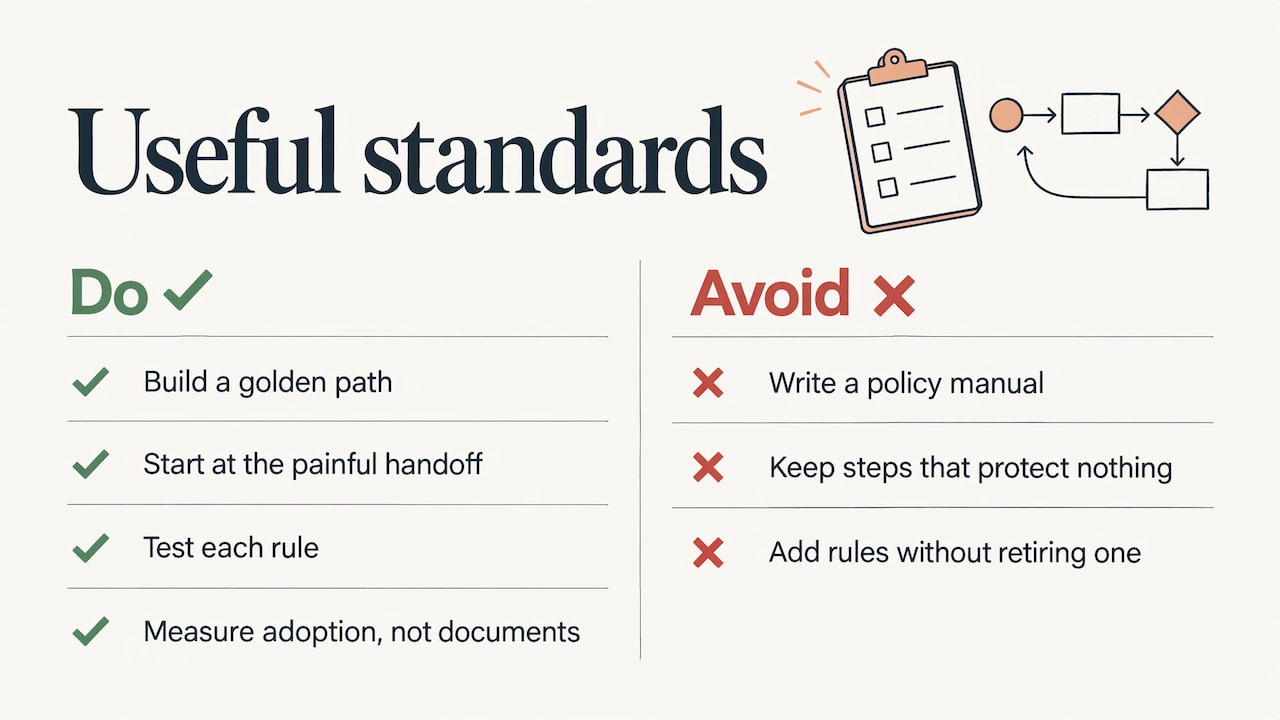
Build a golden path, not a policy manual. Define the preferred way to do the work and make it the easiest way. Standards built into the tools people already use, such as forms with required fields or templates with the right defaults, get followed more reliably than documents people must remember to open.
Start at the most painful handoff. Fixing one visible problem earns trust for the next change.
Test each rule. Ask what would break for a customer or for team coordination if you removed the step. If nothing, remove it. Process earns its place by protecting customers, handoffs, compliance or high-stakes decisions.
Count what you add and what you remove. Every new rule has a coordination cost. If you add one, look for one to retire.
Measure adoption, not documents. “Most quotes now follow the standard path” is a better progress signal than “we wrote twelve procedures.”
The aim, as McKinsey puts it, is the lightest structure that still protects what matters.
Standardize first, then automate
The most common mistake we see is automating a workflow before anyone has agreed on how it should run. Automation encodes rules. If the rules are informal or contradictory, the automation either fails or forces you to formalize them anyway. Automating a messy process gives you the mess faster.
The research literature points the same direction: the Schmalenbach review cited above describes standardized processes as essential groundwork for robotic process automation. There is a counter-view in the industry that you can automate a single dominant path without eliminating every variation, and for high-volume work that can be reasonable. Even then, someone has to decide which path to automate, which is a standardization decision.
Once a process is stable, these parts are usually the best candidates for automation:
| Part of the process | What automation does |
|---|---|
| Routing | Sends work to the right person based on your decision rules |
| Notifications | Alerts owners when something arrives or stalls |
| Data validation | Checks required fields before work moves on |
| Escalations | Flags items that miss their time target |
| Status tracking | Keeps one current view of where each item stands |
| Record keeping | Logs what happened and when |
| Reporting | Summarizes volume, speed and exceptions |
For most small and mid-sized teams, the first wins are customer-facing: an instant reply when a lead comes in, a follow-up email sequence, or a lead capture form that feeds one place. Our pages on automatic messaging and finance workflow automation show how these look once the underlying steps are defined. If you are still collecting ideas, the automation ideas page is a good place to browse.
Worked example: standardizing lead follow-up
Imagine a four-person services firm where leads arrive by web form, email and phone. Each person follows up differently, and some leads wait days.
- Boundaries. The process starts when an inquiry arrives through any channel and ends when the lead is booked, declined or moved to nurture.
- Map. The team discovers three habits: one person replies within an hour, another batches replies at the end of the day, and a third forgets leads that arrive by phone.
- Decide. They agree on one path. Every inquiry is logged in one place. A first reply goes out the same business day. A person follows up in two days if there is no answer. Anything unanswered after that moves to a monthly email list.
- Document. One page: trigger, steps, owner of each step, reply templates, and the definition of done.
- Automate. Capture from every channel into one list, send an immediate acknowledgment, schedule the follow-up reminder, and record the outcome.
- Measure. Track time to first reply and the share of leads that follow the path.
No step in that list needed special technology until step five. The standard came first, and the automation simply enforces it.
Measure, maintain and improve
A standard is a snapshot of the best-known method today. To keep it useful, treat it as a living document with a cycle behind it.
Pick a few metrics
Choose one or two per process: time from trigger to completion, error or rework rate, on-time delivery, or the share of cases that follow the standard path. When everyone follows the same process, deviations stand out quickly, which makes problems easier to catch early. Role-based views help too: role-based dashboards in dealership software, for example, give each role its own view of speed-to-lead and inventory aging. The principle carries over to any team: show each person the numbers that relate to their step.
Set a review rhythm
Match review frequency to how fast the process changes. A stable back-office routine may need a look once a quarter. A process tied to a changing product, tool or regulation may need one monthly. Also define events that trigger an immediate review: a new system release, a policy change, a metric drifting off target, repeated exceptions, an audit finding or a change of owner.
Use a simple improvement loop
The Washington State Auditor’s guide to Plan-Do-Check-Adjust offers a clean four-stage cycle for this:
- Plan: identify the problem and design a trial.
- Do: test the change on a small scale and record what you observe.
- Check: compare results with expectations and decide whether to adopt, adapt or abandon the change.
- Adjust: establish the adjusted process, update roles, train people, update the documentation and capture lessons learned.
The discipline here is small tests. Changing one thing at a time tells you what actually worked.
Keep ownership clear
Give each process an owner who is accountable for its accuracy, and let people who do the work suggest changes. Low-risk edits can go live after a quick review by someone who knows the work. Changes that touch compliance, money or customers should get the owner’s approval and, where relevant, a legal or finance review.
How standardization fits into business process management
Business process management is commonly described through five pillars: designing and modeling processes, executing them, measuring performance, optimizing, and governing for compliance. Standardization touches all five. You model the process to see it, execute it consistently, measure the result, improve it on a schedule, and keep it governed through ownership and version control. If you have done the steps above for even one workflow, you have already run a small version of the whole cycle.
Perspective
We build automation for a living, and the most useful thing we do often happens before any software is touched: we help a client decide how the work should run.
Teams come to us wanting to automate a messy handoff. The fastest route to a good result is usually to agree on the path first, even roughly, and then build the automation around that path. The system then does the repetitive part reliably, and your people keep the judgment calls.
That is why we focus on tailor-made systems rather than one-size-fits-all templates. A solo consultant, a ten-person team and an enterprise department each have different handoffs, different volumes and different tolerance for structure. Our consultations, custom training and done-for-you setups are meant to fit the stage your business is at, and to evolve as it grows.
Our advice: standardize one workflow, automate it, watch the numbers, then move to the next.
Joshua
Where we can help
If you have a workflow mapped, or just know where things keep breaking, we can help you turn it into a system that runs on its own. We offer personalized consultations, custom training and full automation setups, covering things like automatic lead capture, automatic emails, auto-responses and social media scheduling. See the full list on our automation services page.
The Turn On Elevator Pitch Automations plan is listed at $300 per month on our setup page. For a project that needs custom design, book a consultation and tell us which process you want to start with. You can also read how to automate before you reach out.
FAQ
What is the difference between standardizing and documenting a process?
Documenting records how work is done. Standardizing decides on one agreed way and then records it. If three people do a task three different ways, documenting captures all three, while standardizing picks one best path and gets everyone to follow it.
How many processes should a business standardize?
Far fewer than most owners expect. McKinsey’s research found most companies need to standardize only 10 to 15 signature and enabling processes across the company. For a small business, start with one workflow tied to customers, handoffs or compliance, then add others as the first one proves itself.
How long does it take to standardize one process?
A focused, single workflow can usually be mapped, agreed and written up in a few weeks, followed by a pilot period. The timing depends on how many people touch the process and how many variations exist. Keep the scope narrow so you can finish and learn.
Should I standardize before I automate?
Yes. Automation follows rules, so unclear rules produce unreliable results. Agree on the steps, owners and decision rules first, then automate the routing, notifications, validation and reporting. The work you do to standardize also tells you which steps are worth automating.
How do I get my team to follow the new process?
Involve the people who do the work in designing it, keep the document short, and put the standard inside the tools they already use. Track how many cases follow the standard path, and ask for feedback at each review.
Sources
- Standardize processes during a Dynamics 365 implementation, Microsoft Learn
- Conceptualizing Business Process Standardization, Schmalenbach Journal of Business Research (2023)
- Getting ruthless with your processes, McKinsey
- Workflow 101: you should document your workflow, Wolters Kluwer
- Documentation and process mapping guide, ASQ
- It starts with a process: A guide to using PDCA, Washington State Auditor
- AutoLens Dashboards: Four Role-Based Views