HR automation means using software, and increasingly AI agents, to handle the repetitive administrative work of human resources: onboarding paperwork, reminders, records, benefits questions and routine approvals. TechTarget describes it as using software to automate and streamline repetitive, laborious HR tasks so HR teams can be more productive and produce error-free output. The best place to start is usually employee onboarding, because it is repeatable, easy to map and visible to every new hire.
TL;DR
- HR automation moves repetitive tasks (forms, reminders, status updates, routine questions) off people and into rules-based workflows and AI agents.
- Start with low-risk, high-repetition work such as onboarding checklists, document collection and HR help-desk questions. Keep people in charge of judgment calls.
- Whether you are a solo employer or a 500-person company, the approach is the same: map the process, automate one workflow, measure it, then expand.
- Choose tools you can explain and govern. Opaque automation in hiring or performance decisions creates risk.
- Measure time saved, error rates, time to complete onboarding and new-hire time to productivity, before and after.
Table of Contents
- What HR automation actually is
- Which HR tasks you can automate
- How to automate employee onboarding
- Where AI chatbots and agents fit
- Choosing an approach by company size
- Risks to manage, in plain terms
- How to measure whether it is working
- A realistic first 30 days
- Perspective
- Work with us on your HR workflows
- FAQ
- Sources
What HR automation actually is
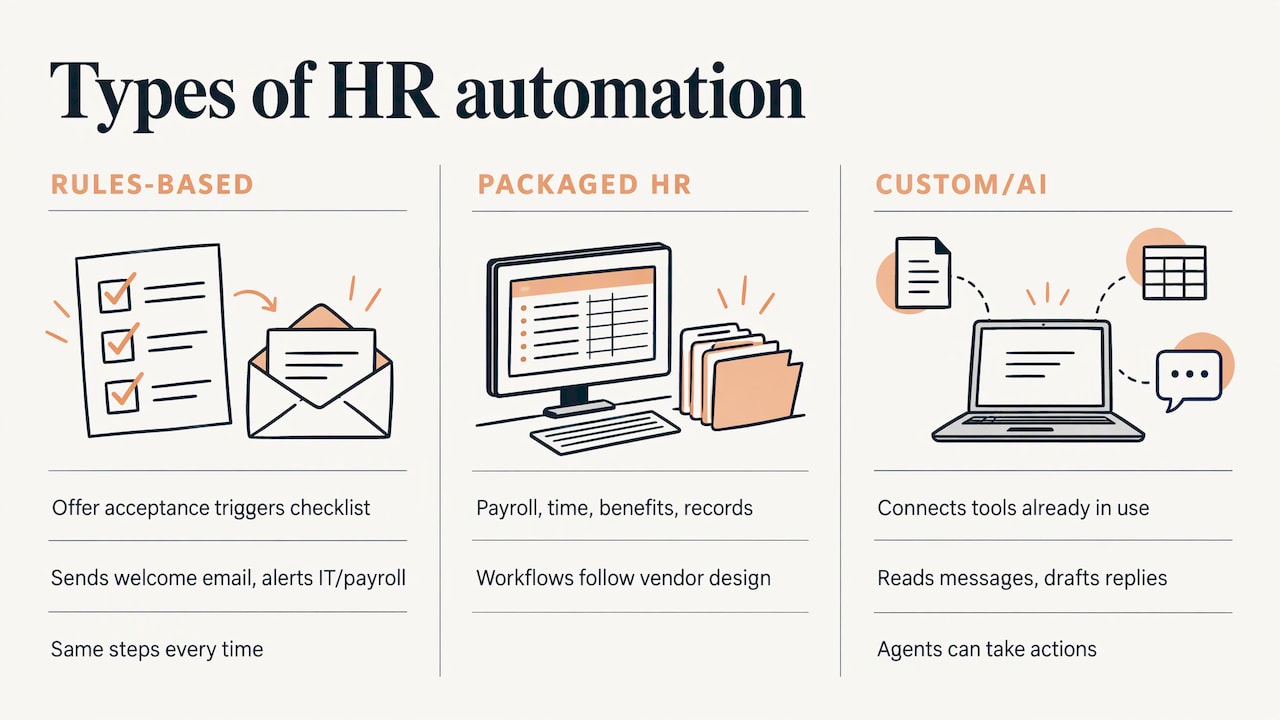
The phrase covers three things that people often mix up.
Rules-based workflows. When a candidate accepts an offer, a checklist is created, a welcome email goes out, and IT and payroll are notified. Nothing is “intelligent” here. It is a trigger and a set of steps that run the same way every time.
Automated HR software. Packaged systems for payroll, time tracking, benefits and employee records. They include automation, but they work the way the vendor designed them. Many teams hit a wall when their real process does not match the product.
Custom automation and AI agents. Workflows built around how your company actually operates, connecting the tools you already use and adding an AI layer that can read a message, answer a question or draft a reply. SHRM reported in 2024 that AI is evolving from chatbots that answer questions to agents that take actions based on those exchanges, and that this will be increasingly built into HR systems.
All three belong under the same umbrella. The practical question is not which label fits but which tasks cost you the most time and which approach removes them with the least disruption.
Which HR tasks you can automate
TechTarget’s overview lists a wide range of HR work that can be automated: day-to-day administration, payroll, benefits administration, email reminders, recruitment, onboarding, offboarding, training and development, timekeeping, tax forms, employee records, compliance, job title classification, performance tracking and HR support requests. You do not need to do all of that. Sort the list by two questions: how often does the task repeat, and how bad is a mistake?
| Task | How often it repeats | Risk if it goes wrong | Good first project? |
|---|---|---|---|
| Onboarding checklists and welcome emails | Every hire | Low | Yes |
| Document collection and reminders | Every hire | Low to medium | Yes |
| Answers to routine HR questions (PTO, pay dates, policies) | Daily | Low | Yes |
| Interview scheduling | Every candidate | Low | Yes |
| Timesheet and leave approvals | Weekly | Medium | After the basics |
| Offboarding checklists | Every departure | Medium | After the basics |
| Payroll calculation | Every pay cycle | High | Usually inside dedicated payroll software |
| Resume screening or ranking candidates | Every opening | High | Only with human review and clear governance |
This mirrors the approach in SHRM’s AI Field Manual for Employers. It sorts 138 workplace AI use cases into four groups by risk and cost, and its low-risk, low-cost group (it calls these low-hanging fruit) is where it recommends organizations make a first HR investment. Scheduling, reminders and routine Q&A sit squarely in that group.
How to automate employee onboarding
Onboarding is the easiest HR workflow to automate well, because it has a clear start (accepted offer), a clear end (a productive employee) and a lot of handoffs in between. Here is a sequence that works for a team of any size.
1. Write down what happens today
List every step from signed offer to day 90: who sends what, who approves, which system holds the data, and where things stall. Most teams discover steps that live only in one person’s head. Do this before you touch any tool.
2. Mark each step as automatic, assisted or human
- Automatic: welcome email, calendar invites for day-one meetings, account request tickets, form links, reminder nudges when a document is missing.
- Assisted: an AI agent drafts a personalized message or answers a question, and a person can step in.
- Human: the manager’s first conversation, goal setting, culture, anything involving a sensitive situation or accommodation.
The goal is to free HR and managers for the human steps, not to remove them. SHRM’s AI Transformation Guide points to one useful role after the new hire starts: AI can act as a help desk and coach, serving up quick answers to process questions and suggesting tips for the worker to adopt.
3. Connect the systems that hold the data
Onboarding fails when information has to be retyped. A new hire’s name, role, start date and manager should be entered once and flow into email, payroll, the HR record and your task tracker. This is where custom integration earns its keep, since most small and mid-sized teams run a mix of tools that were never designed to talk to each other.
4. Build reminders and escalation
A workflow that sends one email and hopes is not automation. Build in the follow-up: a nudge after two days if the form is incomplete, a message to the manager after four, and a visible status for HR. Missing paperwork is the most common reason onboarding drags.
5. Keep compliance steps under human sign-off
Employment eligibility verification, tax withholding forms and state-specific requirements have legal deadlines and consequences. Automation can collect, route and remind. A responsible person should review and sign off, and your employment counsel or payroll provider should confirm how your process meets federal and state rules.
6. Run it on the next hire, then fix it
Do not wait for a perfect build. Run the workflow for the next new hire, ask that person what felt confusing, and adjust. Two or three rounds usually removes most friction.
If you also onboard customers, the structure is nearly identical. Our guide to client onboarding automation covers the same map-then-automate approach for that side of the business.
Where AI chatbots and agents fit
Some readers arrive here looking for an ERP chatbot. The idea is simple: instead of logging into a system and hunting through menus, an employee asks a question in plain language (“How many vacation days do I have left?” or “Where do I upload my direct deposit form?”) and gets an answer pulled from your policies and records.
There are two levels.
- Answering agents respond using your handbook, policies and FAQs. They deflect the repeated questions that eat HR time.
- Acting agents go further and do something: open a ticket, update a field, schedule a meeting, send a form. This is the shift SHRM describes when it talks about AI agents that take actions based on those exchanges.
What matters is the quality of what the agent is connected to. An agent that answers from an out-of-date handbook is worse than no agent. Before launch, decide which documents it may use, who owns keeping them current, which questions must always go to a person (harassment complaints, medical leave, pay disputes) and how it hands off. Our overview of business AI agents explains what they do and how to start without overbuilding.
Choosing an approach by company size
Self-employed and solo employers
If you have one or two contractors or employees, you do not need an HR suite. You need a short list of repeatable steps: a welcome message, a document request, a payment reminder, a simple intake form. Automating these can return hours every month, and they are cheap to change as you grow.
Small teams (about 5 to 50 people)
This is where the manual approach breaks. One person, often the founder or office manager, is doing HR on the side. Focus on onboarding, time-off requests and a shared answer bank for common questions. A custom workflow connecting your existing tools usually fits better than adopting a large platform you will use 10 percent of.
Medium teams
Now consistency and scale matter. Different managers onboard differently, and requests arrive in email, chat and spreadsheets. Standardize one process across departments, add dashboards so HR can see where requests are stuck, and introduce an AI help desk for routine questions.
Enterprises
The challenge shifts to governance: many systems, many locations, many rules. Automation has to respect role-based access, audit trails and regional requirements, and it must move from pilot to production without breaking what exists. Our piece on AI deployment from pilot to production lays out that path.
Packaged software or custom build?
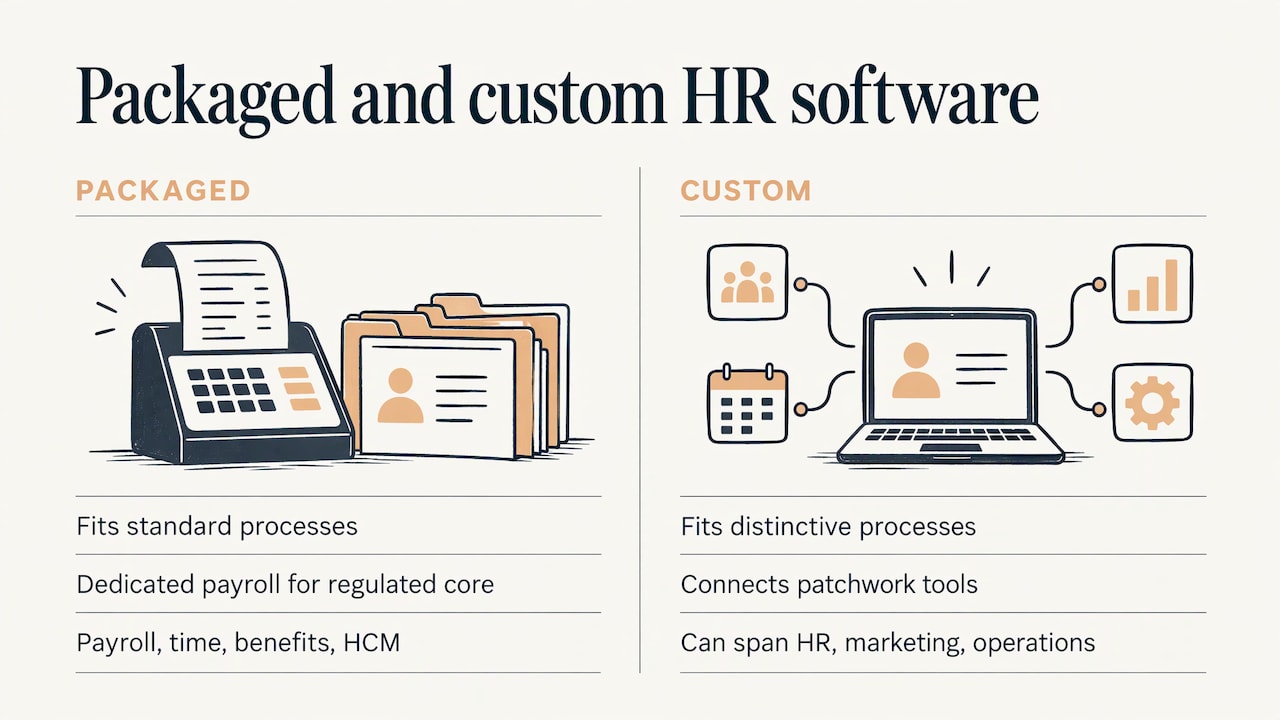
Packaged HR platforms for payroll, time and attendance, benefits and human capital management are widely used, and TechTarget’s overview groups the market by those functions. They suit standard processes. A custom build suits you when your process is distinctive, when your tools are a patchwork, or when you need automation across HR, marketing and operations in one connected setup. Many companies use both: dedicated payroll software for the regulated core, and custom automation around it for everything that is specific to them.
Risks to manage, in plain terms
Good HR automation is explainable. SHRM’s AI Transformation Guide advises that organizations should make sure their AI applications do not work as a black box that produces answers through an opaque process. It adds that companies seeing the biggest returns on AI are more likely to follow best practices for explainability, typically through governance structures and proper training of their people.
Turn that into four working rules:
- Know what each automation does and why. Write one paragraph per workflow: trigger, steps, data used, who is notified.
- Keep a person accountable for decisions about people. Hiring, pay, promotion and discipline need human judgment. Use automation to prepare information, not to decide.
- Limit data access. An onboarding agent does not need access to performance reviews. Give each workflow only the data it needs.
- Train the people who use it. HR staff and managers should know what the system does, what it does not do, and how to override it.
If you use automated tools to screen or evaluate candidates, check the rules in the places you hire, since some US cities and states regulate such tools, and ask your employment attorney before you launch.
How to measure whether it is working
Every HR automation project should start with a baseline. Before you change anything, record these numbers for two or three recent hires or a typical month:
- Hours spent per hire on onboarding admin, by HR and by managers.
- Cycle time: days from signed offer to a complete file, and from start date to all accounts and equipment ready.
- Error and rework rate: missing forms, wrong data, tickets reopened.
- Volume of routine questions reaching HR, and the share answered without a person.
- New-hire time to productivity: AllenComm’s guidance on onboarding metrics describes it as the days or weeks a new hire needs to perform independently, often around 30 days for entry-level roles and 60 to 90 or more for technical or senior roles. Define your own target per role.
- New-hire feedback: a three-question survey at day 7 and day 30 (was it clear, was anything missing, did you know who to ask).
Review the numbers monthly for the first quarter. If hours fall but feedback gets worse, you have automated the wrong steps or removed contact people wanted. Adjust the workflow rather than the target.
A realistic first 30 days
| Week | What you do | Output |
|---|---|---|
| 1 | Map onboarding and pick the three most repeated tasks | One-page process map and baseline numbers |
| 2 | Design the workflow, connect systems, write the messages | Workflow ready to test |
| 3 | Run it with the next hire or a test record | List of fixes |
| 4 | Fix, document, and decide the next workflow | A working automation and a short roadmap |
Resist adding more in month one. A single reliable workflow builds trust and gives you real numbers to justify the next one.
Perspective
Most HR automation projects fail for a boring reason: someone bought a tool before they understood the process. We start the other way around. We sit down with you, map the work that repeats, and build the automation around the way your business runs, whether you are a one-person shop or an enterprise team.
We design systems that grow with you. A self-employed owner might begin with automatic emails, auto-responses and lead capture. A small team might add onboarding workflows and AI agents that answer routine questions. A larger operation might need dashboards and integrations across several departments. Same principle each time: tailor-made, calibrated to your growth stage, with personal consultation along the way.
We also believe people should stay at the center. The point of automating the paperwork is to give your team time for conversations that need a human. That is why we offer custom training alongside the build: your people should understand the system they rely on.
Joshua
Work with us on your HR workflows
We build custom automations and AI agent integrations for self-employed professionals, small and medium teams and enterprises, and we can start with a consultation about your onboarding or other repetitive workflows. Our Elevator Pitch Automations Unlimited plan is listed at $300 per month, and you can see how to get started on our setup page.
If you would rather talk it through first, book a consultation and bring your current process, even if it lives in spreadsheets and inboxes. You can also read about how AI automation consulting works before you decide what help you need.
FAQ
What is the difference between HR automation and HR software?
HR software is a packaged product, such as a payroll or time-tracking system. HR automation is the broader practice of removing manual steps from HR work, whether through features in that software, connections between your tools or custom-built workflows and AI agents. Most companies end up using a mix.
Which HR process should I automate first?
Onboarding is the usual answer, because it repeats for every hire, involves many handoffs and has low risk when you automate reminders, forms and welcome messages. Routine HR questions are a close second. Leave high-stakes decisions about people with humans.
Can a small business or a solo employer benefit from HR automation?
Yes. Small teams often feel the manual workload most, since HR is one more job for someone who already has several. Automating a welcome sequence, document requests and standard replies can save hours each month without adopting a full HR platform.
Is an AI chatbot safe to use for employee questions?
It can be, when it answers only from approved, current documents and hands sensitive topics such as medical leave, complaints and pay disputes to a person. SHRM advises making AI tools explainable and supported by governance and training, so decide who owns the content and who reviews its answers.
How do I know if HR automation paid off?
Compare against a baseline you recorded first: admin hours per hire, days to a complete file, error rates, routine questions reaching HR and new-hire feedback. If the numbers improve and new hires feel better supported, the automation is working.
Sources
- What is HR automation? Examples, benefits and challenges (TechTarget)
- The AI Agents Are Coming (SHRM)
- AI Field Manual for Employers: 138 Use Cases for AI at Work (SHRM)
- AI Transformation Guide (SHRM)
- Time to Productivity: Definition, Benchmarks and KPIs (AllenComm)