You automate customer support by handing the repetitive, predictable parts of the job (acknowledgments, FAQs, order and status updates, ticket routing, follow-ups) to software, and keeping people on anything that needs judgment, empathy or authority. Start small, with one channel and a handful of question types. Add a clear path to a human, then expand only after the first layer proves reliable. This guide shows what to automate, in what order, how to connect it to the tools you already use, and how to tell whether it is working.
TL;DR
- Automate the repeat questions first: order status, hours, policies, password resets, appointment scheduling, and the “we got your message” acknowledgment.
- Fix your data and write down your current workflow before you write a single rule. Automation on messy data sends things confidently to the wrong place.
- Keep complaints, refunds, cancellations, security issues and anything sensitive with a person, and make the handoff carry the full context.
- Roll out in stages (drafts only, then auto-send for safe categories, then full triage) and measure against a baseline you set before launch.
- The same thinking applies to back-office work: invoicing, scheduling and reporting are strong candidates for automation too.
Table of Contents
- What customer support automation actually covers
- Decide what to automate and what to keep human
- A practical order of operations
- Roll out in stages, not all at once
- Where a person must stay in the loop
- Which channels automate well
- How a solo professional or small team can start
- Automating the administrative work behind support
- Measure whether it is working
- Common mistakes to avoid
- Perspective: what we have seen work
- Get it built around your business
- FAQ
- Sources
What customer support automation actually covers
Customer support automation is software, workflows and AI agents that take over support tasks nobody needs to think hard about. In practice that means five groups of work:
- Answering common questions. Return policies, shipping times, setup steps, pricing basics, business hours.
- Routing. Reading an incoming message, tagging it, setting priority and sending it to the right person or queue.
- Status updates. Order confirmations, shipping notices, appointment reminders, ticket progress.
- Account actions. Password resets, address changes, rescheduling, anything with clear rules and low risk.
- Follow-up. Satisfaction surveys, review requests, closing resolved tickets, updating reports.
It also helps to think in time. Some automation happens before a request even exists (suggesting a help article while someone types), some during it (routing, prioritizing, alerting the right team) and some after it (follow-ups, feedback, reporting). Most small teams start with the “during” and “after” parts because they are the easiest to get right.
Customers have also gotten used to this. Salesforce’s research reports that a majority of customers have now used a chatbot for a simple service question. A well-built automated reply is no longer a novelty that puts people off. A badly built one still is.
Decide what to automate and what to keep human
The best rule is to sort every kind of message you receive by two questions: how predictable is the answer, and what does a wrong answer cost?
| Type of request | Predictable answer? | Cost of a wrong answer | Best handling |
|---|---|---|---|
| “Where is my order?” | Yes | Low | Fully automated |
| Business hours, location, policies | Yes | Low | Fully automated |
| Password reset, appointment change | Yes, with rules | Low to medium | Automated with identity checks |
| Product how-to question | Mostly | Medium | Automated draft, human review at first |
| Billing dispute | No | High | Human |
| Cancellation or refund request | No | High | Human, with context prepared |
| Angry or distressed customer | No | Very high | Human, fast |
| Security incident, legal matter | No | Very high | Human, immediately |
The bottom half of that table is not a failure of automation. It is where your people earn their keep. A good setup makes sure those conversations reach them sooner, with less typing and more context.
Start with the questions you answer every week
Pull the last 30 to 90 days of messages from your inbox, chat, social messages and contact form. Group them by topic. For most small businesses, a handful of topics account for the majority of volume, and those are your first targets. If you are one person answering the same five questions every day, you have already found your first automation project.
A practical order of operations
Teams that get good results tend to follow a similar sequence. Here is a version that works for a solo professional or a team of ten.
1. Map the workflow as it exists today
Write down what happens from the moment a customer reaches out to the moment the issue closes. Who sees it first? Where does it get copied or retyped? Where does it wait? You are looking for handoffs, delays and repeated manual steps. This takes an afternoon and saves weeks of rework.
2. Clean up your data before you write rules
Routing rules depend on information being present and correct: who the customer is, which product or plan they have, what level of service they are owed. If those fields are blank or inconsistent, automation will route things confidently to the wrong place. Fix customer records, product names and service levels first.
3. Automate acknowledgment, routing and priority
These are the safest wins. An instant, honest acknowledgment tells the customer you received the message and when to expect a real reply. Automatic tagging and routing puts the message in front of the right person without anyone triaging by hand. Priority rules can push the urgent or high-value cases to the top.
4. Add automated answers for the repeat questions
Once routing works, connect your help content to an automated responder or AI agent so it can answer the common questions directly. Keep the answers grounded in material you wrote and approved, such as FAQs, policies and product documentation. If your documentation is thin, writing it is the real first step.
5. Build escalation paths with named owners
Every automated path needs an exit. Decide who receives the handoff, how fast they should respond, and what triggers the handoff. An automation with no owner behind it is a dead end for the customer.
6. Connect the rest of the business
Support touches sales, billing, shipping and product. Use alerts, shared records and webhooks so that a support conversation can notify the right team or update the right system without anyone copying and pasting. A customer who writes in about an unpaid invoice, for example, should not need a person to look up the invoice. If invoice work is a pain point for you too, our guide to invoice processing automation covers how that side works.
7. Measure, then prune
Review what the automation is doing at least once a quarter. Remove rules nobody uses, fix the ones that misfire, and expand the ones that work.
Roll out in stages, not all at once
The riskiest way to automate support is to switch everything on the same day. A staged rollout builds trust with both your team and your customers:
- Drafts only. The AI or workflow prepares a reply and a person reads, edits and sends it. You get the time savings of not typing from scratch, with no risk of an unreviewed answer going out.
- Auto-send for safe categories. Pick the question types where answers never change and mistakes are cheap, such as order status or business hours. Let those go out automatically.
- Full triage. The system categorizes everything, answers the routine questions, and routes the complex cases to people with context attached.
Many teams stay at stage one or two for a long time, and that is a perfectly good place to be. The goal is not “no humans.” It is humans only where humans matter.
Where a person must stay in the loop
Handle these with a human every time, or at minimum with a human review before anything is sent:
- Complaints and refund requests
- Cancellations and “I’m thinking of leaving” moments
- Billing disputes and anything legally or financially sensitive
- Security concerns or account compromise
- Anything the system is unsure about
- A customer who asks for a person
There is a research-backed reason for this. BCG’s analysis of generative AI in customer service notes that these systems can produce occasional inaccuracies and could unintentionally reveal proprietary information or customer data. It names keeping human agents in the loop to check AI-produced content before it reaches customers as the most effective way to limit that risk. The same analysis suggests starting with off-the-shelf systems on high-value use cases, such as improving the accuracy of chat channels, before moving into more ambitious territory.
If you handle sensitive data or operate in a regulated field, the question of where your AI runs matters as much as what it says. For that situation, it is worth reading about routing sensitive cases to human agents as part of a security-minded incident process.
Make the handoff carry the context
The worst automated experience is repeating yourself. When a conversation moves to a person, pass along:
- Who the customer is and which account or order is involved
- The issue in the customer’s own words
- What the automation already tried
- A suggested next step
- Any relevant policy or product notes
A person who receives this summary can pick up mid-conversation instead of starting over. Also set a rule that after the first unsatisfied reply, the system routes to a human rather than looping through variations of the same wrong answer. A customer who asks for a person and gets a bot again is the fastest way to lose that customer.
Which channels automate well
- Email. Auto-acknowledgment, tagging, routing, drafted replies and scheduled follow-ups. The easiest starting point.
- Website chat. Good for FAQs, order tracking and capturing contact details before a handoff.
- Contact forms and lead capture. Route by topic, confirm receipt, and create the right record automatically.
- Social media messages. Auto-responses for common questions and a quick acknowledgment, with scheduled posts to cut inbound repeat questions.
- Phone. The most delicate channel. Automated phone support works only with a fast, easy way to reach a person.
- In person. Events and trade shows generate questions and contacts too, which is where in-person automations can capture details at the booth and trigger the follow-up automatically.
How a solo professional or small team can start
If you are self-employed or part of a small team, you do not need a help desk with dozens of features. You need a few layers, built in this order:
- Automatic acknowledgment. Every message gets an instant confirmation and a realistic response time.
- AI-assisted drafts. Replies to repeat questions are drafted for you to approve.
- Automated confirmations and notifications. Order confirmations, booking confirmations, shipping updates and reminders go out without you.
- Automatic answers to repetitive questions, once you trust your knowledge base.
What matters is the order. Trust the layer below before you build the one above. For more starting points, our automation ideas page lists workflows that small teams commonly set up first.
Automating the administrative work behind support
Support is rarely only support. Behind every conversation sits admin work: invoices, appointment scheduling, expense records, reporting, follow-up tasks. The people who search for how to reduce administrative workload usually have the same problem as those who search for how to automate support: skilled people spending hours on tasks a system could do.
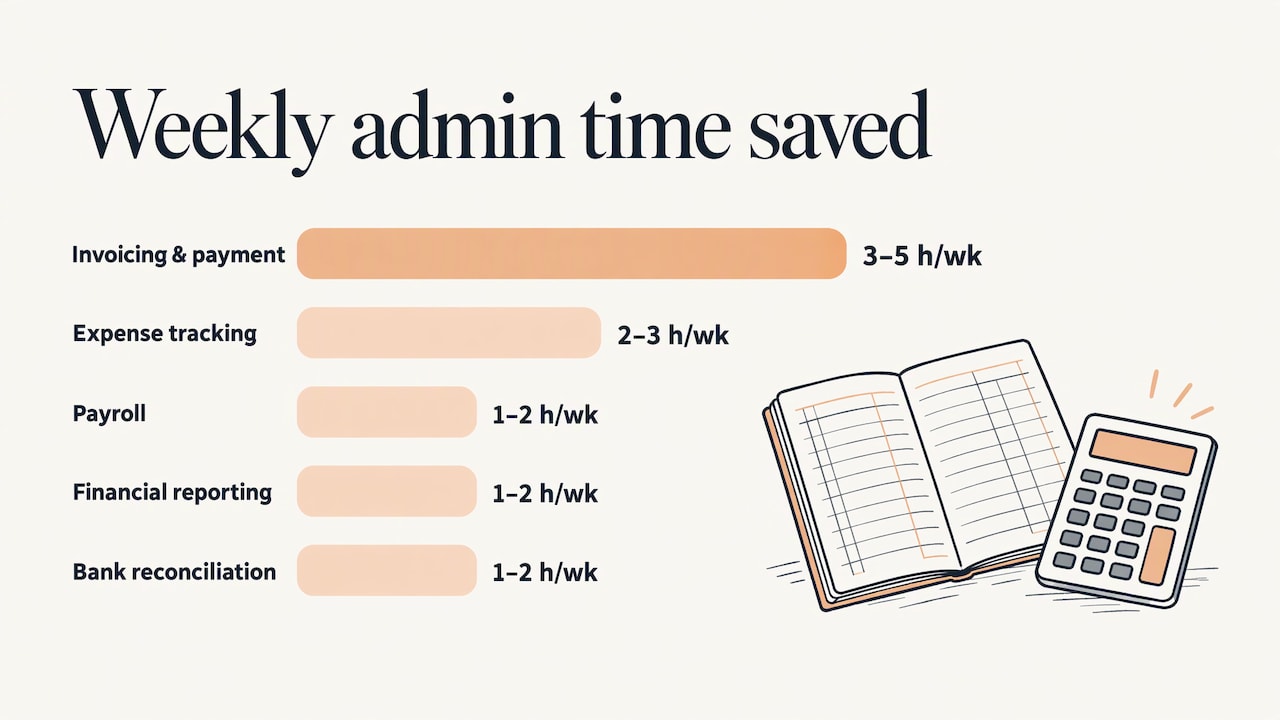
Business.com’s January 2026 article on SMB admin burden puts rough weekly time savings on common back-office automations. It cites three to five hours for automated invoicing and payment collection, two to three hours for expense tracking and categorization, and one to two hours each for payroll, financial reporting and bank reconciliation. Treat those as ranges that depend on your volume, not promises.
A sensible admin shortlist for a small business:
- Appointment booking, confirmations and reminders
- Invoice creation, sending and payment reminders
- Turning a new customer inquiry into a task with an owner and a due date
- Recurring reports sent on a schedule
- Routine email follow-ups after a purchase or service
The method is the same as for support: map it, clean the data, automate the predictable part, keep a person on the exceptions.
Measure whether it is working
Set a baseline before you launch. Without “before” numbers, “after” numbers mean nothing. Record your current figures for these, then track them monthly:
- First response time. How long a customer waits for the first reply.
- Resolution time. How long from first message to closed issue.
- Share of requests resolved without a person. Often called the deflection or self-service rate.
- Escalation rate. How often automation hands off to a human. Too high means the automation is not pulling its weight. Too low may mean it is holding on to cases it should release.
- Customer satisfaction. Compare scores for automated and human-handled conversations. A sudden drop is a warning signal.
- Error rate. How often an automated answer was wrong or had to be corrected.
- Time saved. Hours your team spends on repeat work, before and after.
Read a sample of actual conversations each month, not just the numbers. Ten minutes with real transcripts tells you things a dashboard cannot.
Common mistakes to avoid
- Automating a broken process. If the manual workflow is confusing, the automated one will be confusing faster.
- Skipping the knowledge base. An AI agent is only as good as the material it draws on.
- No visible way to reach a person. Always offer one.
- Launching everywhere at once. One channel, a few topics, then grow.
- Never reviewing. Policies, prices and products change. Automated answers go stale unless someone owns them.
- Treating it as a one-time project. The best systems evolve as your business does.
Perspective: what we have seen work
We build custom automation for self-employed professionals, small and medium teams and larger organizations, and the pattern is consistent: the businesses that do best do not start with a tool. They start with a clear picture of their own workflow.
That is why we begin with a consultation. Every business has different customers, different channels and different exceptions, and a generic setup tends to answer the wrong questions or send them to the wrong place. A tailor-made system, calibrated to your growth stage, lets you automate the repeat work now and add more as you grow.
We also believe automation should make your people more valuable, not less visible. Auto-responses, automatic emails, lead capture and routing take the repetitive load off, so the person who joins the conversation can spend their time on the part of the job that needs a human being.
Joshua
Get it built around your business
If you would rather not assemble this yourself, we do it with you or for you. Elevator Pitch Automations offers consultations, customized help and done-for-you builds, covering auto-responses, automatic emails, lead capture and more, connected to the tools you already use.
Our monthly plan, Elevator Pitch Automations Unlimited, is $300 per month, and you can turn it on here. For a larger or more specific project, book a consultation and we will look at your workflow together first. If you want to understand the approach first, read about hiring AI automation consulting well.
FAQ
Can a small business really automate customer support?
Yes, and small teams often feel the benefit most because each hour saved is a larger share of the week. Start with automatic acknowledgments and answers to your most common questions, and keep a person on anything sensitive.
What should I automate first?
Automate the predictable, low-risk requests: order or booking status, business hours, policies, password resets and confirmations. Review your last few months of messages to see which questions repeat most, and begin with those.
Will automation make my support feel impersonal?
Not if it is designed well. Fast, accurate answers to simple questions are what most customers want. The impersonal experience comes from bots that cannot be escaped, so always offer a path to a person and pass along the context when they step in.
How do I know if my automation is working?
Compare first response time, resolution time, escalation rate and customer satisfaction against a baseline you recorded before launch. Also read a sample of real conversations each month to catch errors the numbers miss.
Can the same approach reduce my administrative workload?
Yes. Invoicing, scheduling, reminders, reporting and task creation follow the same pattern: map the process, clean the data, automate the predictable steps and keep a person on the exceptions.
Sources
- How Generative AI Is Already Transforming Customer Service (BCG)
- How SMB Owners Can Save Time on Administrative Tasks (Business.com)
- What is Automated Customer Service? (Salesforce)