An ecommerce agent is an AI system that works toward a goal inside your online store. It reads context, decides what to do, uses your business tools and carries out multistep tasks such as answering an order question, drafting a product description or flagging a pricing problem. It is different from a chatbot that only talks and from a rule-based automation that only follows a script. The useful version is also bounded: it works alone on low-risk tasks and stops for a person when money or reputation is on the line.
This guide is for store owners and operations leads in the US. It covers what these agents do, how they work, which tasks to hand over first, which to keep behind approval, and what the evidence says about results and risks.
TL;DR
- An ecommerce AI agent decides and acts across your systems. A chatbot answers within a script, and ordinary automation follows fixed rules.
- Start with low-risk, high-volume work: order status questions, FAQs, product data cleanup, review summaries and lead follow-up.
- Keep humans in the loop for price changes above a threshold, large refunds, escalated complaints and anything that moves money.
- Published results exist, such as Wayfair’s catalog and support work, but they come from large retailers. Size your first project to your own volume.
- Map your workflow before you pick tools. The agent is only as good as the process and data behind it.
Table of Contents
- What an ecommerce agent is, and what it is not
- How an ecommerce agent works
- What agents can do for customers and operations
- What the evidence says about results
- Where humans should approve
- Risks to plan for in US retail
- Agent-to-agent commerce, briefly
- How to start without wasting a quarter
- Perspective
- Working with us on an ecommerce agent
- FAQ
- Sources
What an ecommerce agent is, and what it is not
Shopify describes an AI agent as a goal-directed system that interprets context, decides what to do and executes multistep actions. Ordinary automation follows fixed rules. A chatbot generally answers within a defined conversational scope. An agent can pull live data, reason across systems, change records and escalate when it cannot safely finish the job.
A simple way to feel the difference is a return request.
- Rule-based automation: if the form says “return,” send template email #3 and create a ticket.
- Chatbot: answers “What is your return policy?” with the policy text.
- Agent: reads the order, checks the return window and item condition rules, drafts the label request, tells the customer what happens next and hands the case to a person if the refund is unusually large.
The agent is not a replacement for your rules. Good setups keep firm rules for the things that must never vary, such as tax handling and refund limits, and use the agent for the judgment-heavy glue between steps. If you want to see how the categories split in CRM and sales tooling, this breakdown of AI-native versus AI-enabled systems shows the same line between bolted-on features and software built around agents.
How an ecommerce agent works
Under the hood, most commerce agents follow the same pattern. Anthropic’s guide to commerce agents describes a model running in a standard loop: it reasons about a goal, explores context, takes actions through tools and observes the results, asking clarifying questions along the way, until the goal is met.
In a store, that loop looks like this:
- Interpret the task. A shopper writes, “Where is my order, and can I change the size?” The agent splits that into two jobs.
- Gather context. It reads the order record, shipping status and your exchange policy.
- Act through tools. It calls the order system, the shipping lookup or the help-desk system. Each tool is a defined permission, not open access.
- Check the result. It confirms the lookup worked, then replies or asks a question.
- Finish or escalate. It closes the case or passes it to a person with the full context attached.
One design point matters for safety. In Anthropic’s framing, no model tool call moves money or changes the business by itself. Order placement, payments, refunds, price changes and campaign launches all end in an action controlled by the surrounding harness rather than the model. In plain terms: your system decides what the agent is allowed to finish.
What agents can do for customers and operations
The work splits into customer-facing tasks and back-office tasks. Retail guidance from Shopify lists connections to a product catalog, email marketing, shipping providers and internal documentation as the kinds of systems an agent can use to answer questions or draft marketing work.
Customer-facing work
- Support: order status, delivery questions, FAQs, return and exchange guidance.
- Shopping help: searching the catalog, comparing products and building a cart. Anthropic’s commerce-agent documentation describes a pattern where the agent fills a cart, answers order and policy questions, then hands off to hosted checkout instead of placing the order itself.
- Lead capture and follow-up: answering a pre-sale question on your site, collecting contact details and sending a timely response.
- Post-purchase messages: review requests, replenishment reminders and back-in-stock notes.
Operations work
- Product data: writing and correcting descriptions, validating attributes, and keeping catalog fields consistent.
- Review analysis: summarizing what customers praise and complain about so merchandising can act.
- Inventory and pricing signals: flagging low stock or competitor price moves for a person to approve.
- Marketing tasks: drafting email and social copy, scheduling posts, adjusting campaign settings within limits.
A useful order of operations is to begin where mistakes are cheap and volume is high, then move up. Product description cleanup and order-status replies sit at the bottom of the risk ladder. Refunds and pricing sit at the top.
What the evidence says about results
Published numbers are mostly from large companies, so read them as proof of possibility rather than a forecast for a ten-person store.
Catalog and supplier support at scale. Wayfair worked with OpenAI to validate and correct attribute data across more than 11 million products and to automate about 41,000 supplier support tickets a month, reaching up to 70% of ticket volume in some workflows. A controlled A/B test in that work showed significant increases in impressions, clicks and page rank for the treatment group.
Where shoppers are heading. Bain & Company estimates the US agentic commerce market could reach $300 to $500 billion by 2030, roughly 15% to 25% of US ecommerce, and notes that 30% to 45% of US consumers already use generative AI for product research and comparison. L.E.K. is more conservative: it projects agentic ecommerce at about 9% of US ecommerce volume by 2029, growing from roughly $5 billion in 2025 to about $144 billion in 2029.
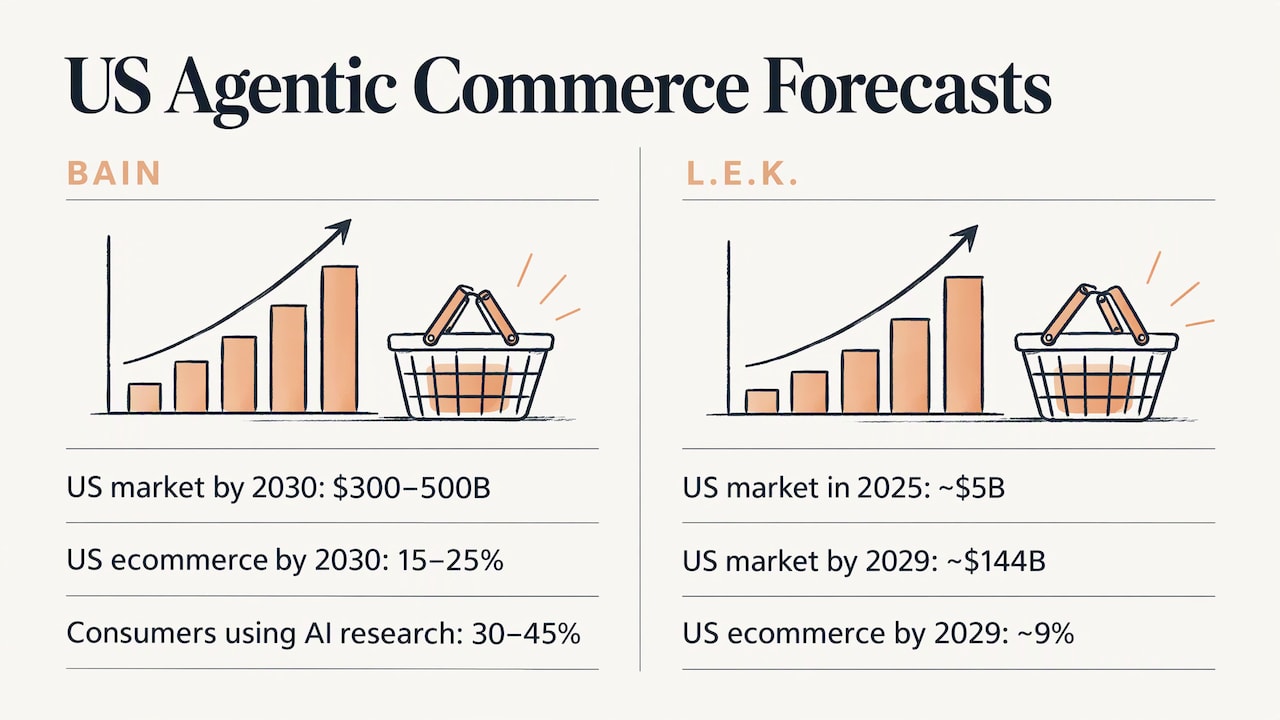
The two forecasts differ in size but agree on direction: more product discovery and buying will pass through AI. Bain also expects uneven adoption. Spec-driven purchases, such as the cheapest four-pack of a standard battery by tomorrow, shift first, while considered categories like apparel or travel follow as trust grows. If you sell commodity or replenishable goods, clean product data and clear availability matter sooner. If you sell considered purchases, the agent’s early value is more likely in service and content.
Where humans should approve
The most practical rule in agent design is that autonomy should scale with risk. Shopify’s guidance is to set permission levels for the systems and actions the agent can reach, separate read-only from write access, use human checkpoints for high-stakes actions such as large refunds, price changes above a threshold and escalated complaints, and monitor and log what the agent does.
Here is a starting permission map you can adapt.
| Task | Suggested access | Human checkpoint |
|---|---|---|
| Answer order-status and policy questions | Read-only on orders and help docs | None for routine cases |
| Draft product descriptions | Write to a draft field | Review before publish at first |
| Summarize reviews | Read-only | None |
| Send post-purchase emails | Write within approved templates | Review new templates |
| Issue refunds | Write, capped by amount | Approval above your set limit |
| Change prices | Suggest only, or write within a band | Approval for changes above a set percentage |
| Handle complaints | Read plus draft reply | Person takes escalated or legal-sounding cases |
| Place orders or move money | Hosted checkout or tokenized payment | Approval required |
On payments, AWS says transaction agents can use merchant APIs and tokenized payment credentials, while human approval can be required for checkout and discovery agents may be limited to read-only access. For a store with limited staff, “read-only first, write access later” is the lowest-regret path.
If your business handles sensitive data or runs private infrastructure, the same thinking applies to the AI stack itself. This piece on AI supply chain security explains why you should know where your models and tools come from before you give them access.
Risks to plan for in US retail
The US Payments Forum’s 2026 primer on agentic commerce lists risks worth taking seriously: prompt injection, wrong-SKU selection, restricted-item purchases, duplicate transactions and unclear merchant-of-record responsibility. It also notes that agentic payments can expose transaction history, preferences, location, budgets and loyalty data, which makes consent and data minimization harder than in conventional payments.
Here is how to turn that list into design choices:
- Prompt injection: treat any text the agent reads from outside, such as a customer message or a web page, as untrusted. Keep write permissions narrow so a manipulated agent cannot do much.
- Wrong item or duplicate action: require the agent to confirm the SKU and quantity against the catalog, and add a duplicate check before anything is submitted.
- Restricted items: keep an explicit blocklist and age-restricted category rules in your own system, not in the prompt alone.
- Data exposure: give the agent only the fields it needs for the task. An order-status answer does not need a customer’s full purchase history.
- Accountability: decide in advance who owns a mistaken refund or message, and keep logs so you can trace what the agent did and why.
None of this is a reason to wait. It is the list of things a well-built agent handles by design.
Agent-to-agent commerce, briefly
You will see “agent-to-agent commerce” in coverage of this topic. It means a shopper’s AI agent dealing with a merchant’s systems or agents. AWS describes agentic commerce as orchestration in which an agent interprets a natural-language goal, delegates discovery, comparison and transaction subtasks, and coordinates the transaction across services. The US Payments Forum says protocols for agents to coordinate are emerging, translation layers may help them work together, and the landscape is still fragmented.
For a store, the practical takeaway is modest. Keep your catalog accurate, your inventory current and your policies written clearly. An agent on either side of a transaction can only work with what it can read.
How to start without wasting a quarter
- Map the workflow first. Write down where time goes: tickets, order lookups, product updates, follow-ups. Pick the one with the most repeated, rule-bound steps. A short AI readiness assessment approach that maps revenue workflows before buying tools fits this step well.
- Fix the data. Product titles, attributes, policies and shipping information should be consistent. Agents amplify whatever they read.
- Define the goal and the limits. For each task, write what “done” means and what the agent may never do alone.
- Connect read-only. Let the agent answer and draft for two to four weeks while you review the output.
- Add write access in steps. Turn on actions one at a time, with caps and approval thresholds.
- Log and review. Check a sample of conversations and actions every week. Update the instructions when you see patterns.
- Expand. Add the next workflow only when the first one is steady.
If you want a plain explanation of what outside help should cover, our guide to AI automation consulting walks through what to ask for and how to hire well.
Perspective
We build automation for self-employed owners, small teams and larger operations, and the pattern is the same at every size. The agent is rarely the hard part. The hard part is deciding which repeated task is worth handing over, what the agent may touch and who checks the result.
That is why we start with a consultation and a map of the workflow instead of a tool list. Lead capture, automatic emails, auto-responses and social scheduling are the pieces most stores already do by hand, and they are where a custom setup pays back first. A system built around your products, your tone and your policies behaves differently from a generic one.
Our view is that bounded autonomy is the right default. Let the agent work freely on routine questions and drafts, and put a person at the points where money, prices or an upset customer are involved. As your business grows, you loosen the limits on the tasks that have earned it. We design our frameworks to grow that way, so the system you start with is still the one you use later.
Joshua
Working with us on an ecommerce agent
If you would rather not assemble this yourself, we design and set up custom automation for the workflows described above: automatic lead capture, automatic emails, auto-responses, automated social media, and custom AI agent integration, with consultations and custom training for your team. You can see the full list on our automation services page.
Our Elevator Pitch Automations Unlimited plan is $300 per month, and you can turn it on here. Other work, such as hardware and systems or a business website, is scoped to your project, so see the pricing page for what each option covers. To talk through your store first, book a consultation.
FAQ
What is the difference between an ecommerce agent and a chatbot?
A chatbot answers questions within a set scope. An ecommerce agent works toward a goal: it reads live data, uses tools such as your order or help-desk system, takes multistep actions and escalates to a person when it cannot safely finish. A chatbot can be one interface an agent uses to talk with customers.
Which tasks should an ecommerce agent handle first?
Start with high-volume, low-risk work: order-status questions, FAQs, product description drafts, review summaries and lead follow-up. These tasks are repetitive, easy to review and low in cost if something goes wrong. Add refunds and pricing later, with caps and approval thresholds.
Can an AI agent place orders or issue refunds on its own?
It can be technically set up to, but most guidance recommends limits. Shopify advises human checkpoints for large refunds and price changes above a threshold, and AWS notes that human approval can be required at checkout. A common pattern is to hand the customer to hosted checkout instead of letting the agent complete payment.
Is an ecommerce agent only for large retailers?
No. The best-known published results come from large companies like Wayfair, but the underlying work, such as answering repeated questions, following up leads and keeping product data tidy, exists in every store. A smaller business should pick one workflow, keep access narrow and expand from there.
Sources
- What Are AI Agents? Types, Uses, and How They Work, Shopify
- AI Agents For Retail, Shopify
- The anatomy of effective commerce agents, Anthropic
- Commerce agent use case guide, Anthropic
- What is Agentic Commerce?, AWS
- Wayfair boosts catalog accuracy and support speed, OpenAI
- 2030 Forecast: How Agentic AI Will Reshape US Retail, Bain & Company
- Built for Agents: Winning in the Era of Agentic Commerce, L.E.K.
- Agentic Commerce: A Primer for the Payments Industry, US Payments Forum