AI deployment is the stage where an AI system leaves the test environment and starts doing real work inside your business. AWS describes it as moving a solution from development to production, making it available to users through an application or system, and scaling it for real-world data and usage. For a self-employed professional, that might be an assistant that answers every inquiry. For an enterprise, it might be an agent wired into several departments. The steps are the same: prepare, pilot, roll out gradually, monitor, and keep improving.
TL;DR
- Deployment is an ongoing effort, not a launch day. Plan for monitoring and maintenance from the start.
- Start with one repetitive workflow, a clear objective and clean data, then pilot before you roll out.
- Match the setup to your size: a solo operator needs a managed, simple system, while an enterprise needs central governance and security.
- Treat risk management as a continuous cycle, using the NIST AI Risk Management Framework as a guide.
- Measure value with a baseline you set before launch, such as hours saved, response time or leads handled.
Table of Contents
- What AI deployment actually means
- The steps to deploy AI in a business workflow
- Testing, integrating and rolling out
- Choosing an approach for your size
- What to settle before you deploy
- Monitoring after launch
- Scaling without losing control
- Our perspective
- Where Elevator Pitch Automations fits
- FAQ
- Sources
What AI deployment actually means
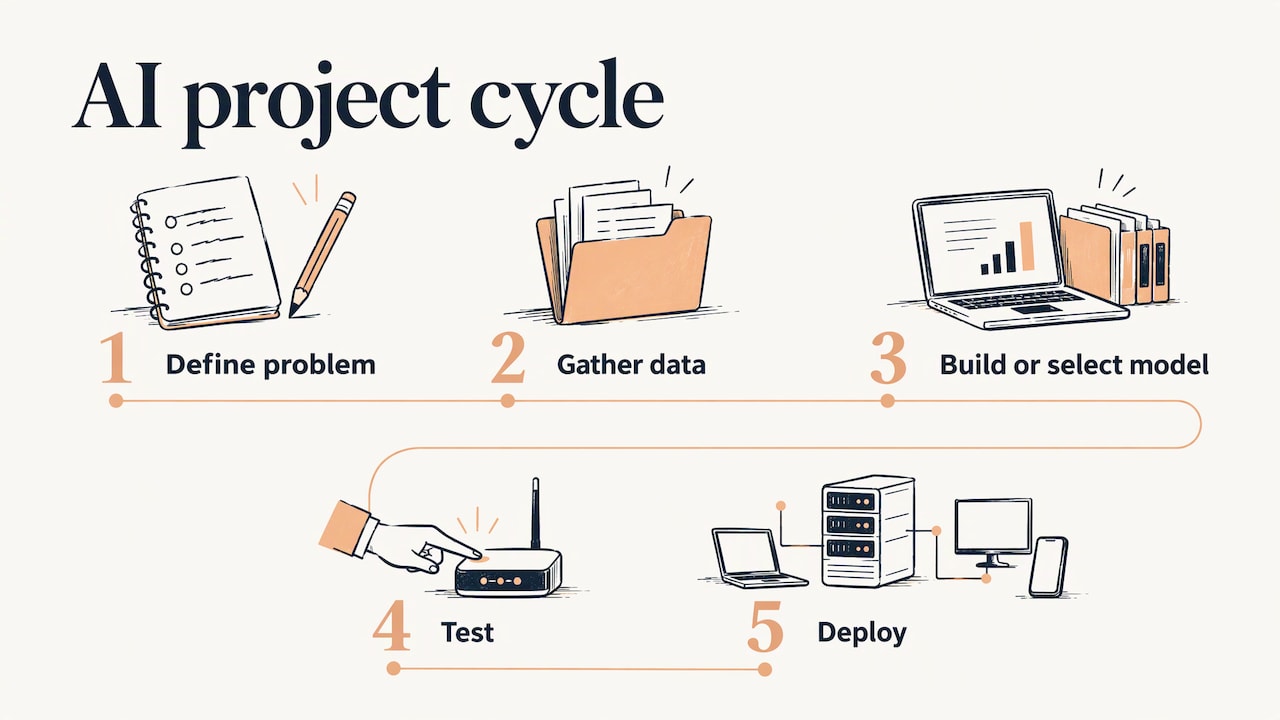
In the usual AI project cycle, you define a problem, gather data, build or select a model, test it, and then deploy it. A peer-reviewed review of the AI life cycle puts it this way: in the deploy phase, an engineer turns a prototype into a service standardized for access by stakeholders and end users.
That definition hides most of the work. Boston University’s College of Engineering makes the point that deployment is a complex, ongoing effort rather than a single moment of activation, and that it needs coordination across interdependent systems and workflows.
So a working demo is not a deployed system. A deployed system is connected to your real tools (your inbox, CRM, website forms, calendar), handles real data, has someone responsible for it, and has a way to tell you when it stops working.
Deployment versus development
Development asks, “Can this work?” Deployment asks, “Does this keep working for real customers, on a Tuesday, when the data looks different from the test set?” Most of the pain in AI projects shows up in the second question.
The steps to deploy AI in a business workflow
Microsoft’s implementation guidance walks through a similar sequence: assess readiness, set clear objectives, form a cross-functional team, prepare and secure data, choose infrastructure, pilot, roll out gradually, and keep monitoring. Here is how that translates into practical work.
- Pick one workflow. Choose something repetitive, frequent and easy to judge: replying to new inquiries, sending follow-up emails, capturing leads from a form, scheduling social posts. A narrow first target makes success measurable.
- Write down the objective and the baseline. “Reply to every new lead within five minutes” is an objective. “Be more efficient” is not. Record today’s numbers (hours spent per week, response time, leads lost) so you can compare later.
- Name an owner. Someone must be accountable for the system after launch, even in a one-person business. In a larger organization, bring in operations, IT or security, and whoever owns the data.
- Prepare the data and access. Decide what the system may read, what it may write, and what it must never touch.
- Choose where it runs. More on this below.
- Test with realistic inputs. Use real examples, including messy ones.
- Pilot with a small group. Run the system on a slice of traffic, with a human reviewing the output.
- Roll out gradually. Expand in stages, and keep a way to switch back to the manual process.
- Monitor and improve. This never ends, and it is where deployments succeed or quietly decay.
Testing, integrating and rolling out
Testing should reflect what the system will meet in production, not what was convenient during the build. The NIST AI Risk Management Framework organizes its work into four functions: govern, map, measure and manage. The map function establishes the context for the risks, and the framework treats risk management as continuous across the whole system lifecycle, not a one-time checklist.
For a business workflow, that translates into a few habits:
- Build a test set from your own history. Pull 30 to 50 real past emails, inquiries or tickets, including the awkward ones, and see how the system handles them.
- Define what “wrong” looks like. A wrong lead reply that promises a price is worse than a slow reply. Rank mistakes by cost and set rules for the expensive ones.
- Integrate in small steps. Connect one channel first, such as a website form, then add email, chat or social channels once the first behaves.
- Keep a human in the loop during the pilot. Approve or review outputs until the error rate is something you would accept from a new employee.
- Plan the rollback. Know how to pause the automation and route work back to a person in minutes.
Choosing an approach for your size
The right deployment depends less on how advanced the AI is and more on who will maintain it. IBM notes that deployment environments include on-premises systems, cloud computing services and edge devices. Which one fits depends on your team.
| Business size | What usually fits | Main priority |
|---|---|---|
| Self-employed | A managed, hosted setup connected to your existing email, forms and calendar | Saving hours without learning infrastructure |
| Small team | Shared automations across lead capture, email and scheduling, with one named owner | Consistency and handoffs between people |
| Medium organization | Several connected workflows, role-based access, documented processes | Scalability and reliability |
| Enterprise | Centralized governance, security and logging, with separated workloads per business unit | Risk control and auditability |
For larger organizations, Google Cloud’s architecture guidance recommends centralizing governance and security, including identity management and logging, and isolating AI workloads in dedicated tenant projects to prevent data exposure.
Notice what is absent from the table: building your own model. Most businesses get the most value from connecting proven AI capabilities to their own workflows, not from training anything from scratch.
What to settle before you deploy
Microsoft’s implementation roadmap groups pre-deployment work into data readiness, architecture and infrastructure, talent and operating models, and governance for trust, transparency and accountability. Here is what each means for a working team.
Data readiness
List the data the system will touch: customer names, emails, phone numbers, order history, internal documents. Check that it is accurate, current and stored where the system can reach it. An assistant that answers from an outdated price sheet will confidently give outdated prices.
Content matters as much as records. If your website explains your services poorly, an AI system drawing on it will explain them poorly too. Improving how your site presents services, through an AI search visibility audit, is one way to make sure the information any automated system relies on is clear and consistent.
Infrastructure
Decide where the system runs, how it connects to your tools, and what happens when a connection fails. Repeatable setups beat hand-built ones. AWS guidance on building enterprise-ready platforms recommends infrastructure as code for repeatable deployments, standardized MLOps practices and reusable application patterns.
Security and privacy
Give the system the least access it needs. Keep API keys and credentials out of shared documents. Decide what customer data may be sent to outside AI services, and say so in your privacy policy. If you handle regulated data such as health or payment information, talk to your attorney or compliance officer before connecting it to any AI tool.
Governance
Governance sounds heavy, but for a small team it can be one page: who owns the system, what it is allowed to do, what it must escalate to a person, and how often you review it. NIST’s framework is a useful reference for structuring that thinking at any size.
Monitoring after launch
The U.S. General Services Administration’s AI guide states plainly that deployment is part of an iterative lifecycle that requires continuous monitoring for performance drift, model maintenance and retraining as real-world data conditions change. Google Cloud adds that production monitoring should detect performance degradation, data drift or unexpected behavior.
In plain terms, watch for these:
- Quality: a weekly sample of outputs, read by a person.
- Volume and speed: how many items it handled, and how long each took.
- Exceptions: how often it handed off to a human, and why.
- Business results: the baseline numbers you recorded earlier, such as response time, leads captured, hours saved, bookings made.
- Changes upstream: new products, new prices, a redesigned form or a changed policy. Any of these can break an automation silently.
Schedule a review monthly at first. If the numbers are stable after a quarter, move to quarterly.
Scaling without losing control
Once the first workflow pays off, the temptation is to automate everything at once. Resist it. Add one workflow at a time, reuse what worked, and keep the shared parts (access rules, logging, templates) in one place.
Google Cloud’s architects warn that as organizations grow, fragmented application silos create governance and security risks. Their answer is to centralize governance while letting teams build specialized agents. Smaller businesses face a version of the same issue: five automations built by five people with five sets of logins become hard to maintain.
Our perspective
We build automation for a living, and the pattern we see most often is this: the technology is rarely what fails. The workflow around it is.
A company buys a tool, switches it on, and nobody decides who owns it, what it should handle, or how to tell if it is working. Three months later it is quietly ignored. That is why we start with the workflow, not the software. We look at what repeats, where leads or time are being lost, and which task is worth automating first.
Our approach is tailor-made: the system is calibrated to your growth stage, whether you are self-employed, a small team, or running enterprise operations, and it is designed to evolve as your needs do. We offer consultations, custom training and full automation setups, so you can hand the work over, learn to run it yourself, or do both.
If you are deciding where to begin, begin small and measurable. Automatic replies, lead capture and follow-up emails are good first deployments because the results show up within days, and each one teaches you what the next one needs.
Joshua
Where Elevator Pitch Automations fits
If you would rather not assemble and maintain this yourself, we handle the deployment work: auto-responses, automatic emails, lead generation and capture, social media scheduling, custom AI agent integration and turnkey infrastructure. You can see the full list on our automation services page, or read how to choose a provider in our guide to AI automation consulting.
The Elevator Pitch Automations Unlimited plan is listed at $300 per month, and you can turn it on here. Consultations, customized help and done-for-you work are also available, and you can start from our main page to book a conversation about your workflow.
FAQ
What is the difference between AI development and AI deployment?
Development is building and testing the model or system. Deployment is putting it into production, where real users and real data reach it through an application or workflow. Deployment also includes the ongoing monitoring and maintenance that keeps it reliable.
How long does an AI deployment take?
It depends on scope. A single automation, such as automatic replies to new inquiries, is a much smaller job than a multi-department rollout with security review. Plan for a pilot period either way, because the pilot is where you find the problems that matter.
Do I need my own data scientists to deploy AI?
Not for most business workflows. Many deployments connect existing AI capabilities to your tools and data. You do need someone who owns the system and reviews its results, and outside help with design, integration and training can fill the technical gaps.
How do I know whether an AI deployment is working?
Compare against the baseline you recorded before launch: hours spent, response times, leads captured, errors caught. Pair those numbers with regular review of sample outputs, and keep monitoring, since performance can drift as your data and business change.
What security steps should I take first?
Give the system only the access it needs, keep credentials out of shared files, and decide what customer data may leave your systems. For regulated data, consult your attorney or compliance officer. NIST’s AI Risk Management Framework offers a structure for ongoing risk review.
Sources
- Generative AI lifecycle, AWS Well-Architected Generative AI Lens
- An artificial intelligence life cycle: From conception to production
- AI Deployment: From Prototype to Production Systems, Boston University College of Engineering
- AI Implementation Strategy Guide, Microsoft 365
- AI Implementation Strategy: A Practical Roadmap, Microsoft
- AI RMF Core, NIST AI Resource Center
- What Is Model Deployment?, IBM
- Multi-tenant agentic AI system, Google Cloud Architecture Center
- Building an enterprise-ready generative AI platform, AWS Prescriptive Guidance
- Understanding and managing the AI lifecycle, GSA
- Deploy and operate generative AI applications, Google Cloud
- AI search visibility audits, Picshaw