Marketing workflow automation means turning the steps you repeat every week (capturing a lead, sending the follow-up, scheduling a post, logging a result) into rules that run on their own. The tools are easy to find. The hard part is deciding which workflows to build, wiring them into the systems you already use, and keeping them running as the business grows. That is why most self-employed owners and small teams get further with a system designed around their own process. We build exactly that: custom automation, from a single auto-response to a full deployment, shaped to your growth stage.
This guide covers what a marketing workflow is made of, which ones to automate first, how scheduling and integrations fit in, what consulting involves, and how to think about cost and return.
TL;DR
- A marketing workflow has three parts: a trigger, one or more actions, and conditions that decide the path. Map those before you touch any software.
- Start with the workflows that repeat daily and have a clear trigger: lead capture and follow-up, welcome emails, social scheduling and reporting.
- Integration matters more than features. A workflow that cannot read your lead list or write to your calendar creates more manual work, not less.
- Judge return by hours recovered, response time and leads that did not slip through, measured against what you do today.
- We design custom systems for self-employed professionals, small and medium teams and enterprises. Our Unlimited plan is $300 per month.
Table of Contents
- What marketing workflow automation actually is
- The three building blocks of every workflow
- Which marketing workflows to automate first
- Social media content scheduling inside the workflow
- Connecting automation to the tools you already use
- How to plan, build and improve a workflow
- Who needs what: self-employed, small, medium and enterprise
- What marketing automation consulting involves
- Cost and ROI: how to think about it
- Marketing automation in retail
- Perspective
- Put it to work
- FAQ
- Sources
What marketing workflow automation actually is
A marketing workflow is a repeatable sequence of tasks that moves a piece of work from start to finish. Someone fills out a form, the lead is tagged, a message goes out, a salesperson gets a notification. Automation replaces the human hand-offs in that chain with rules.
Two things get mixed up under this name. The first is customer-facing automation: email sequences, lead scoring, abandoned-cart reminders. The second is internal workflow automation: briefs, reviews, approvals and publishing inside the team. Most businesses need both, and the same design logic applies to each.
The case for doing it is time. A 2023 survey of more than 1,350 marketing, sales, service and SEO professionals found marketers spending around five hours a day on manual, administrative or operational tasks, according to HubSpot’s AI Marketing Report. That is a survey from a software company, so treat it as a signal rather than a promise. But anyone who has copied a lead from an inbox into a spreadsheet at 9 p.m. recognizes the pattern.
The useful mindset is to automate the workflow, not the craft. Writing the offer, choosing the angle and talking to a customer stay with you. Moving data, sending the reminder and posting at the right time go to the system.
The three building blocks of every workflow
Every automated workflow, whatever it is called, comes down to the same parts. G2’s step-by-step guide to marketing automation workflows explains them with a simple example, and a consulting write-up on workflow automation covers triggers, actions, branching rules, task assignment and approvals in more depth.
Trigger. The event that starts the workflow: a newsletter sign-up, a form submission, a new blog post, a deadline approaching.
Actions. What happens next: send an email, create a task, notify a person, update a record, publish a post.
Conditions and timing. The rules that choose the path and the pauses between steps. In G2’s example, a sign-up triggers a welcome email, the workflow waits two days, then sends a follow-up offer.
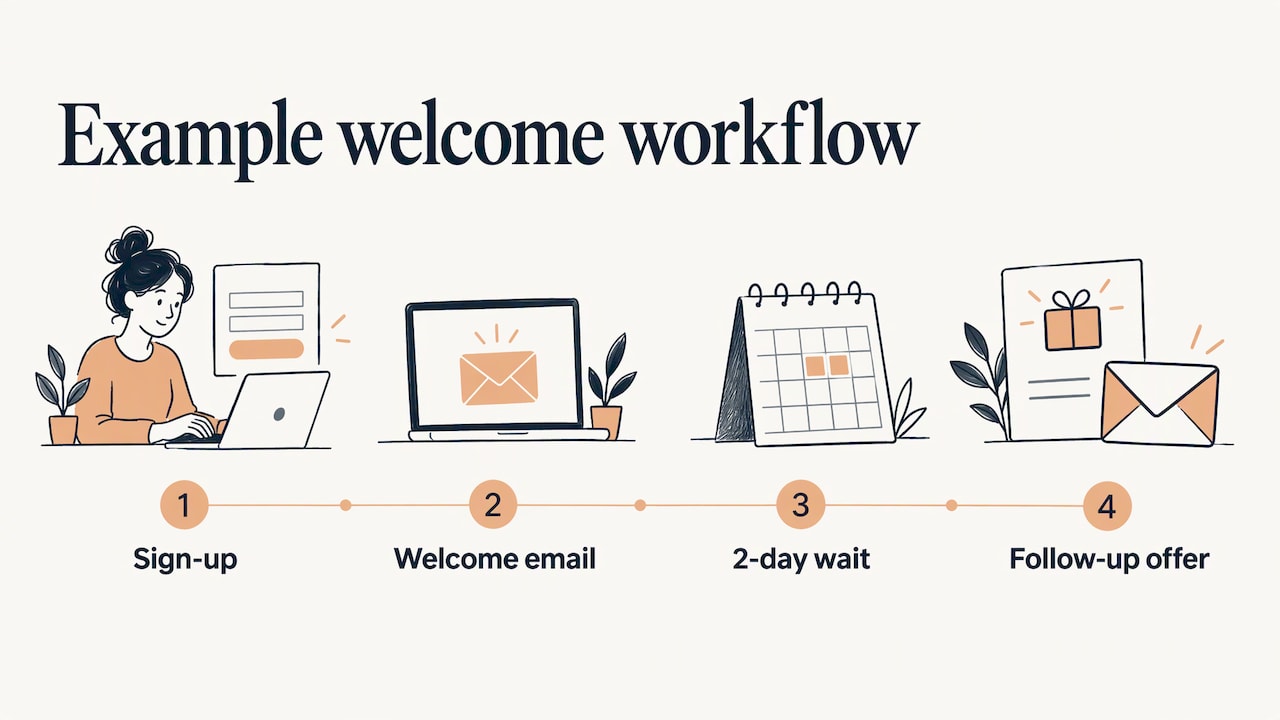
Write each workflow on one page before you build it: “When X happens, if Y is true, do Z, then wait N days.” If you cannot fill in that sentence, the process is not ready to automate. It is usually a sign the manual version is inconsistent, and the first job is to decide how it should work.
Which marketing workflows to automate first
Pick workflows that have a clear trigger, happen often and cost you something when they are late. For most self-employed professionals and small teams, five stand out.
1. Lead capture and instant response
A person fills out a form, books a call or messages you on a channel. The workflow stores the contact, sends an immediate acknowledgment and alerts you. Speed is the point: the person who answers first usually has the advantage. We go deeper on this in our guide to building a lead capture system that works automatically.
2. Welcome and nurture emails
A short series that introduces who you are and what you do, spaced over a couple of weeks. It runs for every new subscriber without you remembering to send it. For B2B teams, the same idea extends to qualifying, segmenting and nurturing leads, as in these B2B lead nurturing workflows built around paid acquisition.
3. Re-engagement and win-back
When a contact has gone quiet, for example no opens for 60 days or no purchase for a long time, the workflow sends a gentle “we miss you” message and then cleans the list if nothing happens. This protects deliverability and keeps your list honest.
4. Abandoned-cart and follow-up reminders
For retail and online sellers, a reminder an hour after the cart is left, a second message the next day and a small incentive after two days is a common pattern. A service business has the same shape: a quote was sent and nobody answered, so a reminder goes out on day three.
5. Social scheduling and reporting
Planning a month of posts in one sitting, queuing them, then getting a weekly performance summary replaces daily “what do I post today” decisions. More on this below.
A quick trigger-to-action table
| Workflow | Trigger | Core actions | Exit |
|---|---|---|---|
| Lead response | Form or channel inquiry | Store contact, send reply, alert owner | Meeting booked |
| Welcome series | Newsletter sign-up | 3 to 4 emails over two weeks | First purchase or call |
| Re-engagement | No opens for 60 days | Win-back email, then list clean-up | Clicks or removal |
| Cart or quote reminder | Cart or quote left idle | Reminder, follow-up, small incentive | Order or reply |
| Social publishing | Approved post in calendar | Queue and publish at set time | Posted and logged |
Every row has an exit. A workflow without one keeps messaging people who already bought, which is the fastest way to make automation feel annoying to customers.
Social media content scheduling inside the workflow
Scheduling is one step in a longer chain: ideas, drafts, edits, approval, scheduling, monitoring and reporting. Automating only the scheduling step helps a little. Connecting it to the steps around it helps a lot.
A practical setup for a small team looks like this:
- Keep a simple content calendar with date, platform, topic and format.
- Batch the writing once a week or once a month.
- Mark a post as approved. That status is the trigger.
- The system queues the post at the chosen time and fills open slots in the calendar.
- A weekly summary of what performed lands in your inbox.
To see how a content pipeline can run, a practical AI content workflow for service businesses shows where human review and clear roles belong. The rule we follow is simple: automate drafting support, queuing and reporting, but keep a person on community replies and anything sensitive. A customer complaint answered by a template is worse than a late answer.
Content can also be chained. One public example turns a new video upload into captioned clips and a publishing task, and logs brand mentions to a spreadsheet with a daily summary, as described in Backlinko’s guide to eight simple marketing workflows. The lesson is the pattern: one input creates several outputs without anyone re-entering it.
Connecting automation to the tools you already use
Automation fails most often at the seams. Your form tool, email platform, calendar, CRM, ad accounts and spreadsheet all hold part of the picture. If they do not share data, someone ends up exporting and importing by hand, which is the work you wanted to remove.
Before you build, make a list of every place a lead or customer record can live. Then answer four questions:
- Where is the single source of truth? Pick one place where the contact record is complete.
- Which tool starts each workflow? The trigger should live where the event really happens.
- What has to flow back? Replies, bookings and purchases should update the record so the next workflow knows.
- Who is notified, and where? Alerts that land in an inbox nobody checks are the same as no alert.
Integration comes in three broad forms: a cloud hub with prebuilt connectors, direct connections between two systems, and heavier middleware for large organizations. A solo professional rarely needs the last. An enterprise with several departments often does, along with governance on who can change a live workflow.
This is where custom work pays off. Off-the-shelf connectors cover the common cases. Your odd cases (a legacy spreadsheet, a quoting form from 2019, a kiosk at a trade show) are where a tailored build earns its keep. Our approach covers custom AI agent integration, website and channel lead capturing and turnkey infrastructure deployment, so the pieces are designed to work together from the start. Our guide to moving AI from pilot to production explains the step many teams get stuck on.
How to plan, build and improve a workflow
- Pick one workflow. Choose the one that costs you the most time or loses the most leads. Resist building five at once.
- Write it out. Trigger, actions, conditions, exit. One page.
- Do it by hand for a week. Note exceptions: the customer who replies in a different channel, the form with a missing field. Those exceptions become your conditions.
- Build it with a test contact. Run your own email address through the whole path and check the timing, the wording and the record updates.
- Launch, then watch. Look at the first twenty real contacts. Read what they received.
- Measure and adjust monthly. Check response time, reply rate and hours saved. Change one thing at a time.
Teams skip step 3 and step 5 most often, and those two steps prevent most embarrassing automation mistakes.
Who needs what: self-employed, small, medium and enterprise
The right level of automation changes with your size.
Self-employed professionals. Your bottleneck is your own attention. Prioritize instant lead response, appointment follow-up and a posting routine. Complexity is the enemy: two or three workflows that never break beat ten that need weekly repair.
Small teams. Coordination is the pain. Add approvals, task assignment and shared reporting so nobody asks “did that go out?” Consistent templates matter more than clever branching.
Medium teams. You are scaling, so duplicated tools and inconsistent data begin to hurt. Standardize the contact record, document each workflow and assign an owner to each one.
Enterprises. Governance, permissions, audit trails and cross-department integration dominate. Workflows touch many systems, and a change in one place can break another. Planning and change control matter as much as the build.
What marketing automation consulting involves
A consultant, or a consultancy for larger projects, typically does four things: reviews the tools and processes you have, designs the workflows, builds and connects them, and trains your people to run them. You should come away with workflows running, documentation you can read and a team that knows how to adjust them.
Consulting makes the most sense when:
- You have tools but the data does not flow between them.
- Leads are coming in and some are falling through gaps.
- You are about to grow headcount and want processes in place first.
- You tried a template and it did not fit how your business works.
Our offering matches this shape: personalized consultations, custom training content and full-scale automation setups, with a done-for-you option when you would rather hand the build over. Consultations are available through our main page.
Cost and ROI: how to think about it
Software subscriptions are only one line of the cost. The others are setup time, integration work, training and the upkeep that keeps workflows healthy as your offers change. Count the hours you would spend learning and maintaining a tool yourself, because those are hours not spent selling.
For return, use three plain measures:
- Hours recovered. If a weekly task takes three hours and now takes ten minutes, that is roughly twelve hours a month back. Multiply by what an hour of your time is worth.
- Response time. Minutes to first reply on a new lead, before and after.
- Leads saved. Count inquiries that used to wait more than a day, or never got an answer.
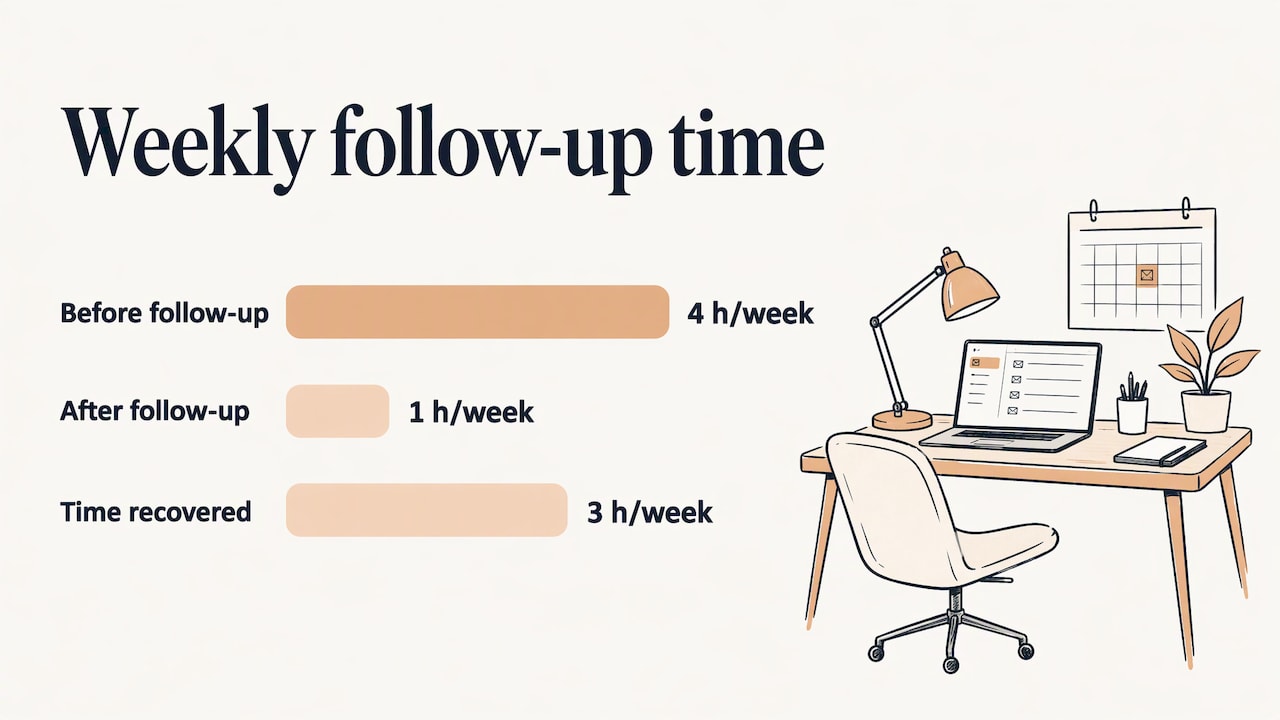
Here is a worked example. A self-employed consultant spends four hours a week on follow-up emails, calendar reminders and copying leads to a spreadsheet. If automation cuts that to one hour, that is three hours a week, about thirteen hours a month. At an hourly value of $100, that is roughly $1,300 of recovered time a month, before counting any deals that were rescued by a faster reply. Use your own numbers, and compare them with the cost of the build, not with an ideal.
We publish two $300 per month plans on our site: Elevator Pitch Automations Unlimited and Turn On Elevator Pitch Automations. Project work such as automation services, hardware and systems and websites is quoted per project. Details are on our pricing page.
Marketing automation in retail
Retail runs on timing. The workflows with the clearest payoff are the welcome series for new subscribers, the abandoned-cart sequence, win-back messages for lapsed buyers, and seasonal campaigns scheduled weeks ahead. For stores with a physical presence, capturing contact details in person matters too. Our in-person automations and our guide on capturing leads at trade shows and following up show how an offline moment can feed the same workflows as your website.
Perspective
We see the same pattern in marketing automation: the tool is rarely the problem. The problem is a process that was never written down, or a set of systems that do not talk to each other.
That is why we build around the business, not around a template. A self-employed professional needs two workflows that never fail. A growing team needs shared processes and clear owners. An enterprise needs a framework that scales without breaking. The same trigger, action and condition logic sits under all three, but the design is different at each stage.
Our view is that you should automate the repetitive work and protect the human work: the conversation, the judgment call, the creative idea. When a system handles the follow-ups, the reminders and the posting schedule, you have time for those. A consultation, custom training and a full automation setup are designed to get you there, and to keep the system evolving as your business does.
Joshua
Put it to work
If you want a marketing workflow built around how your business really runs, start with a conversation. We offer consultations, custom training and done-for-you automation setups, from lead capture and automatic emails to automated social media and advertising. Our plans are $300 per month for Elevator Pitch Automations Unlimited and for Turn On Elevator Pitch Automations. Start on our automation services page or turn on your setup.
FAQ
What is the first marketing workflow I should automate?
Start with lead capture and instant response. It has a clear trigger, runs constantly and loses you business when it is slow. Once that works, add a welcome email series and a social scheduling routine.
Do I need a consultant, or can I build workflows myself?
If you have one simple workflow and the time to maintain it, you can start alone. A consultant helps when tools do not share data, leads are slipping through or you are preparing to grow. We offer consultations and done-for-you builds for those situations.
Which parts of social media should stay human?
Keep replies to customers, complaint handling and anything time-sensitive in human hands. Automate the calendar, queuing and reporting. That keeps your posting consistent without making your voice sound automated.
How do I know if the automation is paying off?
Track three numbers before and after: hours spent on repeat tasks, minutes to first reply on a new lead and the number of inquiries that waited more than a day. If all three improve, the workflow is earning its place.
Is marketing automation only for large companies?
No. Self-employed professionals often see the clearest gain because every hour recovered goes back into client work. The scope should match your size: a few reliable workflows for one person, shared processes and owners for a team.
Sources
- HubSpot AI Marketing Report 2023
- G2: The 8-Step Guide to Create the Perfect Marketing Automation Workflow
- Workflow Automation for SaaS: Examples, Mapping, and Measurement
- 14 Day Meta Campaign Optimization for DTC Ecommerce
- AI Content Creation for Service Businesses: A Practical Workflow
- Backlinko: How to Automate Marketing With 8 Simple Workflows