The ROI on AI is the financial gain from an AI tool or automation, minus everything it cost to run, divided by that cost. The hard part is not the formula. It is proving the gain is real: measured against the process you had before, with the setup, training and checking time counted. AI returns show up when a specific workflow is redesigned around the tool, not when more people log in. That is why we build automations around one workflow at a time, with a consultation first, so the baseline and the target are clear before anything goes live.
TL;DR
- ROI on AI = (measured benefit − total cost) ÷ total cost. Usage, prompts and pilots are activity, not return.
- Use the process the AI replaced as your baseline, and count time saved only if it is redeployed into capacity, service or lower spend.
- Count the hidden costs: training, process redesign, governance and the time spent verifying output.
- Published results range widely, from $3.70 back per $1 spent in a US small-business study to no independently measured ROI in a review of enterprise assistants. Task and workflow decide where you land.
- Start with one repetitive workflow, measure it for a quarter, then scale what the numbers support.
Table of Contents
- What ROI on AI actually measures
- Set the baseline before you switch anything on
- Time saved is not money saved
- What to count on the cost side
- A worked example
- What the evidence says about returns
- Why AI projects miss their ROI
- A simple process to measure your own ROI
- Where ROI shows up first by team size
- Our perspective
- Start with one workflow
- FAQ
- Sources
What ROI on AI actually measures
Return on investment is a simple ratio. If an automation costs $9,000 in its first year and produces $20,000 of measurable value, your net gain is $11,000 and your ROI is about 122%.
The trouble is what counts as value. American Banker’s August 2026 analysis makes the point that access, prompts, training completion and pilots show experimentation. They do not show that work improved or that a financial return was earned. The same piece describes four stages of AI adoption: experimentation, workflow improvement, business outcomes and financial outcomes. Each stage needs different evidence.
For a self-employed professional or a small team, that translates into a plain chain:
- The tool is used.
- It performs the task well enough.
- The workflow around it gets faster or better.
- A business outcome moves: more leads answered, fewer late invoices, shorter turnaround.
- That outcome converts to dollars.
Most disappointing AI projects break the chain between steps 3 and 5. The tool works, but nobody changed the workflow, so the hours saved vanish into the day.
Set the baseline before you switch anything on
The right baseline is the process the AI replaced, not an idealized version of what AI might do. American Banker draws that line explicitly. So before you automate, write down what the current process costs.
For each workflow you plan to automate, record:
- Volume: how many times per week it runs (leads handled, invoices processed, tickets answered).
- Time per run: actual minutes, from a week of tracking, not an estimate from memory.
- Error or rework rate: how often it has to be redone.
- Speed of outcome: how long a lead waits for a reply, how many days an invoice sits.
- Loaded hourly cost of the person doing it, including benefits.
Two weeks of honest tracking beats any benchmark in a report. It is also the number you will compare against in month three, when someone asks whether the automation paid off.
Time saved is not money saved
The most common ROI claim is “it saves us 10 hours a week.” American Banker’s guidance is that saved time creates value only when it can be redeployed to increase capacity, improve service or reduce required resources.
So decide in advance where the hours go. A self-employed consultant who saves five hours a week and books two more client calls has a revenue number. A five-person team that saves the same hours but spreads them across the day has a feeling, not a return. Name the destination: more billable work, faster response to leads, or a deferred hire.
What to count on the cost side
Cost is where most back-of-envelope calculations go wrong. The KPMG and University of Technology Sydney AI ROI framework (September 2026) separates costs into layers:
- Direct costs: technology acquisition, testing, integration, data quality work and risk controls, plus the vendor’s terms.
- Operational indirect costs: training, the productivity dip while people adapt, process redesign and change management. The framework identifies these as consistently the largest determinant of whether AI delivers its projected ROI.
- Structural indirect costs: governance, risk management, policies, data infrastructure and regulatory compliance. These are front-loaded and can be spread across several AI investments.
A small business will not have a governance office, but the logic holds. If your automation touches customer data, someone has to decide what it may send, to whom, and who reviews it.
The verification tax
One cost that rarely makes it into a spreadsheet is checking the output. Nasdaq’s Economic Institute cost-benefit model (published November 2026) notes that one study found more than a third of AI-saved time goes to human verification of output, and recommends counting that as a cost. If an AI drafts follow-up emails and you read every one before it goes out, that reading time belongs in the calculation.
This is also why narrow, rule-based automations tend to show cleaner returns than open-ended ones. An auto-response that sends a fixed, approved message in under a minute needs far less checking than a free-form draft. How AI automation works in practice, and where it fits, is covered well in this explainer on how AI automation works.
A worked example
This is an illustration with assumed figures, not a client result. Take a five-person services team that automates lead capture, first replies and appointment follow-up.
| Line | Assumption | Annual figure |
|---|---|---|
| Gross time saved | 3 hours per person per week, 50 weeks | 750 hours |
| Verification and exceptions | 1 hour per person per week | −250 hours |
| Net hours | 500 hours | |
| Value of net hours | $40 loaded hourly cost | $20,000 |
| Total first-year cost | Setup, training, subscriptions, management time | $9,000 |
| Net gain | $20,000 − $9,000 | $11,000 |
| ROI | $11,000 ÷ $9,000 | about 122% |
Now stress it. If verification takes two hours instead of one, net hours fall to 250 and value falls to $10,000, a gain of $1,000. The case barely survives. That sensitivity is the real lesson: small changes in checking time or hours saved swing the result.
Nasdaq’s model shows the same pattern at larger scale. It finds that the case depends mostly on two variables, the share of work exposed to AI and the productivity gain, and that cutting both assumptions in half makes the financial case roughly a wash. Its base case estimates AI saves workers about 9% of their time, with costs taking under an hour a week and a net gain above 130 hours per worker per year. At 17% work exposure, costs eat nearly 70% of the benefit. At 77% exposure, only 15% does.
The practical rule: put your automation where most of a person’s repetitive work lives, not where AI is merely possible.
What the evidence says about returns
Published numbers disagree because they measure different things. Read them as a range, not a promise.
| Source | What it found | Scope |
|---|---|---|
| JBMI Insight study, July 2025 | Average ROI of $3.70 per $1 spent on generative AI; top performers $10.30 | US small and medium businesses |
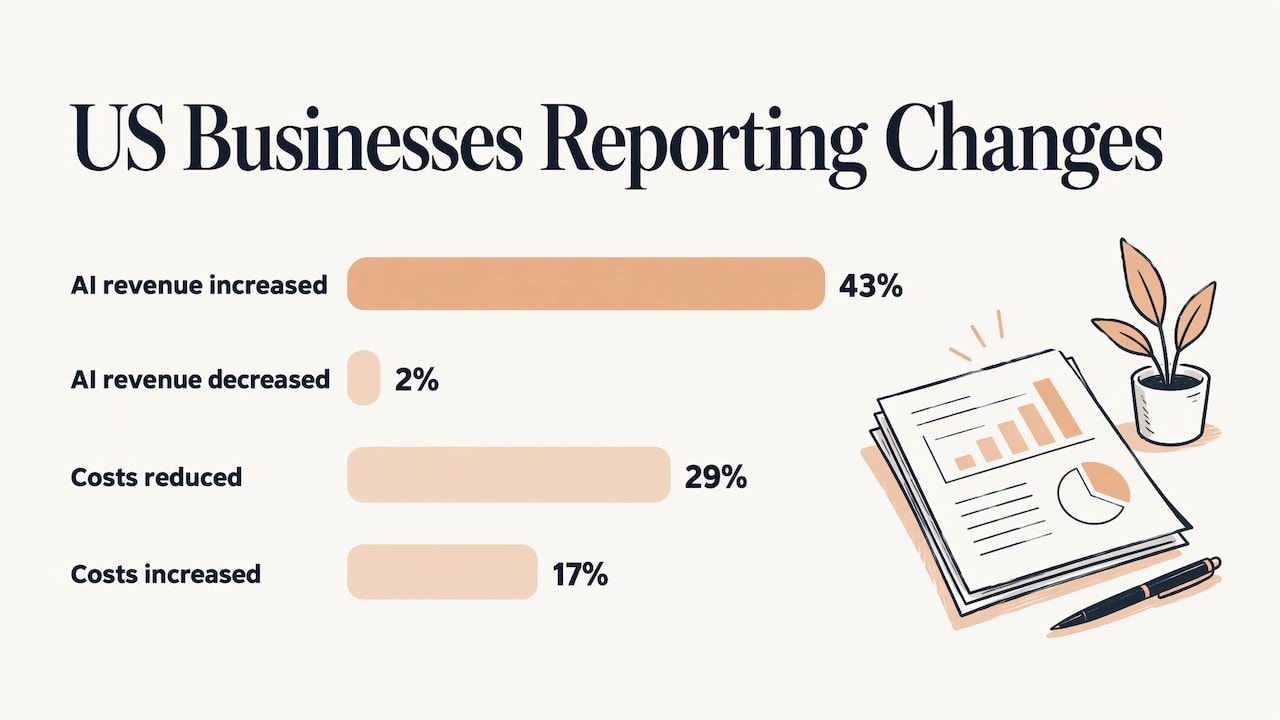
| Intuit 2026 AI Impact Report | In January 2026, 43% of US businesses reported an AI-driven revenue increase versus 2% reporting a decrease; 29% reported cost reductions versus 17% reporting increases | Payment records from over 5.3 million businesses plus 34,000+ survey responses |
| Forbes report on a small-business study, February 2026 | A 10-point rise in workforce AI exposure predicts monthly revenue about 2.2% higher six months later | Small businesses |
| Forrester TEI, agentic AI, January 2026 | $44.5 million benefits versus $20.2 million costs over three years, 120% ROI | Modeled 10,000-employee organization |
| Rah and Johnson systematic review, September 2026 | Task-dependent productivity effects, with no independently measured financial ROI for named enterprise assistants | 61 US-focused studies |
A few things stand out.
Smaller businesses report encouraging returns. The JBMI study also found that among SMEs implementing AI successfully, 87% reported higher productivity and 86% reported better effectiveness and business growth. The barriers it names are lack of understanding of AI benefits (62%) and insufficient in-house resources (60%). Neither is a technology problem. Both are about knowing what to automate and having someone to build it.
Results depend on the task. The Rah and Johnson review reports causal studies with about 15% more customer-service issues resolved per hour and 26.08% more completed coding tasks, alongside null effects in other settings. The review also found that greater workforce reduction did not consistently correlate with higher ROI among large organizations using agents. Cutting headcount is not the lever. Fitting the tool to the task is.
Modeled enterprise numbers are modeled. Forrester’s composite studies are built from interviews and assumptions about a hypothetical organization. They are useful for seeing which cost lines matter (one projected study lists $13 million of training against $3.1 million of subscriptions over three years), but your own baseline is the number that counts.
Why AI projects miss their ROI
From the sources above, the failure pattern is consistent:
- Measuring activity. Seats activated and prompts sent are reported as success.
- Judging too early. American Banker warns against demanding fully attributable financial returns from immature pilots, which causes promising projects to be dropped.
- Skipping the workflow redesign. The KPMG framework puts process redesign and change management among the largest determinants of outcome.
- Ignoring checking and training time. These costs are real and recurring.
- Scaling on unverified numbers. Rah and Johnson propose an evidence-gated sequence: first investment, pilot, production, scale-up, budget expansion, then any workforce restructuring, each step unlocked by measured results.
The fix is a small, staged approach. IDC recommends a portfolio of use cases, quantifying direct and indirect benefits, projecting ROI under several scenarios, tracking performance over time and adding a cost for AI decay, meaning results that erode as data and conditions change.
A simple process to measure your own ROI
- Pick one workflow that is repetitive, high-volume and rule-based: lead capture, first-response emails, invoice intake, appointment confirmations.
- Record the baseline for two weeks: volume, minutes per run, error rate, response speed.
- Define the destination for saved time: more client work, faster replies, or avoided hiring.
- List every cost: build, subscriptions, training, management time, review time.
- Run it for a full quarter. A shorter window mixes the learning dip with the steady state.
- Compare to baseline on the operational metric first, then convert to dollars.
- Decide the next step from the numbers: extend, adjust or stop.
If you want a second pair of eyes on steps 1 to 4, that is the point of a consultation. Our Automation Services cover auto-responses, automatic emails, lead generation, lead capturing, social media, advertising and search and media optimization, which map directly onto repetitive workflows that are easy to baseline. For the step from a working pilot to something your team depends on, our guide on moving AI from pilot to production goes through it in order.
Where ROI shows up first by team size
Self-employed professionals. The return is usually capacity. Auto-responses and automatic follow-up emails answer leads while you are working, so the measure is leads replied to within an hour and calls booked. Your time is the cost base, so a few recovered hours matter.
Small teams. The return is often removing handoffs: a lead captured from a website form lands in the right place with a reply already sent. Measure turnaround and dropped leads. Our overview of business AI agents explains what they handle and how to start.
Medium teams. The return is consistency at scale: the same process executed the same way across people or locations. Finance and HR workflows are common places to begin. See our pages on finance workflow automation and HR automation.
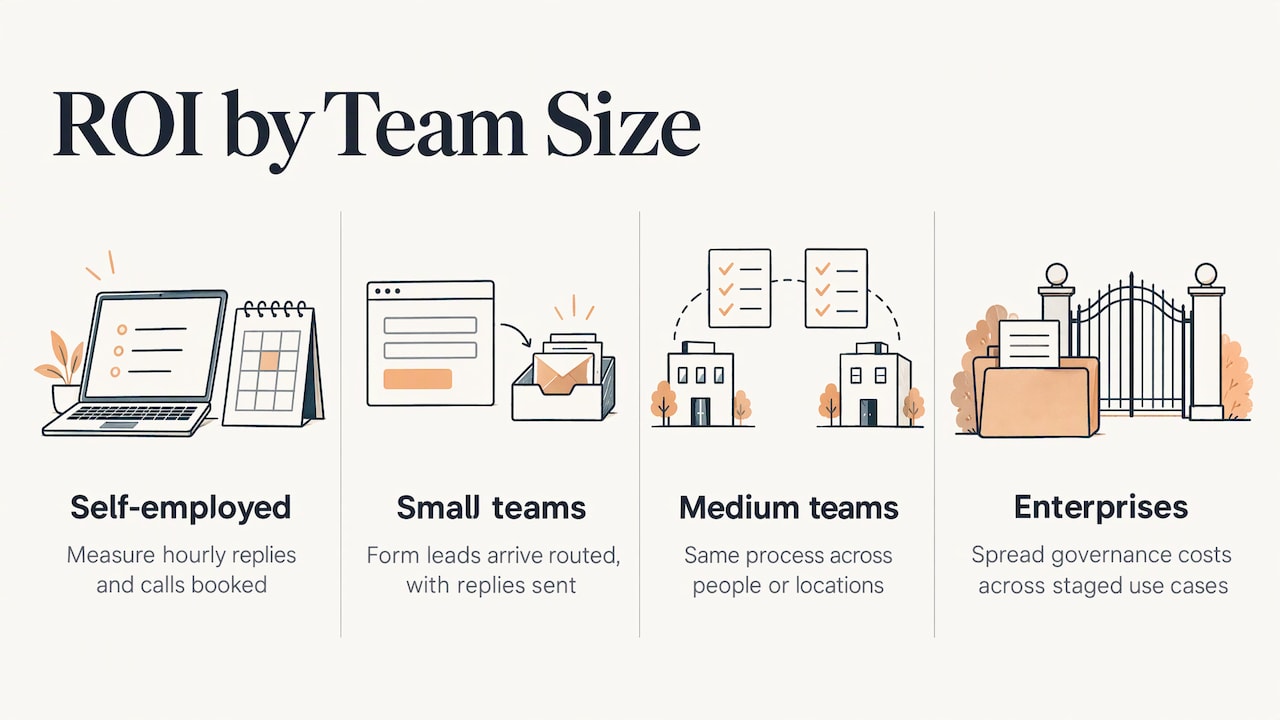
Enterprises. The return depends on portfolio discipline: several use cases, staged gates, and governance costs spread across them, as the KPMG framework describes.
Our perspective
We have one view on AI ROI: the return comes from the workflow, not the tool. Two businesses can buy the same software and see opposite results because one of them redesigned the process around it and the other bolted it on.
That is why we start with a consultation and not a product demo. We look at which repetitive work eats your week, what it costs today, and what a tailor-made automation would have to do to pay for itself. Our systems are built for your growth stage and are meant to change as your business does, whether you are on your own, on a small team or running a large operation.
We also think training belongs inside the project. The research is clear that adoption, training and process change decide whether projected returns appear, so we offer custom training content alongside the build, and ongoing support after it.
Measure first, automate one workflow, check the numbers, then expand. That order protects your budget and gives you a result you can defend to a partner, a board or yourself.
Joshua
Start with one workflow
If you have a repetitive process and a baseline, the next step is to test the case on paper. We offer consultations, custom help and done-for-you builds, and our plan to turn on Elevator Pitch Automations is $300 per month. You can compare the full range of services on our pricing page.
If you are not sure which workflow to start with, get in contact and bring your numbers. We will work from them.
FAQ
What is a good ROI on AI?
There is no single benchmark. One US study of small and medium businesses reported an average of $3.70 back for every $1 spent on generative AI, with top performers at $10.30. Modeled enterprise cases are higher or lower depending on assumptions. A good ROI for you is one that beats your own baseline after all costs, including training and review time.
How long does it take to see a return on AI?
Plan on a full quarter of measurement for a single workflow. Early weeks include setup and a learning dip, so they understate the steady state. Judging a pilot too early on revenue alone is one of the errors American Banker warns about. Track operational metrics first, such as response time and hours per task.
Is saved time counted as ROI?
Only when it turns into something. Saved hours create value when they are redeployed to more capacity, better service or lower resource needs. Subtract the time spent checking AI output, since one study cited by Nasdaq found more than a third of saved time can go to verification.
Which costs do people forget?
Training, process redesign, the productivity dip while people adapt, and ongoing review. The KPMG and UTS framework treats these operational indirect costs as the biggest determinant of whether AI delivers its projected return. Governance and data work also count, especially when customer data is involved.
Sources
- American Banker: How banks can better measure AI ROI and business impact
- KPMG and UTS: AI ROI framework
- Nasdaq Economic Institute: What’s the Cost-Benefit of AI?
- JBMI Insight: The Rise of Artificial Intelligence in Small and Medium Enterprises
- Intuit: 2026 AI Impact Report
- Forbes: Want To Grow Revenue In A Small Business?
- Forrester TEI: Microsoft’s Agentic AI Solutions
- SSRN: Enterprise AI at the Decision Point
- IDC: Calculate the AI ROI