To automate order processing, map every hand-off an order goes through, from capture to delivery notice. Then connect your store, payment, inventory and shipping tools so each step triggers the next without anyone retyping data. People only step in when something breaks. The same logic applies to the front of the funnel: leads should be captured, routed and followed up automatically before they become orders.
This guide shows what to automate, in what order, how to deal with errors, and how to tell whether it worked. It is written for self-employed owners, small teams and growing companies that want a system built around their own workflow rather than a generic template.
TL;DR
- Automated order processing links order capture, payment checks, inventory, fulfillment and customer updates into one flow, with people handling only exceptions.
- Start by mapping your current hand-offs on paper. Automate the most repetitive, error-prone step first, usually order entry.
- Plan for failures from day one: failed payments, bad addresses and stock mismatches should flag one order, not stop everything.
- Lead routing and follow-up use the same principle. Speed matters: contact within minutes, not hours.
- Track time per order, error rate, touchless rate and response time before and after, so you can see the gain.
Table of Contents
- What order processing automation covers
- How connected systems move an order
- The steps, in the order to build them
- A quick comparison of approaches by team size
- Handle exceptions before they handle you
- Lead routing and follow-up: the front end of the same workflow
- Measure whether it is working
- Our perspective
- Where Elevator Pitch Automations fits
- FAQ
- Sources
What order processing automation covers
An order passes through many hands before the customer has it. One NetSuite guide breaks automation into ten steps: order placement, verification, inventory update, routing, picking and packing, carrier selection, shipping label generation, tracking and notifications, delivery and confirmation, and returns and restocking. Sage describes a shorter cycle of six: placement, confirmation, inventory sourcing, picking and packing, shipping, and delivery and customer support.
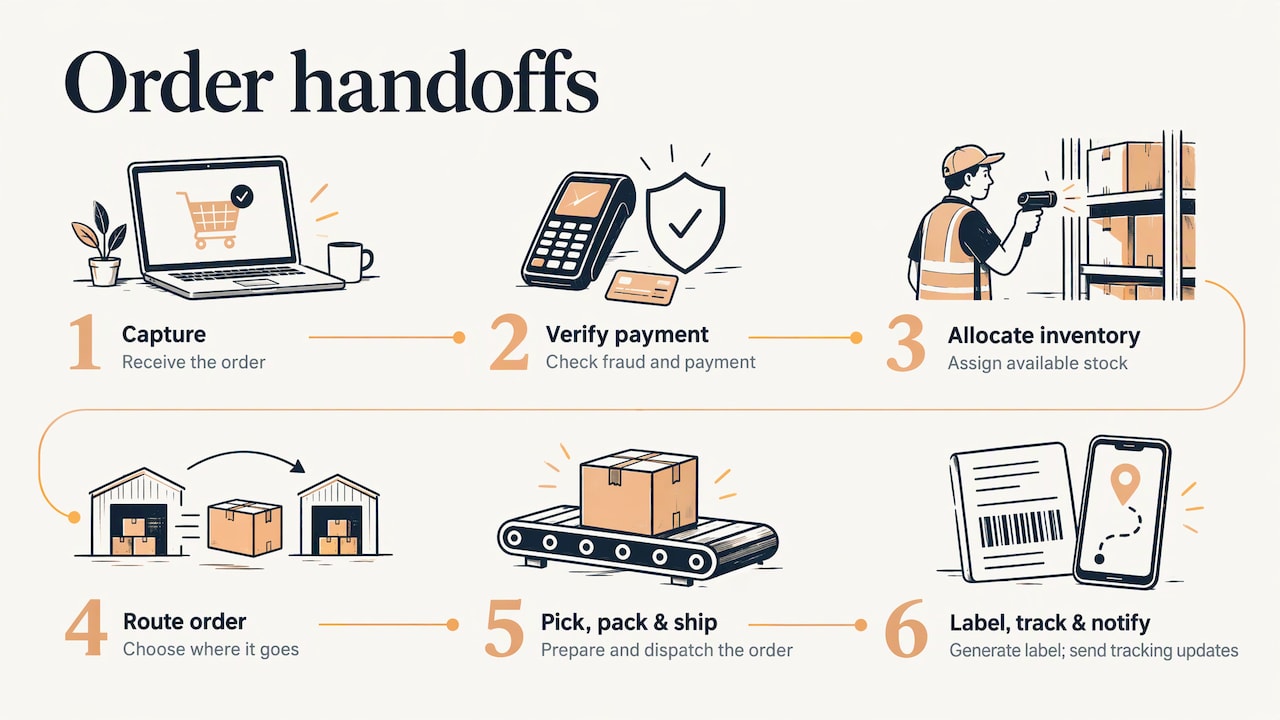
The number of steps depends on how you count, but the pattern is the same. Every point where a person copies information from one screen to another is a candidate for automation. In a typical multi-channel business, an order moves through at least seven such hand-offs, according to OmniOrders: capture, fraud and payment verification, inventory allocation, routing, pick/pack/ship, label generation, and tracking and notification.
You do not have to automate all of them at once. A self-employed seller might only need orders from a website to land in a spreadsheet, trigger an invoice and send a confirmation email. A larger team may need routing rules across warehouses. Both are automated order processing.
How connected systems move an order
The core idea is a chain of connected tools in which each step passes the order to the next. If you want a view of how fragmented systems become one working whole, this case study on fragmented systems shows the thinking in a marketing setting. In orders, the logic is the same: one source of truth, and data flowing to wherever it is needed.
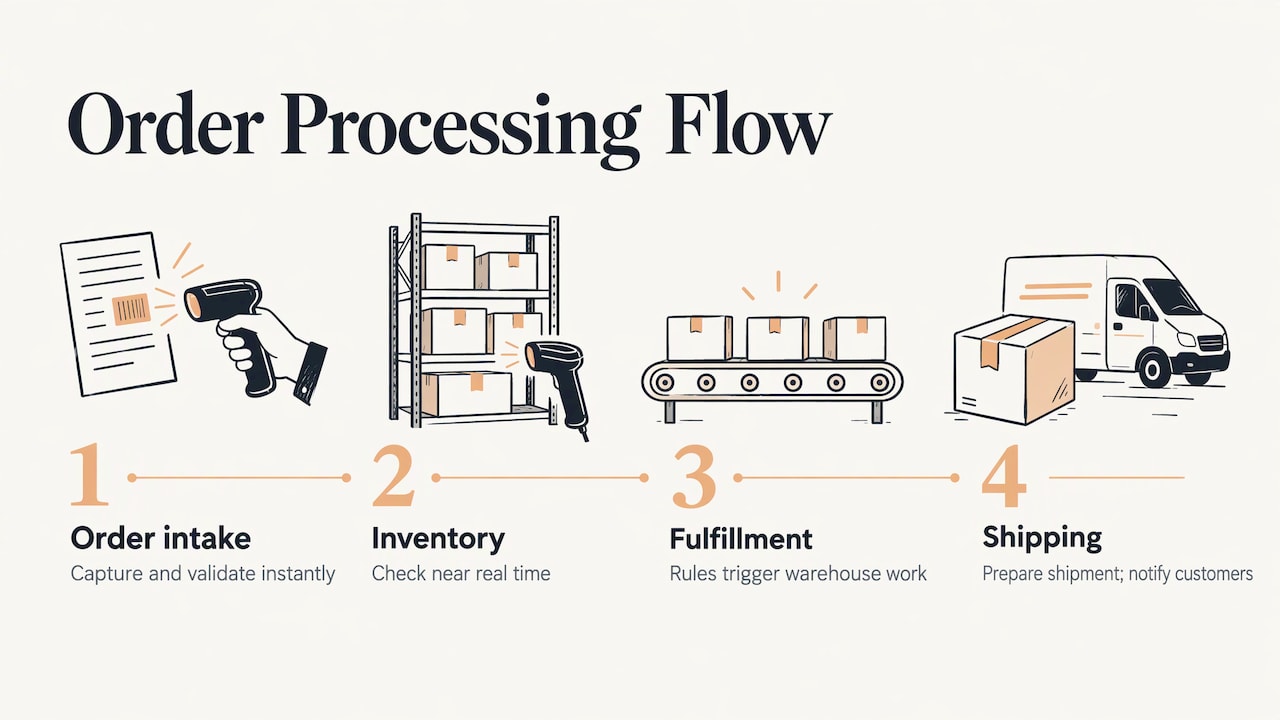
Stripe’s guide to order management automation describes this as replacing a chain of manual handoffs with one continuous flow. Orders are captured and validated instantly, inventory is checked in near real time, and fulfillment decisions are made by rules. Warehouse work starts automatically, shipping is selected and prepared, and customers are notified without delay.
The steps, in the order to build them
1. Map what happens today
Write down every channel orders come from: your website, email, phone, marketplaces, a dealer portal. Then list what someone does with each order. Who reads it? Where do they type it? Who checks stock? Who sends the confirmation? Time one week of this. The map shows where the hours go, and it keeps you from automating a broken process.
If your steps differ from person to person, fix that first. Our guide on how to standardize business processes without slowing your team covers it.
2. Automate order capture and validation
The first target is almost always data entry. Orders arriving by web form, email or marketplace should land in one system in a consistent format, with required fields checked on arrival: address, items, quantities, tax details. Sage notes that automation can capture sales order data instantly and sync customer and sales data across multiple platforms.
If orders arrive as emailed purchase orders or PDFs, add extraction that reads the document and fills the fields. A person reviews only the ones the system cannot read with confidence.
3. Connect payment and inventory
Once an order is captured, the system should confirm payment and check stock. Inventory should update in real time as orders are captured, reserved and fulfilled, which prevents overselling. For invoiced B2B orders, the same flow can generate the invoice. We cover that in more depth in our guide to invoice processing automation.
4. Route to fulfillment
Routing rules decide where an order goes: which warehouse, which supplier, which team member. Keep rules simple at first: nearest location with stock, or a specific supplier for specific products. Add complexity only when real orders demand it.
5. Automate shipping and customer updates
Label generation, carrier selection and tracking notices are repetitive and easy to automate. Customers care about this step. A 2025 Sifted survey cited in Shopify’s ecommerce order automation guide found 63% of shoppers consider full visibility through the tracking process essential. Automatic shipping confirmations and tracking links answer the “where is my order?” question before anyone asks it.
6. Close the loop on returns and reporting
Returns and restocking can follow rules too: a return request triggers a label, and the item’s arrival triggers a stock update. Data from every step should sync into one place so you can report on it. That reporting is what you use to improve the system.
A quick comparison of approaches by team size
| Team | Typical starting point | What to automate first |
|---|---|---|
| Self-employed | Website form or storefront plus email | Confirmation emails, invoice creation, order log |
| Small team (2 to 10) | Several channels, shared inbox | Order entry, stock check, shipping notices |
| Medium team | Multiple locations or suppliers | Routing rules, exception queues, reporting dashboards |
| Enterprise | Many systems, many approvers | Cross-system integration, AI agents for intake, audit trails |
The tools differ, but the sequence does not: capture, validate, route, ship, notify, report.
Handle exceptions before they handle you
No workflow runs perfectly. A card is declined, an address is incomplete, a product is out of stock. Good design isolates the problem. As Stripe’s guide puts it, the system flags only the affected orders for review rather than halting the entire pipeline.
Practical rules:
- Give every exception a queue and an owner. A failed payment goes to one person or inbox, with the order details attached.
- Show customers clear messages. PayPal’s developer documentation on payment failures recommends inspecting API responses for error codes and showing buyers clear, actionable error messages.
- Track asynchronous failures. The same PayPal documentation recommends webhooks so you learn about payment failures that happen after checkout.
- Set time limits. An exception that sits for two days becomes a customer complaint. Add a reminder that escalates it.
- Keep customer and payment data minimal. Pass along only the fields each step needs, and let your payment provider hold card details rather than your own spreadsheets.
Lead routing and follow-up: the front end of the same workflow
Orders start as leads. If your leads arrive by web form, email, social messages or at a trade show, the same automation logic applies, and it is where small businesses often lose the most money.
Capture and route automatically
Every lead source should feed one list. Routing then assigns each lead to the right owner by rule: territory, product line, company size or availability. monday.com’s guide to automated lead routing says best-in-class assignment takes under one minute, time to first touch for high-priority leads should be under five minutes, and routing that takes over ten minutes signals a bottleneck. Use those as your targets.
If you meet prospects in person, the same flow can start at the booth. See how to capture leads at trade shows and actually follow up.
Follow up while interest is fresh
A study from Lead Response Management, cited by monday.com, found that leads contacted within five minutes were 21 times more likely to be qualified than those contacted after thirty minutes. Nobody can watch an inbox that closely all day, so this is a job for automation.
A sensible follow-up sequence:
- Instant acknowledgment. An auto-response confirms receipt and sets expectations.
- Alert to the owner. The assigned person is notified with the lead’s details and source.
- Personal message. A short, human follow-up, ideally drafted from the lead’s own request.
- Scheduled nudges. If there is no reply, send a few spaced reminders, then stop.
- Handoff to the order flow. When a lead says yes, their details move straight into order capture with nothing retyped.
Write the messages so they sound like you. Automation should save you the typing, not remove the personality.
Measure whether it is working
Pick four numbers and record them before you change anything:
- Time per order. Minutes of human work from capture to shipment.
- Error rate. Orders needing correction after entry.
- Touchless rate. Share of orders that flow through with no manual touch.
- Lead response time. Minutes from inquiry to first contact.
Check them monthly. The numbers also tell you the next target. If error rates are low but time per order is high, look at routing and approvals. If the touchless rate is low, read the exception queue and find the most common cause.
Keep expectations grounded in your own volume. Published case studies come from specific companies and are not promises. Your own before-and-after figures matter more.
Our perspective
We see the same pattern in almost every business that comes to us: the work is not hard, it is repeated. Someone copies an order from an email into a spreadsheet, then into an invoice, then writes the customer a note. Each step takes minutes, and together they take the day.
Our approach is to build the automation around how you already work. We start with a consultation to map your hand-offs, then design a system sized to your stage, whether you are a one-person shop or a larger operation. We can connect lead capture, auto-responses, email, routing and AI agents into one flow, and train your team to run it.
We favor starting small and building out. One reliable automation that saves an hour a day is worth more than an ambitious system nobody trusts. As your volume grows, the framework grows with you.
Joshua
Where Elevator Pitch Automations fits
If you would rather not wire this together yourself, we build it for you. Our automation services include automatic lead generation and capture, auto-responses, automatic emails, automated social media and advertising. We also deploy custom AI agents. For online sellers, see how an ecommerce agent works and how to deploy one.
Our Elevator Pitch Automations Unlimited and Turn On Elevator Pitch Automations plans are each listed at $300 per month. You can see the options on our pricing page, or book a consultation and we will map your order and lead workflow with you.
FAQ
What is the first thing to automate in order processing?
Start with order entry. Getting orders from every channel into one system in a consistent format removes the most repetitive typing and the most common source of errors. Once that is stable, add payment checks, inventory updates and shipping notices.
Do small businesses need to automate order processing?
It depends on how much time orders take you. If you spend hours each week copying details, answering status questions or chasing missing information, automation is likely to pay off. Even a simple flow of confirmation email, invoice and order log can free up that time.
How do I handle failed payments or bad addresses automatically?
Send the affected order to an exception queue with a named owner, and notify the customer with a clear message about what to fix. The rest of your orders keep moving. Use webhooks or status checks so you learn about failures that occur after checkout.
How fast should automated lead follow-up be?
Aim for an instant automatic acknowledgment and a personal contact within five minutes for high-priority leads. Research cited by monday.com links contact within five minutes to much higher qualification rates than waiting thirty minutes.
Can lead routing and order processing run in one workflow?
Yes. Leads captured from forms, email or events can be routed to an owner, followed up automatically, and passed into order capture when they buy. Keeping it one flow means customer details are entered once.
Sources
- NetSuite: 10 Ways to Automate Order Processing
- Sage: What Is Order Processing?
- Sage: Benefits of Automated Order Management
- OmniOrders: Order Processing Automation
- Stripe: Order Management Automation
- Shopify: 8-Step Guide to Ecommerce Order Automation
- PayPal Developer: Handling payment failures
- monday.com: Automated Lead Routing
- monday.com: What Is Lead Management?
- Case study on fragmented systems