An LLM (large language model) is the engine that reads and writes language. Agentic AI is a system built around that engine, with tools, memory and a loop, so it can carry a task through to the end instead of just answering. For a business, the difference decides whether you get a draft to copy and paste or a workflow that runs without you. Getting the right one into your own operations takes design work, which is what our consultations and custom automation builds at Elevator Pitch Automations are for.
TL;DR
- An LLM takes text in and produces text out. On its own it cannot send an email, update a CRM or check a live system.
- Agentic AI places an LLM in a loop with tools, memory and a goal, so it decides a next step, acts, reads the result and repeats.
- Plain automation follows fixed rules. AI handles judgment calls. The strongest workflows combine both.
- Match the tool to the task: rules for known logic, an LLM step for language-heavy work, an agent only where the path cannot be scripted in advance.
- Most of the effort in agentic projects goes into integration, data and governance, not the model itself.
Table of Contents
- The short version: answers versus actions
- What an LLM does well, and where it stops
- What an agent adds
- Agentic AI versus an AI agent
- Side by side
- What about AI versus automation?
- Which one fits your workflow
- Where adoption stands, and what to plan for
- Common mistakes when choosing
- What we build for this
- Our perspective
- FAQ
- Sources
The short version: answers versus actions
The cleanest way to hold the distinction is this: an LLM answers, and an agent acts. A model such as the one behind a chat assistant takes a prompt and context, generates output and stops. It has no persistent memory of its own, cannot run code and cannot call your software unless something around it makes that possible. JetBrains puts it as a structural difference, noting that an agent wraps one or more models with tools, memory, orchestration logic and permissions to run multistep workflows.
Researchers at Benning Lab describe it in everyday terms. An LLM predicts text: give it some words and it returns the words that plausibly follow. An agent is that same model placed in a loop, given tools it can operate and a goal rather than a question. It decides what to do, does it, looks at the result and repeats until finished.
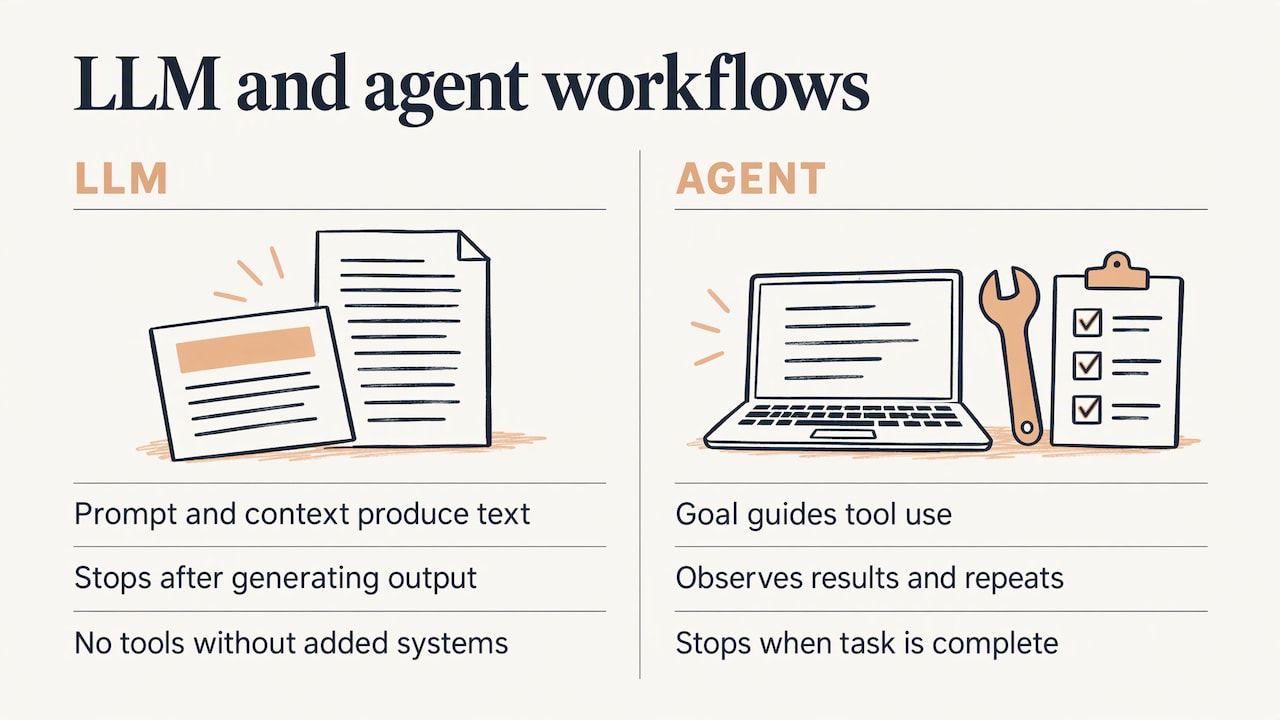
So the two are not rivals. Every agent you will meet in business software has an LLM inside it. The real question is whether you need the model alone, or the model plus everything that lets it work.
What an LLM does well, and where it stops
An LLM is strong at anything where the input and output are language: summarizing a long email thread, drafting a reply in your tone, classifying an inbound message as a sales inquiry or a support request, pulling names and dates out of a document, or rewriting a product description.
For a freelancer or a small team, that alone saves real time. You paste something in, you get something back, and you stay in control of what happens next.
The limit is the edge of the conversation. The Apache Magpie documentation makes the point neatly: a model alone can tell you how to close a stale issue, but it cannot close it. Ask a bare LLM for today’s stock price and it may give you a number from its training data. Connect it to a finance tool and it can fetch the live figure. That connection is the whole difference.
In practice, a bare LLM leaves you as the connector. You copy the output, open the next app, paste, click send. For a task you do five times a week, that is fine. For one you do five hundred times, it is the bottleneck.
What an agent adds
An agent is built from a few parts working together:
- A model that reasons about the situation.
- A goal and instructions that say what done looks like and what is off limits.
- Tools, meaning connections to email, a calendar, a database, a website form or an internal app.
- Memory, so it tracks what has already happened in the task.
- A loop that repeats: look, decide, act, check.
Apache Magpie’s documentation sums the loop up in one line: an agent is a loop in which a language model reads what it knows so far, decides one next action, takes it with a tool, reads the result and repeats until the task is done. AWS describes the same cycle in its explainer on how agents think and use tools: the request goes to the model with context, the system decides whether a tool call is needed, validates and runs it, returns the result to the model and continues until the work is complete.
A worked example
Take a new lead filling out a form on your website.
- With an LLM only: you read the inquiry, paste it into a chat window, ask for a reply, edit it and send it yourself.
- With rules-based automation: the form triggers an instant “thanks, we’ll be in touch” email, the same every time.
- With an agent: it reads the inquiry, checks your calendar, decides whether this is a booking request or a pricing question, drafts and sends the right reply, logs the lead in your system and flags anything unusual for you.
The third version removes the human from the routine path while keeping a person available for exceptions. MIT Sloan gives comparable examples: an agent can plan a trip using access to websites, email and Slack, and with payment permissions could complete the purchase without human involvement.
Agentic AI versus an AI agent
You will see both phrases, and vendors use them loosely. A common way to separate them: an AI agent is one component that handles a defined task, while agentic AI describes the wider approach in which several agents and tools are coordinated toward a larger goal. Google Cloud frames it as individual tools versus building an entire house with all of them working together.
For a business owner, the label matters less than the scope. Ask what the system is allowed to do, which tools it touches and who reviews the results.
Side by side
| Plain LLM | Rules-based automation | Agentic AI | |
|---|---|---|---|
| Input | Prompt and context | A trigger and fixed conditions | A goal plus live information |
| Output | Text or media | The same result for the same input | A completed task, often across several apps |
| Handles surprises | Responds, but cannot act on them | Breaks or skips them | Adapts its next step |
| Memory | Only what you include in the prompt | Whatever you store in fields | Tracks state across steps |
| Predictability | Varies by wording | Very high | Moderate, shaped by guardrails |
| Best for | Drafting, summarizing, classifying | Repetitive, unchanging steps | Multistep work with branching decisions |
What about AI versus automation?
The second question people ask is how AI differs from automation, and it clears up a lot of confusion. Stanford HAI describes automation as technology performing specific tasks based on explicit human instructions: a person defines what to do, and the system executes it within set parameters.
Red Hat’s explanation draws the line at rules. Automation follows manually set, deterministic rules and gives the same output when the input is the same. AI works from probable inference, so it can handle input nobody scripted.
The practical upshot is that you rarely choose one. A rule says “when a form is submitted, create a contact.” An AI step reads the free-text message in that form and decides what it is about. Automation provides the dependable pipes, and AI provides the judgment at the points where rules run out. Agentic systems sit on top, choosing which step to take next.
Which one fits your workflow
Work through these questions in order, because each added layer costs more to build, run and supervise.
1. Is the logic known and stable? If you can write the steps on a sticky note (new order arrives, send confirmation, update spreadsheet, notify the warehouse), use rules. They are cheap, fast and easy to audit. Order handling is a good example, and our guide to automating order processing step by step shows how far fixed rules can go.
2. Is the input messy language? If the trigger is a free-text email, a chat message or a review, add an LLM step to read, classify or draft. The workflow stays scripted, but one stage now understands language. Auto-responses and automatic emails that read the message before replying fall here.
3. Does the next step depend on what was just found? If the path genuinely changes based on intermediate results, such as researching a prospect and then choosing how to approach them, an agent earns its place. Our overview of business AI agents covers what they do and how to begin.
4. Is the time critical? Agents make several model calls and tool calls per task, so they take longer than a single rule firing. AWS notes that this adds latency that suits some uses better than others, so a split-second response is usually better served by a rule.
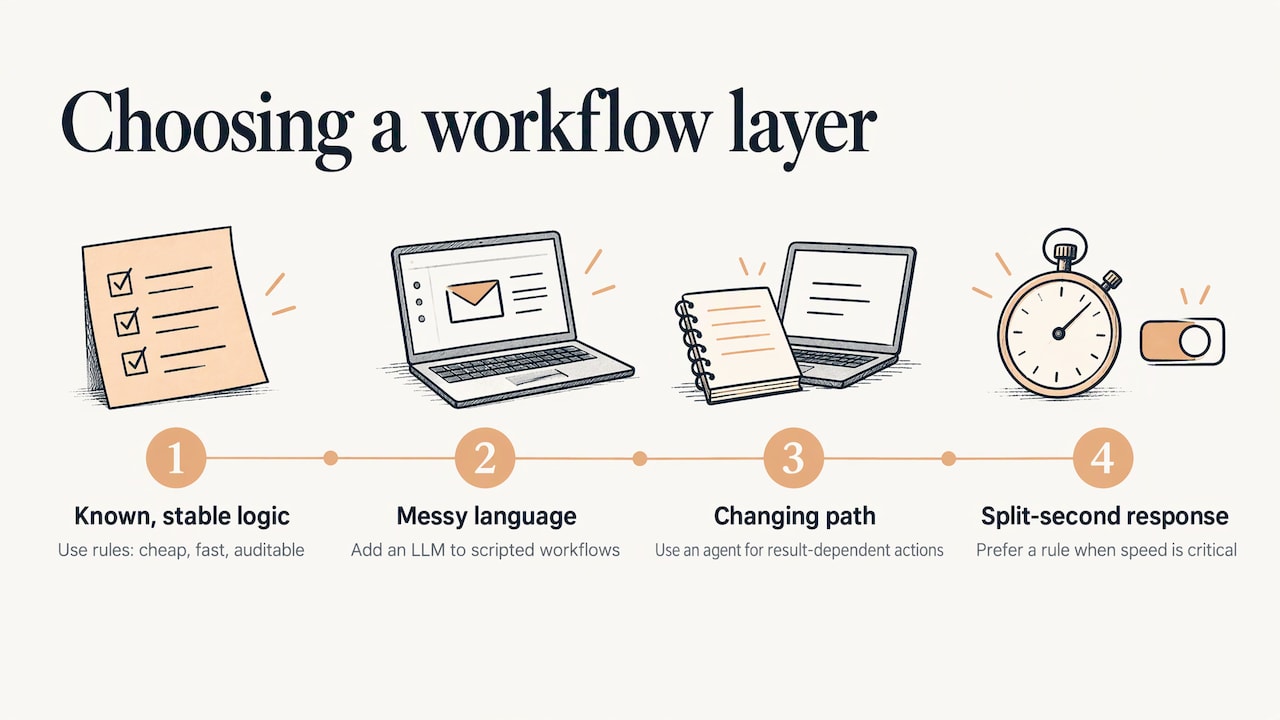
A useful habit: start with the simplest layer that does the job, then add intelligence only where the workflow gets stuck.
How this plays out by business size
- Self-employed: the biggest gain is usually lead capture, instant replies and scheduling. A few rules plus an LLM step cover most of it, and a small agent can handle follow-up.
- Small teams: the pain is handoffs. Agents that route inquiries, update shared tools and prepare summaries free people from copy-and-paste work.
- Medium teams and enterprises: the pain is scale and consistency. Here connecting agents to existing systems matters most, which our piece on AI agent integration explains, along with moving from pilot to production.
Where adoption stands, and what to plan for
Using AI is no longer unusual, but using it deeply still is. A U.S.-focused systematic review by Rah and Johnson, covering evidence through September 2026, reports that U.S. Census data show AI use in 18% of firms, and among those firms 66% used it only to augment existing work. The same review found task-dependent gains in controlled studies, including roughly 15% more customer-service issues resolved per hour and 26.08% more completed coding tasks.
Two planning lessons follow.
Most of the work is not the model. MIT Sloan reports that in its research, 80% of the effort in building agentic systems went to data engineering, stakeholder alignment, governance and workflow integration rather than prompts or model tuning. If you want an agent to work inside your business, plan for connecting your data and tools properly.
Give agents clear permissions and oversight. Because an agent can act, its reach should match the job. MIT Sloan flags reliability, cybersecurity from expanded permissions and accountability when agents run with little human supervision. The practical response is to grant only the access a task needs, keep a person on approval steps that touch money or customers, and log what the agent did.
Measure the result against a baseline from before you started. Our guide to measuring the return on AI walks through how.
Common mistakes when choosing
- Buying an agent for a rules problem. If the steps never change, a plain automation is faster and easier to check.
- Expecting a chat assistant to run your processes. Without connections to your systems, it will keep producing text for you to move by hand.
- Automating everything at once. Pick one repetitive workflow, prove it, then expand. Sales is a typical first area, and the question of what to automate and what to keep human is worth settling early.
- Skipping the handoff design. Decide in advance which cases go to a person and what that person sees.
What we build for this
Elevator Pitch Automations designs custom automation for self-employed professionals, small and medium teams and enterprises. Our services include automatic lead generation and capture, automatic emails, auto-responses, automated social media and advertising, custom AI agent integration and turnkey infrastructure deployment, delivered through consultations, customized help or done-for-you setups. Our approach is tailor-made frameworks calibrated to your growth stage, so a solo consultant and a multi-department team each get a system sized for them.
If you want to see where a rule, an LLM step or an agent belongs in your own workflow, book a consultation and we will map it with you. Our Elevator Pitch Automations Unlimited and Turn On Elevator Pitch Automations plans are each listed at $300 per month on the pricing and setup pages.
Our perspective
Most people ask us whether they need an LLM or an agent. We usually turn the question around: what is the task, and what should happen when it finishes?
An LLM is a very good brain with no hands. An agent gives it hands, but hands need somewhere to reach. The value comes from connecting the model to your forms, inboxes, calendars and channels, and from setting the boundaries it works inside. That is why we build custom systems rather than hand out one template, and why we pair them with consultations and training so your team understands what the automation does.
Our advice is to begin with the repeated work that eats your week: leads that go unanswered, emails you write the same way daily, posts you schedule by hand. Automate that first, add AI judgment where the input is messy, and let agents take on the multistep jobs once the foundation is stable. Growth should feel lighter, not busier.
Joshua
FAQ
Is an AI agent just an LLM?
No. An LLM is the language model at the center of an agent. The agent adds instructions, tools, memory and a loop that lets it take actions and check results. Google Cloud describes the model as the brain of the agent, with other components supplying reasoning support and action.
Can an LLM do agentic tasks by itself?
Only if it is connected to tools and run in a loop, at which point it is functioning as part of an agent. On its own it generates text and stops. The same model can be a chat assistant in one setup and the core of an agent in another.
What is the difference between AI and automation?
Automation carries out predefined steps the same way every time. AI interprets information and decides how to respond when the input varies. Most useful business workflows combine them: automation for the reliable plumbing, AI for the judgment calls.
Do I need agentic AI for my small business?
Not necessarily for every task. Many gains come from rule-based automation with an LLM step, such as instant replies, lead capture and email sequences. Agents make sense when a task has several steps and the right next move depends on what the last one found.
How long does it take to set up an agent?
It depends on how many systems it must connect to and how clear your process is. Because much of the effort goes into integration and governance rather than the model, a short consultation to define the workflow and permissions is the best first step.
Sources
- LLMs vs. AI Agents: How They Differ, JetBrains
- what is an agent? Benning Lab
- What agents are, Apache Magpie Docs
- AI Agents Explained: How They Think, Use Tools, and Automate Real-World Tasks, AWS Builder Center
- Agentic AI, explained, MIT Sloan
- What is agentic AI? Google Cloud
- What are AI agents? Google Cloud
- What is Automation? Stanford HAI
- AI vs. automation: What’s the difference? Red Hat
- AI Agents vs. Automation: a strategic guide for business leaders, AWS
- Enterprise AI at the Decision Point: A U.S.-Focused Systematic Review, ResearchGate