Finance workflow automation means using software to run the repeated steps of a financial process, such as invoice intake, approvals, payments and reconciliation, in a defined sequence with rules, handoffs and exception routing. Done well, your team stops chasing paper and spreadsheets and spends its time on review and decisions. Done badly, it just moves errors faster. This guide covers what to automate first, how to design it, which controls to build in and how to roll it out, whether you are a solo operator or a finance team of fifty.
TL;DR
- Workflow automation connects the steps of a process (intake, coding, approval, payment, reconciliation). Task automation only speeds up one step.
- Start with high-volume, rule-based work: accounts payable, accounts receivable, expense categorization, bank reconciliation and recurring reports.
- Clean data, clear ownership and human review of exceptions matter more than the tool you pick.
- Build controls in from day one: least-privilege access, separated duties, approval trails and monitored exceptions.
- Pilot one workflow, measure it, then expand. Custom integration pays off when your systems do not talk to each other out of the box.
Table of Contents
- What finance workflow automation actually is
- Which finance workflows are worth automating
- What fits each size of business
- What you gain, and what it takes to get it
- How to identify, design and implement a finance workflow
- Controls, security and human review
- Where finance automation is heading
- What to look for in finance automation services
- Our perspective
- Work with us on your finance workflows
- A practical first month
- FAQ
- Sources
What finance workflow automation actually is
A finance workflow is a chain of steps that moves a financial item from start to finish: an invoice arrives, someone codes it, a manager approves it, payment goes out, the bank transaction is matched to the ledger. Automating the workflow means the software handles the handoffs between those steps and routes exceptions to a person, instead of automating one isolated action while people still carry the item from desk to desk.
That is the practical difference from task automation. A macro that formats a report is task automation. A sequence that pulls the data, builds the report, checks it against rules, sends it to the right reviewer and logs the approval is workflow automation. Process automation is usually the widest view, covering company-wide structures rather than one day-to-day workflow.
You will also hear about autonomous finance, where AI interprets information and recommends or starts actions across several connected workflows. For most small and mid-sized teams, the sensible path is to get rule-based workflows running reliably first. AI agents then become useful on top of a clean foundation, for example reading unstructured emails or flagging odd items for review.
Which finance workflows are worth automating
The strongest candidates share three traits: high volume, clear rules and a measurable cost when they go wrong. Typical examples are accounts payable and receivable, expense tracking and categorization, payroll processing, bank reconciliation, financial reporting and budgeting.
Accounts payable
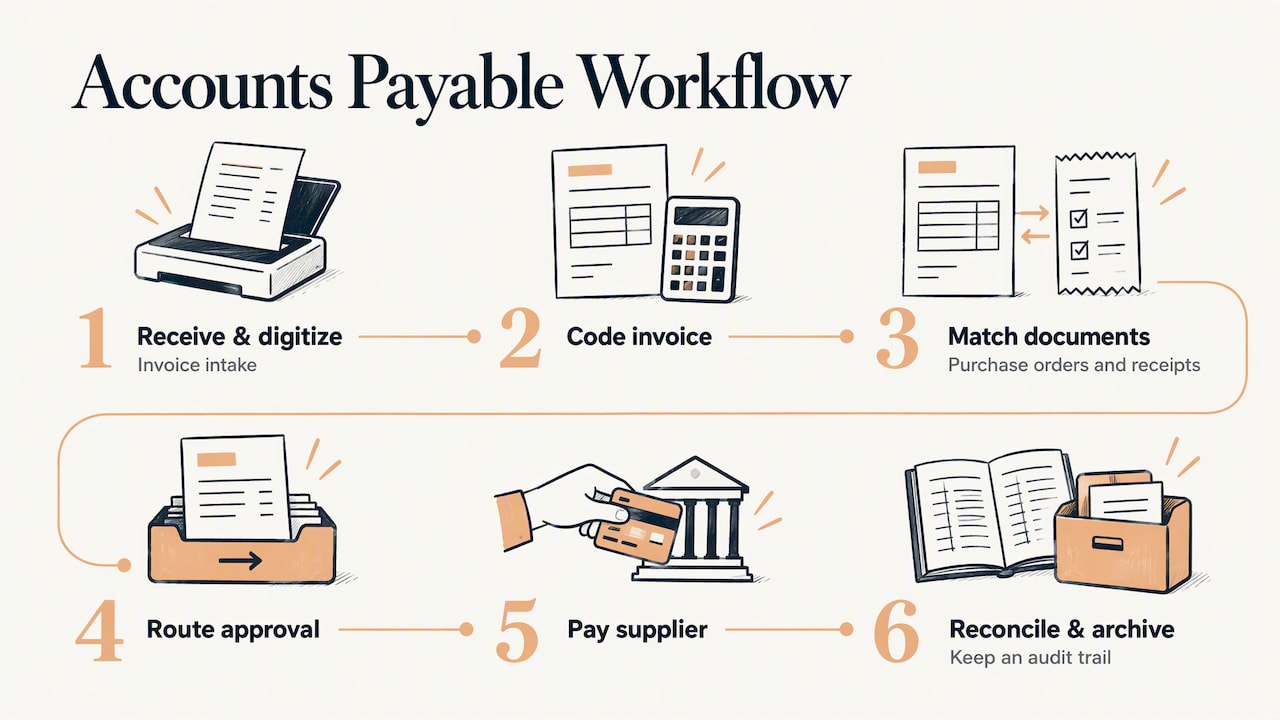
This is usually the first target because it has so many handoffs. The Association for Financial Professionals describes automated AP as the whole invoice-to-payment cycle: receiving and digitizing invoices, coding, matching to purchase orders and receipts, routing approvals, paying suppliers, reconciling, archiving and keeping an audit trail. If you automate only the data entry, you have solved perhaps a fifth of the problem. If you automate the chain, nothing sits in someone’s inbox waiting for a nudge.
If invoices are your biggest pain, our walkthrough on invoice processing automation goes deeper on how intake, matching and approval fit together.
Accounts receivable and billing
Invoice creation from a signed proposal or completed job, automatic reminders on a schedule, payment matching and a flag when a customer goes past a threshold are all rules a system can follow. The human part is the conversation with a late-paying customer, which should start with a clean alert rather than a hunt through spreadsheets.
Expenses, payroll inputs and reconciliation
Receipts captured on a phone, categorized by rule, routed for approval and posted to the right account remove a monthly scramble. Bank reconciliation is a natural fit: the system matches what it can, and your team sees only the unmatched items. Payroll itself is often best left to a dedicated payroll provider, but the inputs (hours, approvals, reimbursements) can be automated and handed over cleanly.
Reporting and month-end tasks
Recurring reports, variance checks against budget and the reminders that drive the close checklist are ideal. Dashboards that refresh from connected systems replace the ritual of copying numbers into a deck.
What fits each size of business
| Business size | Good first workflows | What to watch |
|---|---|---|
| Self-employed | Invoicing and payment reminders, receipt capture, quarterly tax-set-aside transfers, simple income and expense tracking | Do not build a complex system for ten invoices a month. Keep it light. |
| Small team (2 to 20) | Bill approvals, expense reports, customer billing follow-up, bank matching, weekly cash snapshots | One person often owns everything, so separate approval from payment where you can. |
| Medium team | Multi-step approvals, purchase order matching, recurring journal entries, consolidated reporting across tools | Integration between accounting, banking, CRM and payroll becomes the real project. |
| Enterprise | Close management, intercompany reconciliation, audit evidence, policy-driven approvals across entities | Governance, access control and change management outweigh technology choice. |
The pattern is the same at every size: the smaller you are, the more you gain from removing repetitive admin. The larger you are, the more you gain from consistency and traceability.
What you gain, and what it takes to get it
The benefits are well established. Finance automation improves accuracy by removing manual entry, frees staff for analysis and strategic work, and strengthens control through built-in approval steps and audit trails. It can also lower cost per transaction as volume grows.
The conditions matter just as much. APQC reports that the barriers to finance-automation value are reliable data access at 59%, infrastructure limitations at 57% and skills gaps at 55%. The same guidance stresses that people still need to interpret results and decide actions, and that you should choose automation where it can improve a measurable outcome: cycle time, accuracy, cost, cash flow, compliance, spend control or employee capacity.
In plain terms, write down the number you want to move before you build anything. “Reduce time from invoice receipt to approval from nine days to three” is a target. “Be more efficient” is not.
Controls improve too, which is easiest to see in document-heavy work. When every document passes through a defined approval queue, an auditor can trace who approved what and when. This document approval workflow guide lays out the kinds of controls that make an approval trail traceable.
How to identify, design and implement a finance workflow
This is the part most guides skip. Here is the sequence we use with clients, in order.
Step 1: Map the workflow as it really runs
Sit with the person who does the work and trace one real item from start to finish. Note every system touched, every person who handles it, every spreadsheet and every email. The real workflow usually differs from the documented one, and the differences are where the delays hide.
Step 2: Fix the process before you automate it
Automating a messy process makes the mess permanent. Remove duplicate approvals, agree on a single coding standard and decide who owns each step. APQC points to weak process foundations as a common cause of disappointing results, and standardizing first is the remedy it recommends.
Step 3: Score candidates
Rate each workflow on volume, rule clarity, error cost and how clean its data is. The workflow with high volume, clear rules and tolerable data quality goes first. A workflow with fuzzy rules and a high error cost stays partly manual, with automation supporting the human.
Step 4: Define the exceptions up front
Every finance workflow has items that do not fit: a mismatched amount, a new supplier, a missing purchase order, a payment above a threshold. Decide who sees each type of exception, how quickly, and what they can do. This is what separates workflow automation from a script that quietly fails.
Step 5: Choose the integration approach
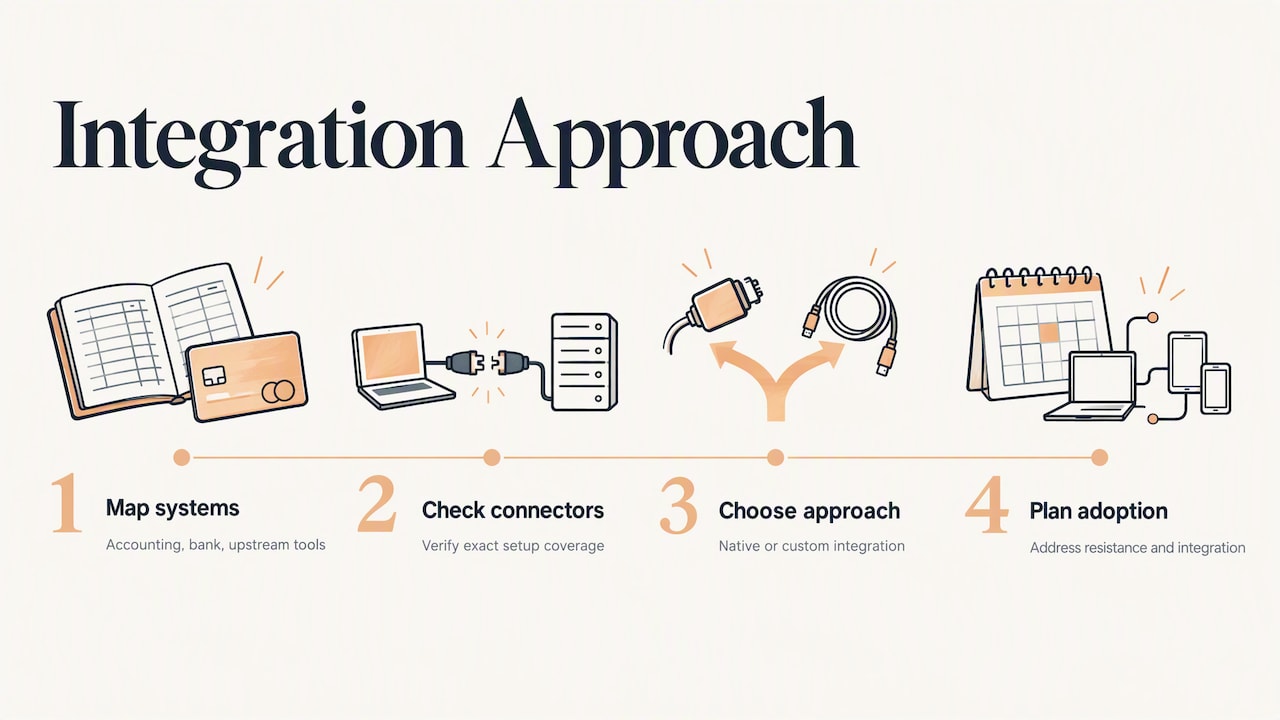
Most finance workflows touch at least three systems: accounting, a bank or payment provider, and something upstream such as email, a CRM or a procurement tool. Ask whether native connectors cover your exact setup. If they do, use them. If your stack is a mix of tools and internal spreadsheets, a custom integration is usually cleaner than stacking workarounds. Integrating financial systems is a recognized hurdle for growing teams, and so is employee resistance to change, so plan for both. For a technical view of how to plan the data side, see this guide to financial data integration.
Step 6: Pilot one workflow for 30 to 60 days
Run the new workflow alongside the old one for a cycle or two. Compare results against the target you set in step one. Fix what breaks while the stakes are small.
Step 7: Train, hand over and monitor
Train the people who will handle exceptions, not just the people who will watch dashboards. Then monitor performance and exception volumes monthly. A rising exception rate is an early signal that a rule is outdated or a supplier has changed their format.
Controls, security and human review
Financial workflows move money and sensitive data, so safeguards belong in the design, not in a later cleanup.
- Least privilege. NIST guidance says to limit system access to authorized users and apply least privilege, and to monitor and control remote access sessions. In practice: an automation account that can read invoices should not also be able to release payments.
- Separation of duties. The same NIST guidance recommends separating individuals’ duties to reduce the risk of malicious activity without collusion. The person who adds a supplier should not be the person who approves payment to that supplier.
- Reliable IT controls. In its auditing standards, the PCAOB noted that automated application controls are generally lower risk than manual controls when the relevant IT general controls are effective, though they still depend on the integrity of the underlying parameters and data tables. Automation helps, but only if someone guards the rules and the data behind it.
- Payment verification. Fraud tends to enter at the point where bank details change. Checks such as confirming a payee’s account details before you pay are standard AP controls, and this overview of payment verification controls walks through several common fraud scenarios.
- Audit trail. Every automated action should log what happened, which rule fired and who approved. If you cannot reconstruct a payment from the log, the workflow is not finished.
- Human review. Keep a person in the loop for exceptions, unusual amounts and anything that needs judgment. Automation handles the rule-based majority so people can focus on the rest.
If your finance data is regulated or you are subject to audit, confirm requirements with your CPA or compliance advisor before you go live.
Where finance automation is heading
The near-term shift is from rule-only automation to AI agents that read and interpret messy inputs: a supplier email that says the invoice changed, a contract clause that affects payment terms, a receipt photographed at an angle. These agents can classify, summarize and propose an action, while the workflow engine enforces approvals and limits. That combination, flexible reading plus strict rules, is where we see the most dependable results. The caution is the same as always: the agent suggests, a governed workflow decides what is allowed, and a person reviews the exceptions.
What to look for in finance automation services
Whether you buy software, hire a specialist or do a mix, judge the options on the same criteria:
- Fit with your stack. Can it connect to your accounting system, bank, payroll and email without fragile workarounds?
- Exception handling. Ask to see what happens when an invoice does not match. If the answer is “it fails,” keep looking.
- Controls and logging. Role-based access, approval rules, change history and exportable audit trails.
- Growth path. Will it still work when you double your volume or add an entity?
- Support and training. Who fixes it when a supplier changes their invoice format? Who trains new staff?
- Clear scope and pricing. You should know what is included, what is billed hourly and what is billed monthly.
Our guide to hiring AI automation consulting well covers the questions to ask any provider before you sign.
Our perspective
Most finance automation projects stall for the same reason: someone bought a tool before anyone mapped the work. We start the other way around. We sit with you, trace the real workflow, and only then decide what to automate, what to simplify and what a person should keep.
We build tailor-made automation for each client’s growth stage. A freelancer needs invoices going out and reminders sent without a second thought. A ten-person team needs approvals and reports that run without a weekly meeting. A larger operation needs integrations, ownership and audit trails that hold up. The principles are the same, the build is not, and that is why we favor custom integration and personal consultation over one-size-fits-all templates.
Our approach is to pilot one workflow, prove it against a number you chose, and then extend. We also train your people, because a workflow nobody understands will be switched off the first time it surprises someone.
Joshua
Work with us on your finance workflows
Elevator Pitch Automations designs and builds custom automation for business workflows, including auto-responses, automatic emails, lead capture and custom AI agent integration, and we offer consultations, custom training and done-for-you setups. If you want a second pair of eyes on which finance workflow to automate first, start with a consultation. You can see how our automation services are organized, or look at the Elevator Pitch Automations Unlimited plan at $300 per month. When you are ready to get going, you can turn on Elevator Pitch Automations.
A practical first month
To make this concrete, here is how a small team might spend its first four weeks.
- Week 1: Pick one workflow, usually vendor bills or customer invoicing. Map it with the person who does it. Write down the target metric, such as days from receipt to payment approval.
- Week 2: Clean up the inputs: a single list of vendors and customers, a standard chart of accounts mapping and a written approval threshold.
- Week 3: Build the automated sequence with exception routing and logging. Test with a batch of past items.
- Week 4: Run live in parallel with the old method, review every exception, and adjust the rules.
By the end you will know whether the workflow hits its target, and you will have a template for the next one.
FAQ
What is the difference between finance workflow automation and finance process automation?
Workflow automation connects the steps of one day-to-day workflow, such as invoice approval, and routes exceptions to people. Process automation is a broader view that improves company-wide processes and structures. In practice the terms overlap, and what matters is that the steps are linked rather than automated in isolation.
Which finance workflow should I automate first?
Choose the one with high volume, clear rules and a visible cost when it goes wrong. For most businesses that is accounts payable or customer invoicing. Set a measurable target first, such as shorter approval time or fewer coding errors, so you can tell whether it worked.
Can a self-employed person or small team benefit, or is this only for large companies?
Small operators often see the clearest gain because one person does everything. Automated invoicing, payment reminders and receipt capture return hours every month. Keep the setup proportional to your volume, and add complexity only when the work justifies it.
Does automation remove the need for human review?
No. Automation handles the rule-based majority, but people still need to review exceptions, unusual amounts and anything requiring judgment. Pair automation with least-privilege access and separated duties so no single account or person controls a payment from start to finish.
Sources
- Financial Workflow Automation: A Practical FP&A Guide
- AFP Financial Operations Guide: Automating Accounts Payable Processing
- APQC: Which finance processes are strongest candidates for automation or AI
- NIST SP 800-171 Revision 1 excerpt
- PCAOB proposed rule on auditing standards, filed with the SEC
- Document Approval Workflow: 5 Controls Auditors Can Trace
- Financial Data Integration: How It Works and How to Plan It
- Payment Verification Controls: 7 AP Checks for Common Fraud Scenarios