The most useful chatbot examples fall into five jobs: answering common questions, tracking orders, qualifying leads, booking appointments and helping employees find internal answers. Some run on fixed scripts. Others use AI to handle questions nobody planned for. Below you will find real deployments with documented numbers, sample questions and replies, and a way to decide which kind fits a solo business, a small team or an enterprise.
TL;DR
- Rule-based bots follow a script and suit predictable tasks like FAQs and bookings. AI chatbots interpret intent and phrasing and suit open-ended questions.
- The best-documented examples are customer service bots: a university assistant with an 83% resolution rate and a city assistant answering about half of its call center’s monthly questions.
- Every good example has a clear handoff to a human, with the conversation history attached.
- Start with one narrow job, connect it to the systems that hold the answers, and widen it once it works.
- Custom builds pay off when the bot has to touch your calendar, CRM, email and lead capture, not just answer FAQs.
Table of Contents
- Rule-based vs. AI chatbots: the difference in one minute
- Customer service chatbot examples
- Ecommerce chatbot examples
- Lead generation and booking chatbot examples
- AI chatbot examples you can try today
- Chatbot question examples: what customers ask and how a good bot answers
- Human handoff: the part that decides whether customers like the bot
- Documented results at a glance
- Internal chatbots: the quiet example
- Which chatbot example fits your size
- Launching a chatbot: a short checklist
- Perspective
- Want a chatbot that does more than chat?
- FAQ
- Sources
Rule-based vs. AI chatbots: the difference in one minute
A rule-based chatbot matches keywords or button choices to pre-written replies. SAP points to ELIZA, built at MIT in 1966, as an early example, and describes modern AI chatbots such as Siri, Alexa and ChatGPT as able to interpret complex inputs and context and produce unscripted answers.
In practice:
- Rule-based: predictable, easy to audit, and limited to what someone wrote in advance. Ideal for a restaurant reservation flow that asks for the date, party size and dietary needs, then confirms in the booking system.
- AI-powered: it understands the same intent phrased ten ways, remembers what was said earlier in the chat, and can answer from a knowledge base. It needs tighter guardrails because it generates text.
- Hybrid: most business deployments. Buttons and fixed steps for transactions, AI for free-text questions, and a human for anything else.
If you remember one rule: use scripts where the answer must be exact, and AI where the question is unpredictable.
Customer service chatbot examples
Customer service is where chatbots have the strongest track record, because the questions repeat and the answers already exist somewhere.
A university assistant that answers routine questions
The University of Houston’s assistant, Shasta, handles questions about enrollment, financial aid, account balances and technology support, using verified university information and integrations with campus systems. The university’s case study reports 23 service areas in the first 18 months, more than 72,000 conversations, an 83% service-wide resolution rate from verified sources, 40% of conversations outside business hours, and an estimated $90,000 in labor-equivalent savings.
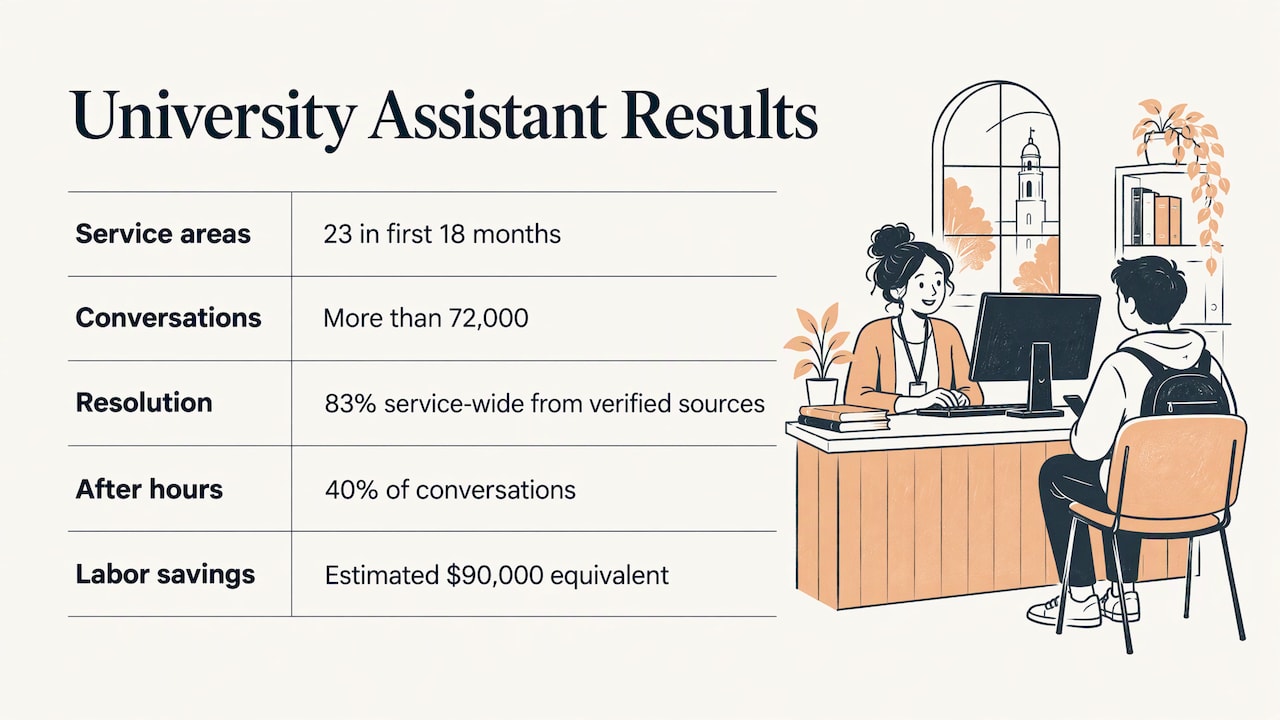
The lesson: the bot works because it answers from approved content and connects to the systems that hold account data. It does not improvise.
A city call center assistant
Amarillo, Texas launched an AI digital assistant called Emma in December 2024. GovTech reported in October 2025 that it had saved the city more than $1 million and was answering 16,000 of the roughly 32,000 questions the call center receives each month.
An airline assistant with internal tools
Microsoft’s case study says Pegasus Airlines’ FlyBot answers flight and baggage questions, recommends destinations using route and weather information, asks for traveler count and dates, and produces a booking link. The same case study describes integration with internal systems so users can reissue tickets, plus a separate internal assistant that answers HR-policy questions for employees.
Ecommerce chatbot examples
In retail, bots do three jobs well:
- Product advice. The bot answers feature questions, asks what the shopper is looking for and suggests relevant items. Telstra describes this pattern, including recommendations based on prior interactions.
- Order tracking. The bot asks for an order ID or email, confirms the match and returns a status such as packed, shipped, out for delivery or delayed, with a tracking link.
- Cart and checkout help. Shipping costs, return windows and sizing questions are the usual blockers, and a bot can answer them at the moment of hesitation.
Insurance shows what a fully digital flow looks like. Lemonade reports that its chatbot Maya can write a quote in under 90 seconds on its website, and its assistant Jim can pay some claims in as little as three seconds without human intervention. If you sell products online, our guide to deploying an ecommerce agent goes deeper.
Lead generation and booking chatbot examples
For service businesses, the chat window is a lead capture form with manners. A good lead bot:
- Asks one question at a time (need, timeline, budget range, contact details).
- Sends the answers straight to your CRM or inbox, so nobody retypes them.
- Offers a calendar slot immediately when the visitor qualifies.
Booking bots use live calendar availability and confirm, change or cancel appointments. For a consultant, a dental office or a contractor, this is often the first bot worth building because every booked call has a direct value. If scheduling is your bottleneck, see done-for-you scheduling.
AI chatbot examples you can try today
General-purpose assistants like ChatGPT, Siri and Alexa are the examples most people know. Narrower AI chatbots are often more useful at work because they answer from one body of material. One example is a tool that lets you chat with a YouTube video, asking questions about a transcript and getting answers specific to that video rather than the open web.
The pattern carries over to your business: an AI chatbot grounded in your own documents, pricing, policies and past emails answers like someone who has worked for you for years. A bot with no grounding answers like a stranger.
Chatbot question examples: what customers ask and how a good bot answers
These sample exchanges show the shape of a useful reply: short, specific, and with a next step. They are illustrations, not data from a particular company.
| Customer asks | Weak reply | Useful reply |
|---|---|---|
| “Where is my order?” | “Please check your email.” | “Can I have your order number or the email you used? Then I’ll pull up the status.” |
| “Do you ship to Canada?” | “See our shipping policy.” | “Yes. Standard shipping to Canada takes the time listed on your shipping page. Want me to estimate it for your postal code?” |
| “Can I change my appointment?” | “Contact support.” | “Sure. I see openings Tuesday and Thursday. Which works better?” |
| “How much does it cost?” | “Pricing varies.” | “It depends on scope. Tell me what you need automated and I’ll point you to the right option or book a consultation.” |
| “This isn’t working, I want a person.” | “I did not understand.” | “Understood. I’m passing this to a teammate with our conversation attached, so you don’t need to repeat yourself.” |
Three habits separate good replies from bad ones:
- Ask for the one detail you need instead of dumping a policy.
- Offer the next action, such as a link, a time slot or a handoff.
- Admit limits. “I’m not sure, let me get a person” beats a confident wrong answer.
Human handoff: the part that decides whether customers like the bot
The strongest chatbot examples treat escalation as a feature. Chatwoot’s documentation of its handoff pattern describes a bot that asks for help or hits a configured trigger, transfers the full conversation history, routes to an available agent and lets the agent take over at any point.
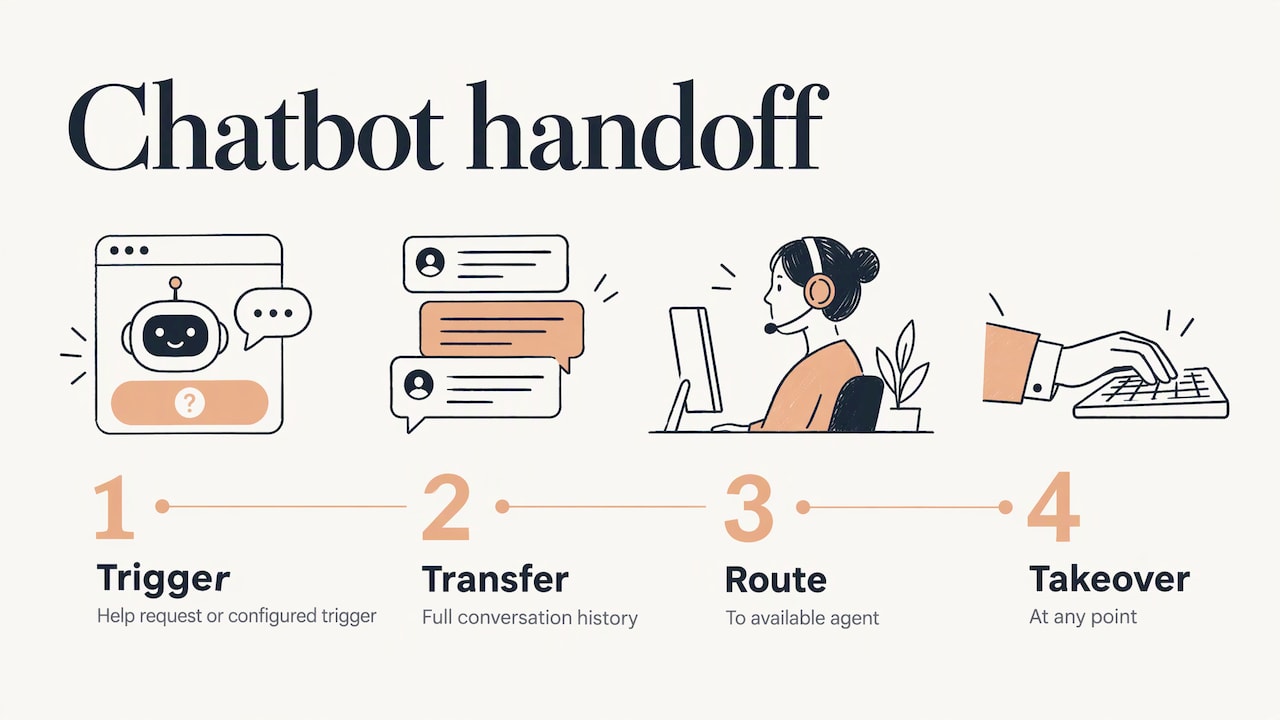
The practical rule: the customer should never have to repeat themselves. Set triggers for frustration words, repeated failed answers, billing disputes and anything involving a cancellation. We cover this balance in how to automate customer support without losing the human touch.
Documented results at a glance
| Example | Type | Reported result |
|---|---|---|
| University of Houston, Shasta | Higher education support | 83% resolution rate, 72,000+ conversations, about $90,000 estimated savings |
| Amarillo, Emma | City services | 16,000 of about 32,000 monthly call center questions answered, $1 million+ saved |
| Pegasus Airlines | Travel and internal HR | About 3,000 employees use the internal assistant monthly, customer satisfaction for the virtual assistant doubled |
| Lemonade | Insurance | Quotes in under 90 seconds, some claims paid in as little as three seconds |
These are the organizations’ own reported figures, and each applies to its own setup. Your results depend on question volume, content quality and how well the bot connects to your systems.
Internal chatbots: the quiet example
Not every bot faces customers. The CMS chatbot is one example: Nextgov reported in February 2026 that the agency launched CMS Chat in December 2024, has given all its employees access and has trained more than 4,700 people through a micro-training program. Training mattered as much as the tool.
Smaller teams use internal bots for HR policy questions, sales enablement (“what is our refund policy for annual plans?”) and onboarding. If your team keeps answering the same questions in chat, that is your first internal bot.
Which chatbot example fits your size
Self-employed. You need fast setup, an easy way to update answers, lead capture, and a clear fallback to email or a form. One bot that answers your top ten questions and books calls is enough.
Small teams. Add routing: sales questions to one person, support to another, with notifications where your team already works. Automatic follow-up emails after a chat turn a conversation into a pipeline.
Medium teams. Look for connections to your helpdesk and CRM, controls over what the bot can say, reports on unanswered questions, and a way to test changes before they go live. Plan the path from simple Q&A to account-aware answers.
Enterprises. Governance comes first: who owns the bot, what data it can read, which actions need human approval, and how incidents are handled. Our guide to moving AI from pilot to production covers that stage.
Launching a chatbot: a short checklist
- Pick one job with high volume and clear answers.
- Map the conversation paths, including what happens when the bot does not know.
- Connect the systems that hold the truth: calendar, CRM, order system, help content.
- Decide what the bot may never do, and document what data it can read, which fields it can change and what needs human approval. Compliance checklists for GDPR, HIPAA and SOC 2 teams recommend exactly this kind of written boundary, plus encryption, access reviews and an incident process.
- Test with real users, read the transcripts weekly and fix the gaps.
If your bot touches health, financial or personal data, involve your legal or compliance advisor before launch, since the rules depend on your industry and state.
Perspective
Most chatbot examples stop at the chat window. The window is the easy part. The value shows up when the answer triggers something: a lead lands in your CRM, a follow-up email goes out, a meeting appears on your calendar, a teammate gets pinged with the full conversation.
That is why we build around the workflow rather than the widget. A chatbot, an auto-response, a lead capture form and an email sequence are one system, and it should be calibrated to your stage. A solo consultant needs something different from a 40-person team, and the system should grow with you instead of being replaced.
Our view: start with the repetitive task that costs you the most hours, automate it well, keep a human in the loop for the moments that matter, and expand from there.
Joshua
Want a chatbot that does more than chat?
Elevator Pitch Automations designs custom automation for self-employed professionals, small and medium teams and enterprises: AI agents, auto-responses, automatic emails, lead capture and more, with consultations and done-for-you setup. You can see the automation services or start with a consultation to scope your first bot.
The Elevator Pitch Automations Unlimited plan is listed at $300 per month on our pricing page, and you can turn it on here. For a wider look at what agents can do, read business AI agents and how to start.
FAQ
What is a simple example of a chatbot?
A restaurant reservation bot is a classic one. It asks for the date, party size and dietary needs, then confirms the booking in the reservation system. It follows a fixed script, which is why it is reliable for one narrow task.
What is an example of an AI chatbot?
Siri, Alexa and ChatGPT are the best-known ones. In business, an AI chatbot trained on your own help content and pricing answers customer questions in their own words and can hand off to a person when it is unsure.
What are good chatbot examples for customer service?
Look at bots that answer from verified content and connect to account systems, such as a university assistant for enrollment and aid questions or a city assistant for call center topics. Order tracking, appointment changes and password help are the most common first jobs.
Do chatbots replace human support?
The documented examples use bots to absorb repetitive questions so staff can focus on complex ones. A visible way to reach a person, with the conversation history passed along, is what keeps customers comfortable.
How do I choose between a rule-based and an AI chatbot?
Use rules when inputs are limited and the answer must be exact, like logging a ticket or booking a slot. Choose AI when questions vary widely or need personalization. Many businesses combine the two.
Sources
- SAP: What is a chatbot
- University of Houston: Shasta case study
- GovTech: As AI Assistant Evolves, Officials Hope It Furthers Trust
- Microsoft: Pegasus Airlines case study
- Telstra: How customer service chatbots can help your business
- The Motley Fool: Lemonade coverage
- Chatwoot: Agent Bots
- Nextgov/FCW: CMS chatbot
- SmartBot Hub: Chatbot compliance checklist
- Claras: chat with a YouTube video